

Black Friday came early. Early-access prices until Nov 8.Black Friday: early-access prices until Nov 8.Early-access price ends in0d00h00m00sClaim the deal



RSOC stands for Related Search on Content. It's a Google AdSense for Search format that shows related search terms inside a content page. When a visitor clicks one of those terms, they land on a search results page with ads, and the publisher earns revenue when the visitor clicks on those ads.
RSOC arbitrage has become one of the main ways to run search arbitrage. If you've been to affiliate conferences, browsed online forums, or talked to peers in the industry, you've almost certainly heard of it.
It's also no longer the easy opportunity it was when it first took off. Competition is higher, Google's policies are stricter, and margins are thinner. But people are still making money with RSOC, as long as they treat it like a real business and do it the right way.
This guide covers everything you need to know about RSOC: what it is, how it works, how to monetize it, which feed providers to work with, how to track it, and how to make it profitable in 2026.
The full form of RSOC is Related Search on Content (you'll also see it written as Related Search for Content). It's a Google AdSense for Search format that lets website owners show their visitors relevant search terms based on the page they're on. These search terms are displayed inside the content page, generally after the introduction paragraph, like in this image from Google:
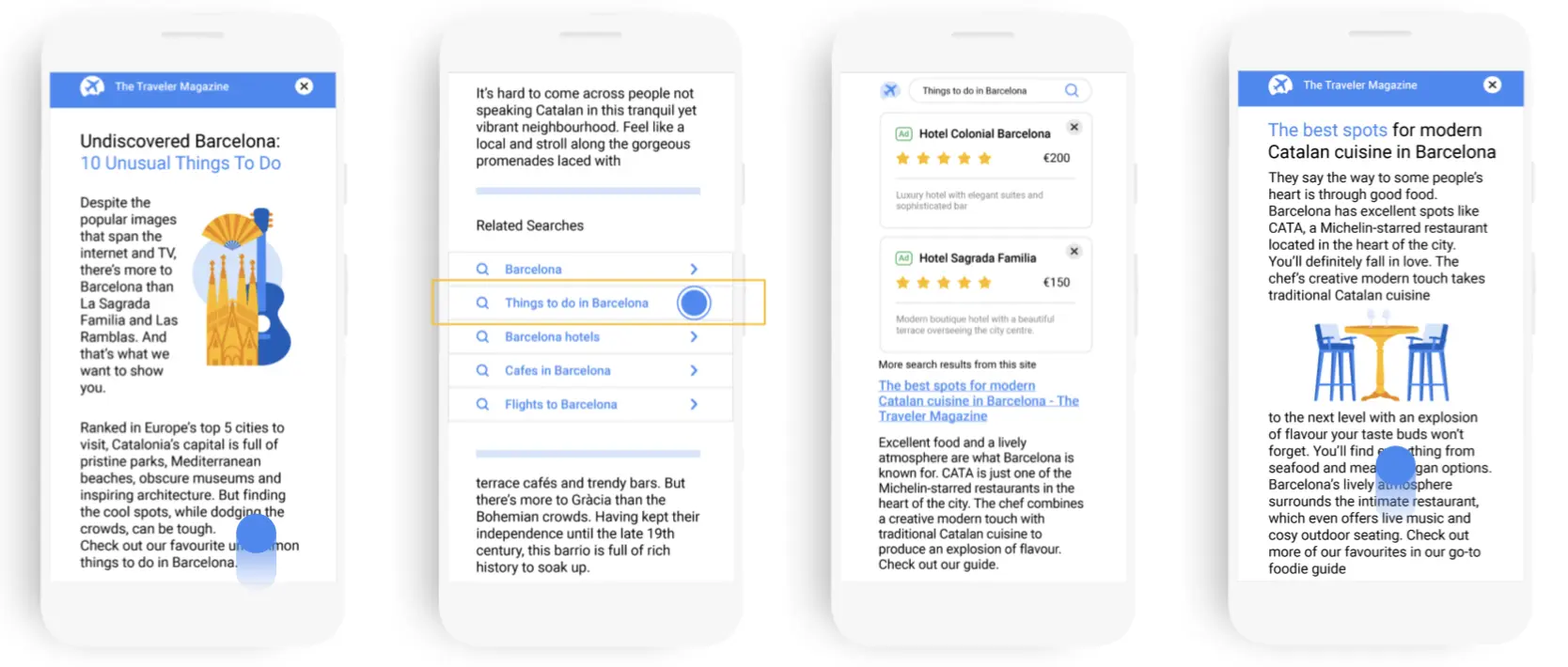
This setup improves user experience, because it helps visitors find more information related to the topic they're reading about. It keeps visitors engaged for longer and exposes them to relevant ads that match the content.
For this article, we will mostly focus on RSOC arbitrage. RSOC arbitrage is a strategy that uses paid ads to attract users interested in specific topics and then directs them to relevant content pages that are monetized with RSOC.
While traditional SEO is all about ranking high for valuable keywords in search results, RSOC arbitrage brings in visitors through paid traffic and guides them to carefully chosen content and search pages.
Just like with classic search arbitrage, you make money by buying traffic for less than you earn from it. If you ran search arbitrage with AFD (parked domain) feeds before, RSOC is a big improvement in user experience compared to old-school parked domains. It's also now the main option: Google stopped serving ads on parked domains through its Search Partner Network on February 10, 2026, which pushed most of the industry to RSOC.
But how does it actually work?
First, you'll need to create a content website and publish a few quality articles to increase the chance of getting your site approved.
Then, you'll have to apply with an RSOC search feed provider, either Google directly or a third-party provider. We'll give an overview of the major RSOC search feed providers below.
After you have implemented the feed on your pages, you can drive traffic to your website through paid ads on platforms such as Google Ads, Facebook / Meta Ads, TikTok Ads, native ads (Taboola, Outbrain) and more. This is commonly referred to as buying traffic.
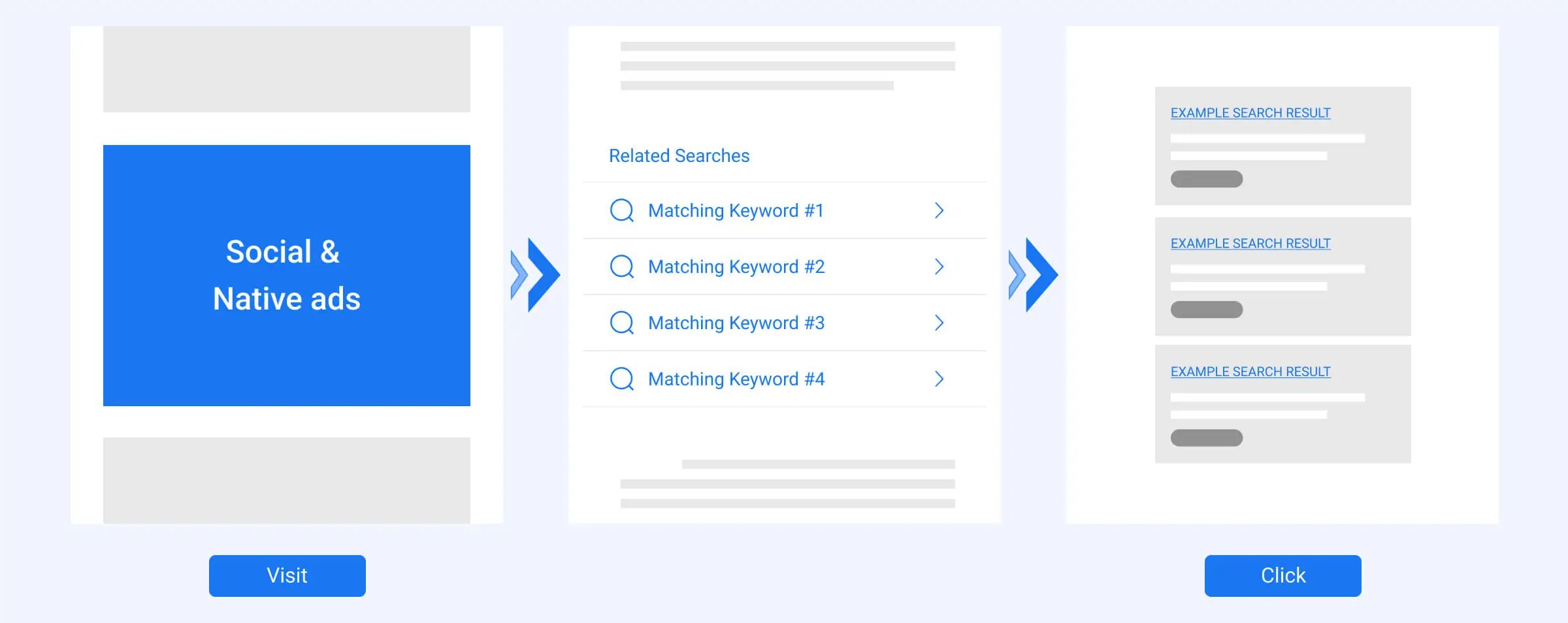
RSOC can have anywhere from 1 to 3-click flows depending on the provider, but generally a user will click on your ad on one of the advertising platforms and land on your content page. There, they'll be able to click on a keyword from your related search block. This takes them to a search results page with ads, and clicks on those ads generate your revenue. Apart from monetizing the keyword block, you can also add other monetization options, which we explain below.
The ultimate goal is for the revenue you generate from your page to exceed the cost of buying traffic.
There are two main options when you are trying to get started with RSOC. First, you can run directly using your Google AdSense account. If you have a website that meets AdSense requirements, such as no scraped content, no prohibited topics and so on, you can apply directly for your AdSense account.
You can also get in touch with one of the monetization platforms, also known as search feed providers. Below, we list the main search feed providers for RSOC right now. The process is similar: you need to apply for an account with one of the providers and get your site approved.
We briefly explained how RSOC makes money above. Here are the main monetization options available today:
As we mentioned above, the user experience with RSOC pages is much better compared to landing on a parked domain.
Since users engage with the content before clicking on the ads, they are likely more informed about the topic and thus more highly qualified. This setup also allows Google to deliver higher quality ads that match the content of the page. These factors typically result in higher RPCs (revenue-per-click).
Another advantage for website owners is the possibility to add more monetization options. As explained above, apart from search ads you can also add display ads or affiliate links on your page, which was not possible with traditional parked-domain arbitrage.
Finally, content pages work with more traffic sources than parked domains ever did. Google has also made its direction clear: with AFD gone, RSOC is now the main way to run search arbitrage with Google's ads.
AFD (AdSense for Domains) was the classic search arbitrage format. Traffic landed on a parked domain that showed little more than a list of keyword links. RSOC replaces the parked page with a real content page, and places the related search block inside the article.
Here's how the two compare:
| AFD | RSOC | |
|---|---|---|
| Where users land | A parked domain with little or no content, showing a block of keyword links | A real content page with a related search block inside the article |
| User experience | Thin pages with no real content | Users read the content first, so their clicks are better informed |
| Monetization options | The keyword block only | Search ads, plus display ads, affiliate links and email capture |
| Traffic sources | Restricted on many ad platforms | Works with more sources, including social, native and Google Ads |
| Revenue tracking | Feeds typically reported revenue per click ID | Google reports revenue by channel, style ID, country and device; many third-party feeds add click-level events and estimated revenue |
| Status in 2026 | Google stopped serving ads on parked domains on February 10, 2026 | The main way to run search arbitrage with Google ads |
The biggest practical difference today is that AFD is no longer an option. If you ran AFD campaigns before, the skills carry over: buying traffic, testing keywords and tracking revenue. The new work is building content pages that are good enough to meet RSOC's quality requirements.
Yes, but it's a very different market from a few years ago, and it's worth being honest about that.
With AFD shut down, a lot of arbitrage budgets moved to RSOC at the same time, so competition for traffic is much higher. Google has also tightened its RSOC policies and enforcement, and accounts that cut corners on content quality or traffic sources get flagged fast. We cover the latest rules in our RSOC policy update guide.
The teams that are still profitable tend to have a few things in common:
The rest of this guide focuses on exactly those areas.
At the start, the main approach to get started with RSOC was to start running with Google AdSense. This remains one of the biggest search feeds as of 2026.
Alongside Google, several third-party search feed providers offer RSOC. Some of the top RSOC feed providers are:
The provider landscape has changed a lot since RSOC first took off. Many search feed providers that were active a few years ago are no longer operating or have stopped onboarding new partners, so make sure a provider is actively working with new accounts before you build your setup around it.
Choosing between Google and other providers comes down to this: you can potentially benefit from a higher rev-share with Google, but Google's reporting is less granular. Third-party providers often offer more detailed reporting, such as click-level events and estimated revenue postbacks, which makes optimization easier. Within the traffic arbitrage space, it is crucial to track accurate data and continuously optimize your campaigns based on the results.
We probably don't need to tell you why limited tracking presents a huge challenge to your scaling strategy. Without knowing what's working and what isn't, you can't optimize your campaigns properly.
RSOC tracking has improved since the early days, but it's still not as simple as AFD tracking used to be. Google AdSense still doesn't report revenue at the click ID level. Instead, revenue is broken down by dimensions such as channel, style ID, country and device, which makes it difficult to attribute revenue to individual clicks.
Many third-party feeds now send click-level events and estimated revenue in real time, but the final revenue is usually confirmed hours or even days later. If you send the early estimate to your traffic source, your ad platform optimizes on numbers that aren't accurate.
There are also limits imposed by RSOC providers on the number of unique channel names you can use daily.
So, how can you overcome these challenges in order to track your RSOC campaigns?
ClickFlare is a click-based tracking platform that works for any business model, such as affiliate, ecommerce, and lead gen, and it offers many features built specifically for search arbitrage, including RSOC.
ClickFlare has direct API integrations with the major RSOC feeds, including Google AdSense, System1, Visymo, Tonic, Sedo and AirFind. These integrations automatically import your revenue into ClickFlare, so you can see cost, revenue and profit for every campaign, ad set and ad in one place.
To connect a feed, go to Integrations > RSOC and click Add Integration. Then:
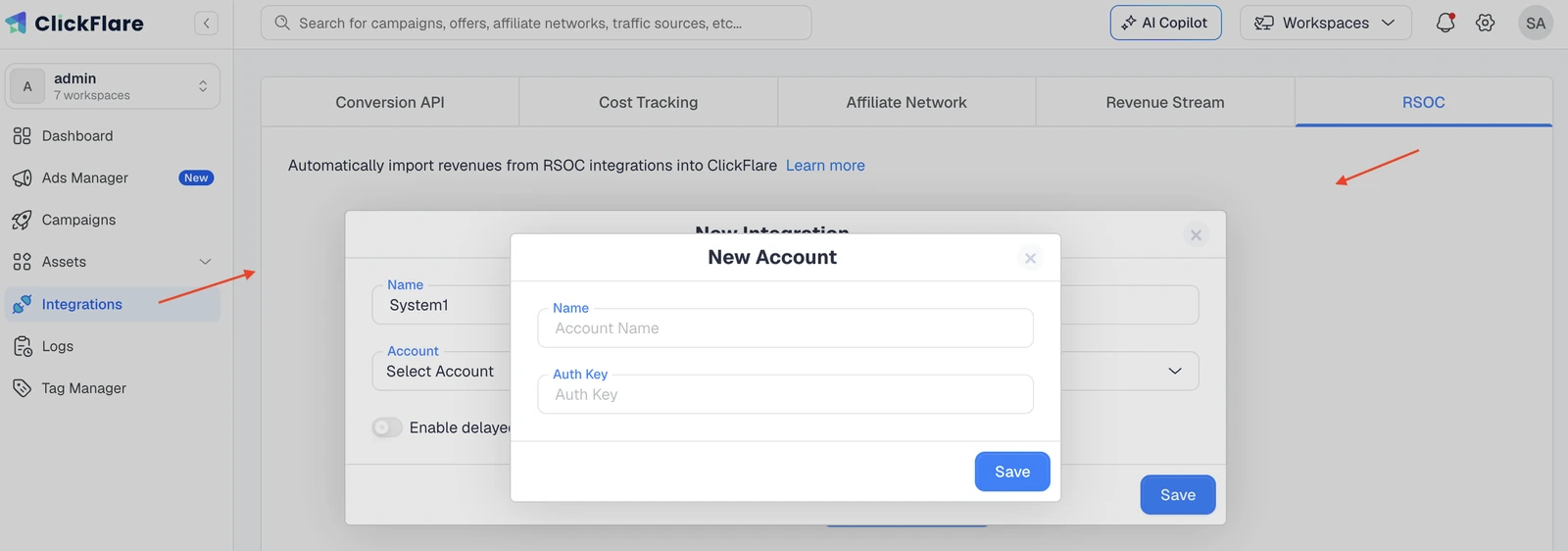
Once connected, ClickFlare pulls revenue every hour for up to 3 days after each conversion, then runs a final sync after 10 days to capture late adjustments from the feed.
Conversions are tracked at the click level, either through a short script on your search results page (for Google AdSense) or through the click-level postbacks that many third-party feeds support. Where the feed only reports revenue by dimensions such as channel, style ID, country and device, ClickFlare uses those breakdowns to estimate revenue at the click ID level.
This lets you attribute revenue to individual campaigns, ad sets and ads, so you can optimize and scale with more confidence.
If you buy traffic on Google Ads, which doesn't allow redirects, you can use ClickFlare's direct tracking script on your article page instead of a redirect link. The rest of the setup stays the same.
Accurate revenue in ClickFlare is only half the picture. Platforms like Meta and TikTok optimize toward ROAS, so they need accurate revenue too.
The problem is timing. When a conversion first happens, feeds usually report a placeholder revenue of $0 or a rough estimate. Most traffic sources record the value from the first event and ignore later updates, so re-sending the same conversion with corrected revenue doesn't work.
ClickFlare's delayed revenue postback solves this by sending a separate conversion event once the feed confirms the final revenue. Here's how to set it up:
delayed_conv.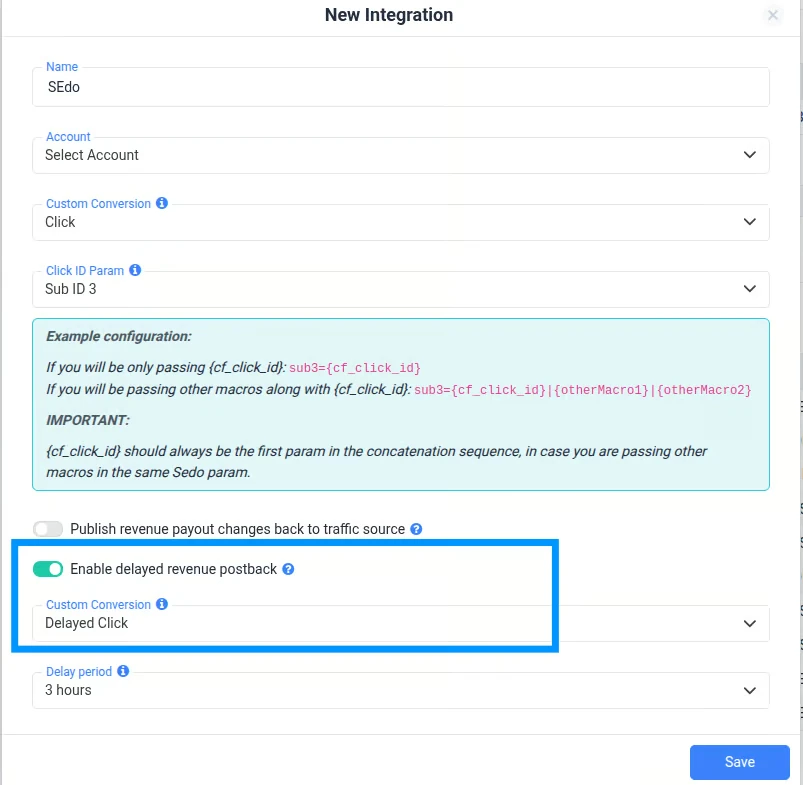
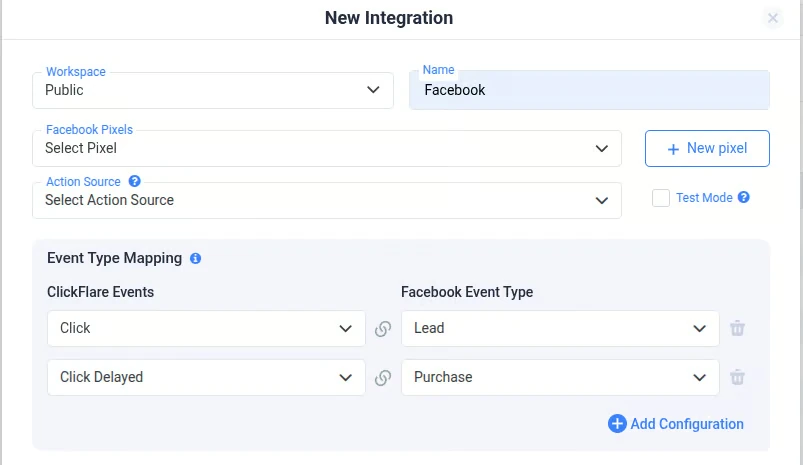
Keep "Include in Revenue" and "Include in Conversions" switched off for the delayed conversion in ClickFlare. Otherwise your reports will count the same revenue twice.
The same setup works for any traffic source that supports a Conversion API or postback URL, including TikTok and Google Ads.
The beauty of RSOC is that, compared to parked-domain arbitrage where you could only optimize the keyword block, you can now optimize different elements on the page to increase your profits.
Here are the top RSOC best practices, based on Google's recommendations as well as our general experience.
Throughout this article, we've highlighted how important the user experience is within RSOC. This should be your main focus when optimizing your content page. If you have control over the page, you need to create high quality content. This means having an attention-grabbing headline and writing text that actually brings value to your visitors and is informative (e.g., sharing tips, reviews). Put special focus on the first paragraph of your article, and write enough content per article to give the page real substance.
You need to update your content consistently. While quality is the most important element, quantity also matters. You need to be able to create articles fast and publish them on a regular basis. Also, make sure that your articles are getting indexed on Google.
The related keyword block also needs to be optimized for better results. After all, you ultimately want users to click on one of these keywords. They should be interesting enough to drive clicks, but never misleading or deceptive. The keyword block should be placed somewhere visible, generally after the introduction to the article.
Finally, the website should appear professional and have an intuitive layout that keeps the user engaged. Below, we give some tips on how to create high-converting content pages using LanderLab.
LanderLab.io is an AI-powered landing page builder that requires no coding or design skills. You can use it to build any kind of landing page or website, but for the purpose of this article we will highlight the features that help with content pages.
The biggest change is AI page creation. Instead of starting from a blank page, you describe the page you want, such as an article for a specific topic or vertical, and LanderLab's AI generates a complete page with structure, sections and copy. You then fine-tune it in the visual editor before publishing.

LanderLab also has AI copy refinement built into the editor. You can rewrite headlines, adjust the tone, shorten or expand sections, and adapt your messaging for new geos without rebuilding the page. This makes it much faster to produce the volume of quality content that RSOC requires.
On top of that, you can split-test different page variations to keep improving your results, and LanderLab has a direct integration with ClickFlare, so your page data flows straight into your tracking.
For a live demo on how to create a content website from scratch with LanderLab, watch our webinar How to Build a Content Website for Search Arbitrage.
As mentioned before, the keyword block is one of your strongest optimization tools. You need to make sure that the keywords you choose to display here are fully optimized for conversion.
While you can find keywords using Google Ads Keyword Planner or other keyword research tools such as Ubersuggest, Ahrefs, Semrush and more, you still need to continuously test and monitor performance.
You can test keywords manually by adding them to the offer URL you're promoting. The problem with this method is that every time you want to test a different keyword set, you need to change the link manually. This takes time, and every change may trigger a review of your ads. Also, many search feed providers only offer basic reports, which are not enough for detailed insights into keyword performance.
ClickFlare has a Keyword Manager that lets you split-test different keyword sets automatically. You simply add your keywords, and you can even assign weights:
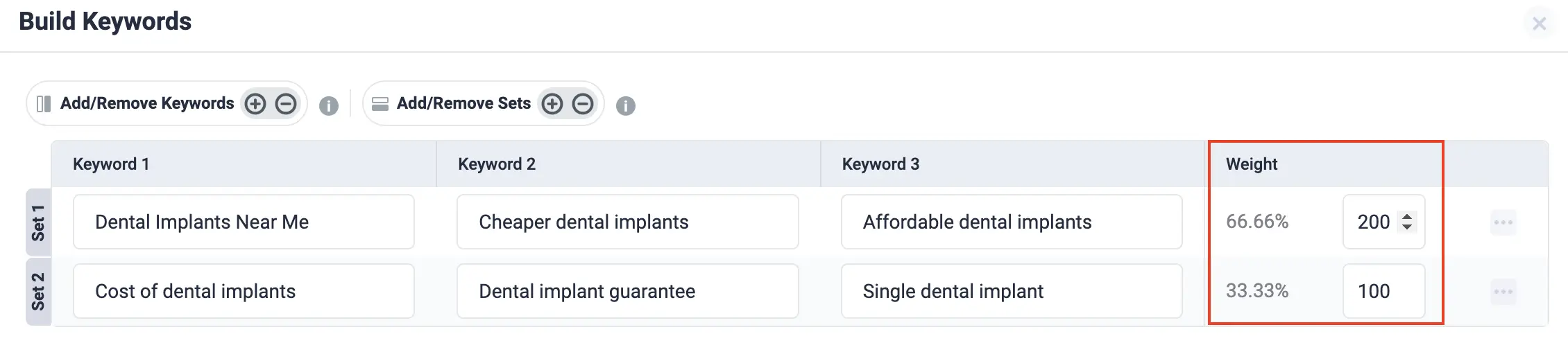
You can then see detailed reporting in ClickFlare to understand which keywords convert best:
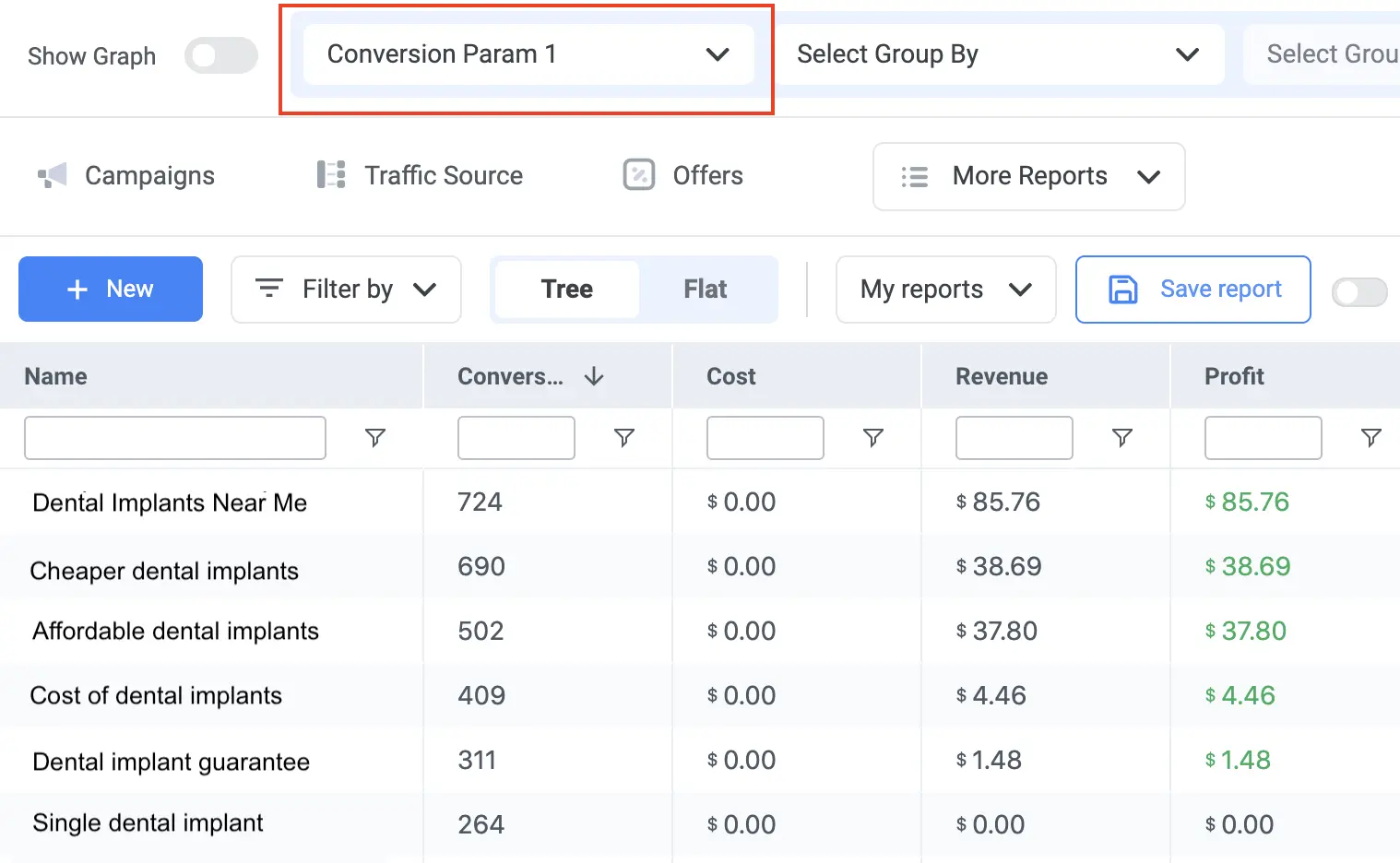
If you want to learn more about keyword optimization, we have a full guide on How to Master Keyword Optimization for Search Arbitrage and How to Analyze Keyword Performance.
RSOC is now the main way to run search arbitrage, and it's a far more competitive market than it was a few years ago. Stricter policies, more competition for traffic, and delayed revenue reporting all make it harder to stay profitable.
But the opportunity hasn't gone away. The teams still making money with RSOC build quality content, test keywords and pages constantly, and make decisions based on accurate revenue data. Tools like ClickFlare make that last part much easier, from importing feed revenue automatically to sending confirmed revenue back to your ad platforms.






