Black Friday came early. Early-access prices until Nov 8.Black Friday: early-access prices until Nov 8.Early-access price ends in0d00h00m00sClaim the deal


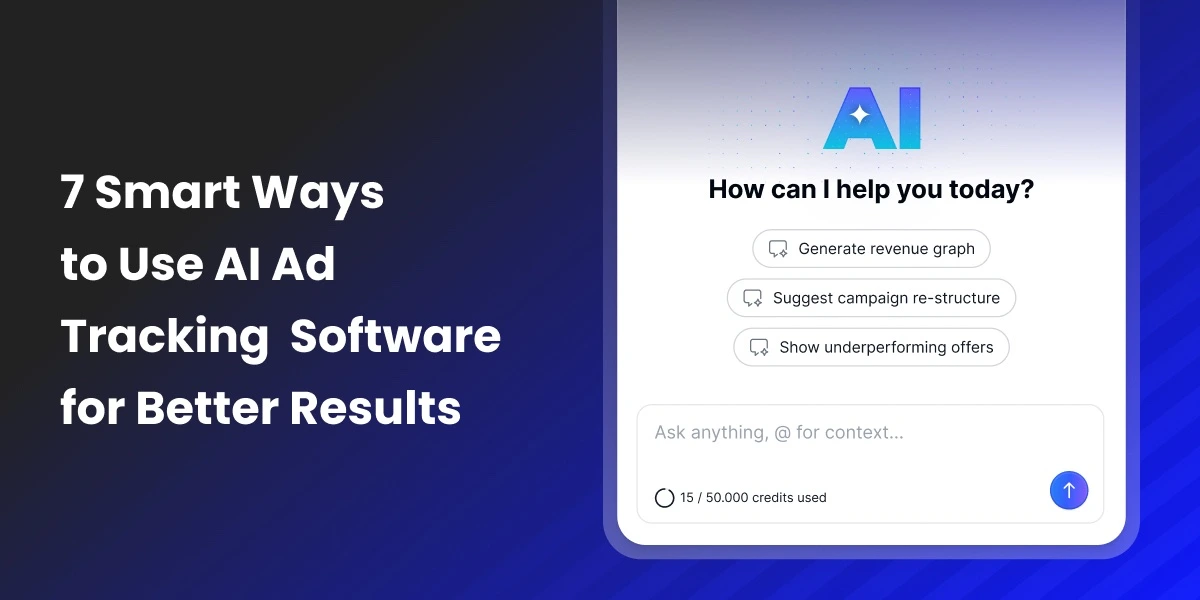

Marketing teams today are dealing with more platforms and data than ever before. They need to turn all that information into actionable insights in record time to improve performance. This is where AI ad tracking software is changing how marketers analyze and optimize their performance. Instead of spending hours reviewing multiple dashboards and manually analyzing large reports, you can simply ask your tracker the questions that matter.
In this article, we’ll share best practices and useful prompts to ask your AI ad tracking software for better results with your campaigns.
AI ad tracking software is a new generation of ad tracking tools that combines traditional tracking abilities with artificial intelligence.
They work similarly to other tracking platforms by collecting data such as clicks, conversions, cost and revenue from various platforms. The main difference is that these tools have a built-in AI Copilot that can analyze this data automatically and help you draw actionable insights.
Instead of analyzing all the information manually, you can ask the AI Copilot to spot patterns, create reports, suggest improvements, and support you with any questions you might have.
You can take this even further by using ClickFlare’s MCP server to automate tasks outside of ClickFlare using data from the platform. The MCP server allows you to integrate ClickFlare to your favorite AI platforms.
You can think of AI ad tracking software as a traditional tracking platform with a built-in intelligent assistant that helps you understand performance trends, uncover wasted ad spend, and find scaling opportunities without having to spend endless hours fine-combing through your data.
ClickFlare is part of the first few traditional ad trackers in the industry to launch an AI Copilot. This AI functionality is built into the platform and is immediately available on all plans.
As mentioned before, one of the main benefits of the AI Copilot is that it helps marketers understand their data faster and make smarter decisions. Instead of navigating multiple dashboards, you can simply ask the AI questions about your performance, and it will analyze your tracking data and return clear insights.
One of its most useful capabilities is performance analysis. You can ask the AI to explain trends, identify sudden changes in results, or compare performance across campaigns, traffic sources, or time periods. This allows you to quickly understand what is working and what needs attention.
The Copilot can also help with scaling and growth opportunities. By analyzing your performance data, it can highlight campaigns, geos, or traffic sources that show strong potential so you can decide where to increase spend or expand your testing.
Another important use case is waste detection. The AI Copilot can identify underperforming verticals, dropping conversion rates, or ad networks that are burning through your budget without delivering results. This makes it easier to detect budget waste early and prevent unnecessary ad spend.
For teams and agencies, ClickFlare’s AI Copilot is also valuable for reporting and client communication. Instead of manually building reports, you can ask the AI to generate summaries, performance breakdowns, or visual reports based on your campaign data.
The AI can further support campaign strategy by suggesting testing ideas, campaign structures, or optimization strategies based on your current performance trends. It can also automate routine tasks inside ClickFlare. Instead of manually setting things up, you can ask the Copilot to create campaigns, generate tracking links, or help configure tracking elements directly within the platform. This reduces repetitive work and lets you focus on what truly matters.
Finally, the AI Copilot provides personalized support by answering questions about how to use ClickFlare, helping you understand platform features, and guiding you through tracking or optimization workflows, directly in your native language.
The AI Copilot can completely change the way you manage your campaigns, but its success depends on how well you can master prompt creation. The better your prompts, the more precise and useful the insights will be.
We will share prompt examples in the next section, but first you need to keep in mind these best practices to make the most out of this feature.
Before relying on the AI Copilot for performance analysis or optimization recommendations, make sure your data inside ClickFlare is accurate and fully set up. This includes correct tracking, properly configured campaigns, and reliable conversion and revenue data. AI can only work with the data you feed it, so if your tracking setup is incomplete or inaccurate, the conclusions it generates may be incorrect.
If you’re a new ClickFlare user, it’s best to give the system some time to collect meaningful data before making AI-based analysis and decisions. While you can still use the Copilot to ask platform questions, generate tracking links, or create campaigns, performance analysis typically becomes more reliable after at least one to two weeks of consistent campaign data, depending on your traffic volume.
When writing your prompt, try to include specific details such as time ranges, metrics, or segments. For example, referencing traffic sources, GEOs, devices, campaigns, or date ranges will help the AI narrow down the analysis and provide more actionable insights. In general, the more context you provide in your prompt, the more valuable the results will be.
One of the most powerful ways to use AI ad tracking software is to quickly understand what is happening inside your campaigns. Instead of manually comparing metrics across dashboards, you can ask the AI Copilot specific questions about your performance. This will help you spot trends and understand what is driving results.
Identify Sudden Performance Drops
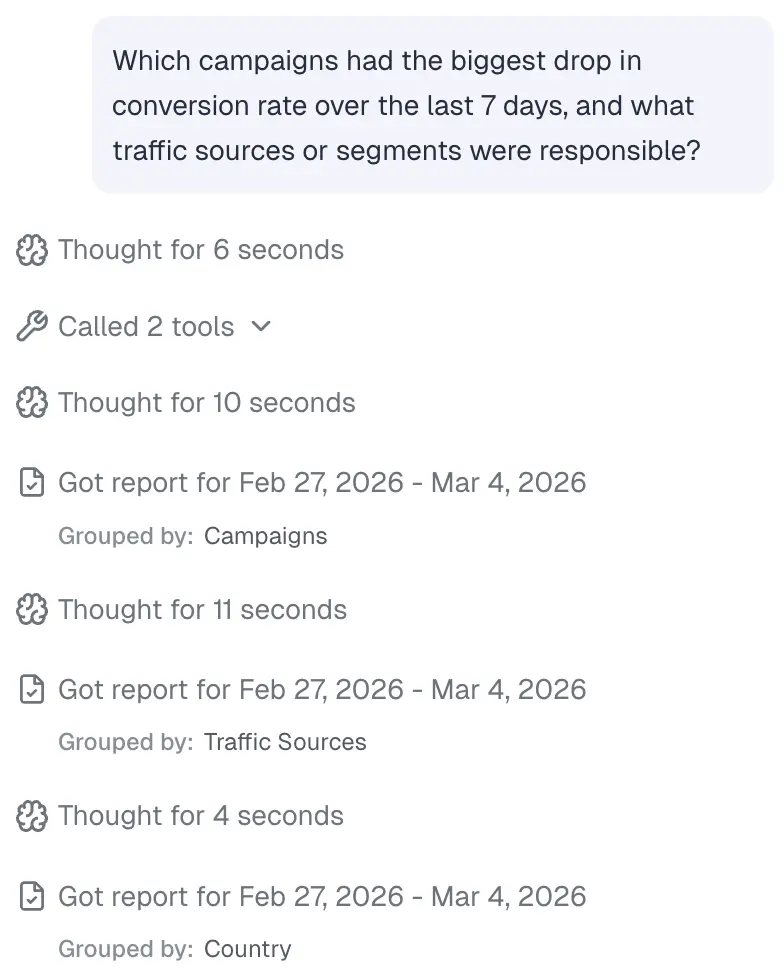
Prompt 1: “Which campaigns had the biggest drop in conversion rate over the last 7 days, and what traffic sources or segments were responsible?”
This prompt helps you quickly pinpoint performance issues before they significantly affect your results.The AI Copilot will then export the relevant reports and analyze the data for a few seconds, applying different breakdowns by campaign, traffic source, country, etc to see if there are any patterns associated with the drop.
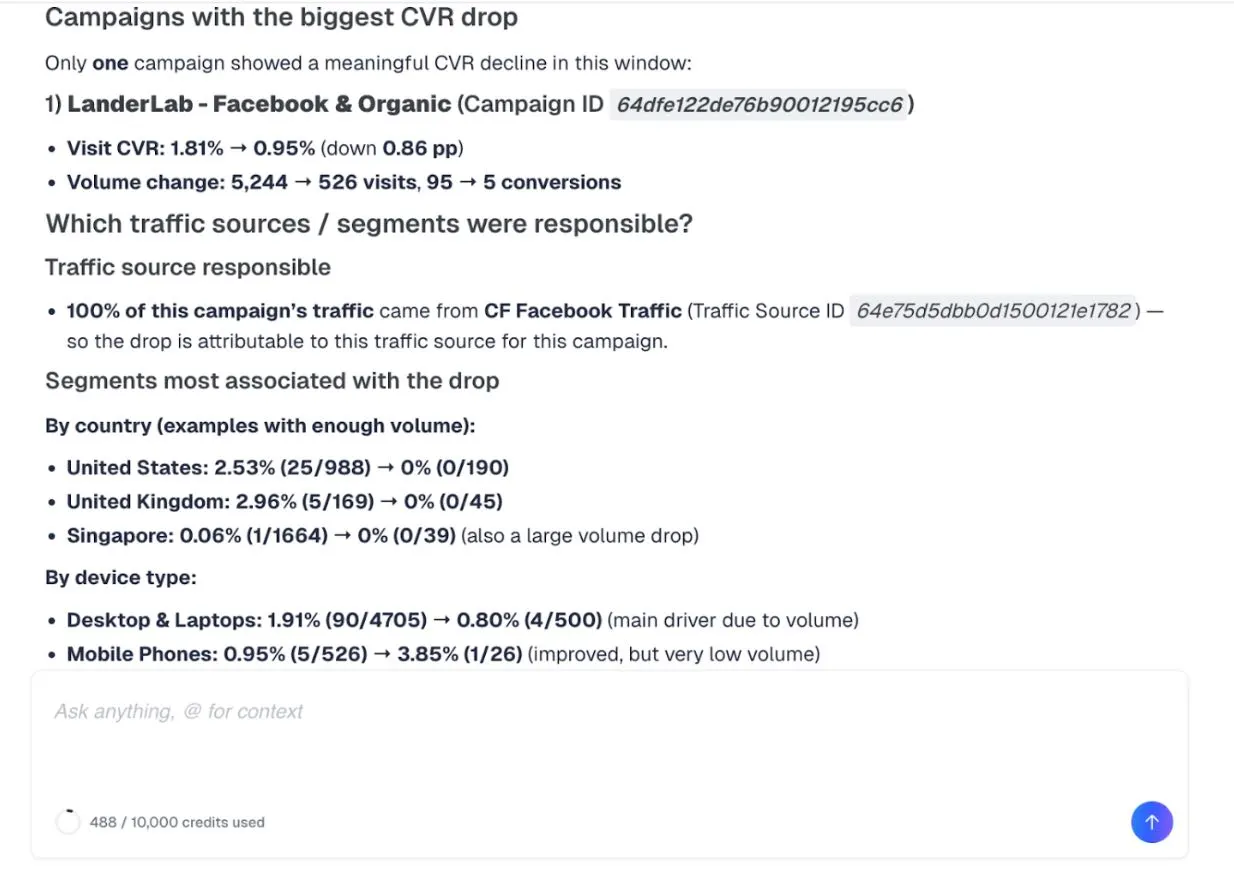
Once it has analyzed all the relevant data, it will generate a conclusion. If it spots any patterns by traffic source, country, device, etc, it will highlight that here:
Compare Performance Across Traffic Sources
Prompt 2: “Compare the performance of my top 5 traffic sources in the last 30 days based on ROAS, CPA, and conversion rate.”
This is useful if you are buying traffic from multiple ad platforms, and want to see which ones to prioritize and which to drop. It’s best to be specific about which metrics matter to you in order to get the most accurate results.
Find the Best Performing Campaigns
Prompt 3: “Show me my top performing campaigns this month based on return on profit and return on ad spend (ROAS).”
Quickly find out which campaigns to invest more budget in or duplicate them.
Analyze GEO Performance
Prompt 4: “Which countries or regions generated the highest profit in the last 14 days?”
If you are testing campaigns across multiple geographical locations, you might want to compare performance to see which countries bring more opportunities.
Detect Unusual Performance Changes
Prompt 5: “Did any campaigns experience unusual changes in CPC, CTR, or conversion rate in the last 48 hours?”
This prompt will highlight outliers that may indicate tracking issues, creative fatigue, or traffic quality changes before they affect your performance.
Break Down Funnel Stage Performance
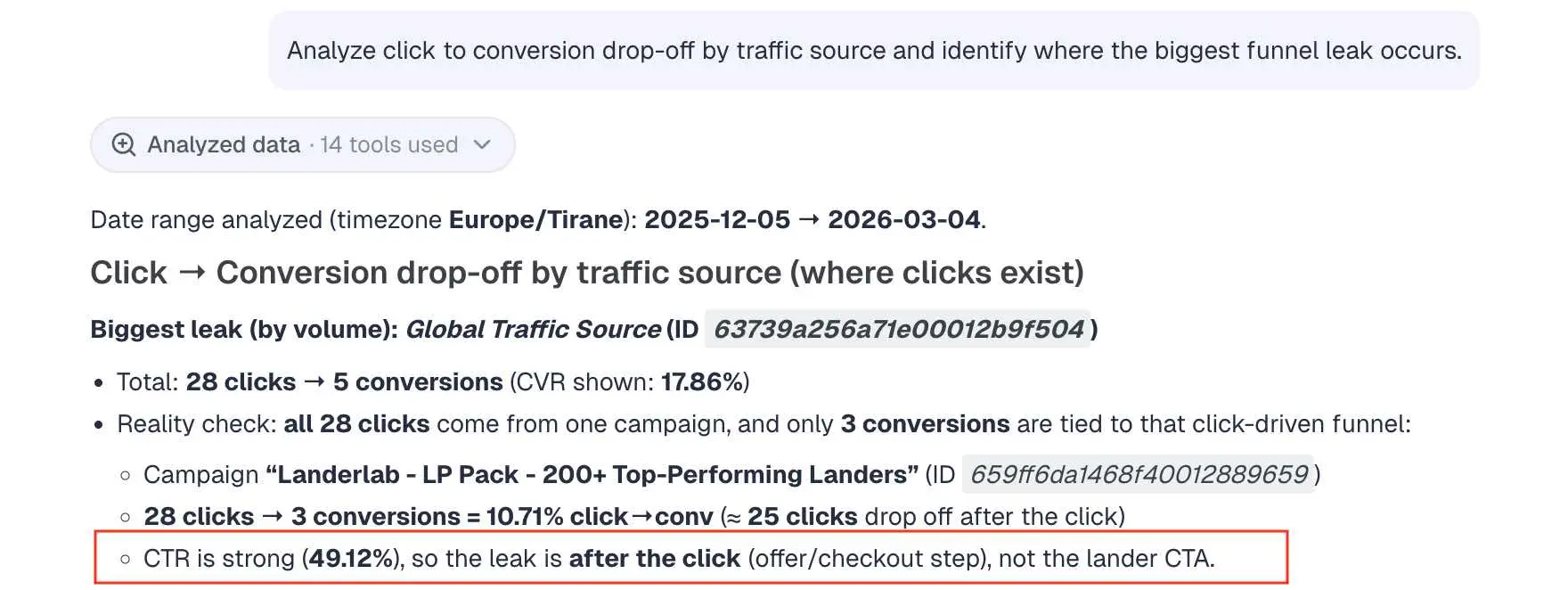
Prompt 6: “Analyze click to conversion drop-off by traffic source and identify where the biggest funnel leak occurs.”
Helps identify which part of your funnel is not working, for example traffic quality, landing page, or offer. In this example, the conclusion is that the click-through-rate (clicks on the landing page CTA) is strong, so the issue with the funnel is coming from the next step, the offer page. To improve performance, you would need to optimize your offer page in this case and keep the lander as it is.
Once you understand performance, the next step is identifying where to scale.
Identify Campaigns Ready For Scaling
Prompt 1: “Which campaigns have stable CPA and above-average ROAS over the last 7 days with increasing conversion volume?”
You want to make sure your campaigns deliver consistency plus volume before increasing ad spend. This prompt will help you pinpoint the right campaigns to scale.
Find High-Margin Segments With Low Spend
Prompt 2: “Show me segments such as traffic sources, countries, devices, with the highest profit margin but below-average spend.”
Many accounts under-allocate budget to their most profitable segments because they do not generate high volume yet. Scaling these segments first improves overall account efficiency before increasing total spend. This protects your ROAS while expanding the budget.
Spot Under-Leveraged Traffic Sources
Prompt 3: “Identify traffic sources with strong conversion rate and stable CPA but limited daily spend.”
Traffic sources that are performing well but getting little budget provide the best low-hanging scaling potential. It’s better to allocate more budget to proven sources than starting to test new ones. This is a good way to grow without undertaking major risks.
Compare Scaling Efficiency by Platform
Prompt 4: “Compare ROAS stability between Meta, Google, and TikTok over the last 30 days.”
Scaling requires predictability. A platform with performance swings may look profitable on average but carry higher risk. Stability analysis helps you determine where budget increases are more likely to maintain good performance if spending is increased.
Detect Campaigns With Rising Volume and Stable Efficiency
Prompt 5: “Which campaigns show increasing click volume without a drop in conversion rate or rising CPA?”
Campaigns that remain stable while traffic volume increases are perfect for budget increases.
Detect Time-Based Scaling Opportunities
Prompt 6: “Which days of the week or hours of the day consistently produce the highest profit margin?”
Scaling does not have to include increasing your total ad budget. Sometimes all you need to do to grow is reallocate your spend toward high-profit time windows. This is another low-risk growth strategy. You can increase budgets only during peak times (or remove any budget caps) and reduce them again during low-profit windows.
Waste prevention is just as important as scaling in order to protect your profit margins. The sooner you spot underperformers, the faster you can safeguard your budget.
Identify High-Spend, Low-Return Campaigns
Prompt 1: “Which campaigns account for the top 25 percent of spend but deliver below-average ROAS over the last 7 days?”
It can be easy to miss large underperforming campaigns because they generate big volumes. This is a quick prompt to immediately target the areas with the greatest potential cost savings.
Detect Creative Fatigue
Prompt 2: “Which campaigns show rising CPC over the last week without an increase in conversion rate or revenue per click?”This is especially important if you’re advertising on platforms with high creative fatigue, such as TikTok or Meta. Consistently rising CPC indicates creative fatigue, and you can prevent further waste by refreshing your ad creative.
Identify Landing Page Issues
Prompt 3: “Which landing pages have above-average click volume but below-average CTA engagement and conversion rate?”
High traffic combined with weak engagement is one of the most expensive types of waste when you’re dealing with paid traffic. In this case, it means you have a compelling ad, good targeting, and a strong message. The problem lies in the landing page. The landing page is either failing to communicate value clearly in the first few seconds, or the value proposition doesn’t match with the ad messaging. You need to figure out why people are compelled by your ad but drop off after they reach your landing page.
Identify Campaigns Near Break-Even Threshold
Prompt 4: “Which campaigns are currently within 10 percent of break-even profitability?”
Campaigns near break-even can quickly turn negative. Monitoring this group allows quick reaction before you actually lose money on them.
Identify Overlapping Targeting Risk
Prompt 5: “Are there campaigns targeting the same GEO, device, and traffic source where one consistently underperforms the other in CPA or revenue per click?”
When two campaigns compete for similar traffic but one structurally underperforms, you are splitting data and budget inefficiently. If that is the case, you can decide whether it’s worth it to pause the underperformer, merge them, or adjust targeting to avoid internal competition.
Detect Offer Saturation Signals
Prompt 6: “Which offers show declining conversion rate across multiple traffic sources simultaneously in the past 7 days?”
If multiple sources decline at once, the issue is likely offer-level saturation rather than traffic-level problems. You need to figure out what is causing this offer saturation (for example, is it the creative angle, or is the offer seasonal).
Apart from analyzing your data, the AI copilot can also recommend strategy improvements.
Recommend Creative Testing Directions
Prompt 1: “Based on patterns in my highest converting campaigns over the last 30 days, suggest new creative angles or messaging themes I should test next.”
ClickFlare will then make an analysis of where your top converting campaign creatives overlap:
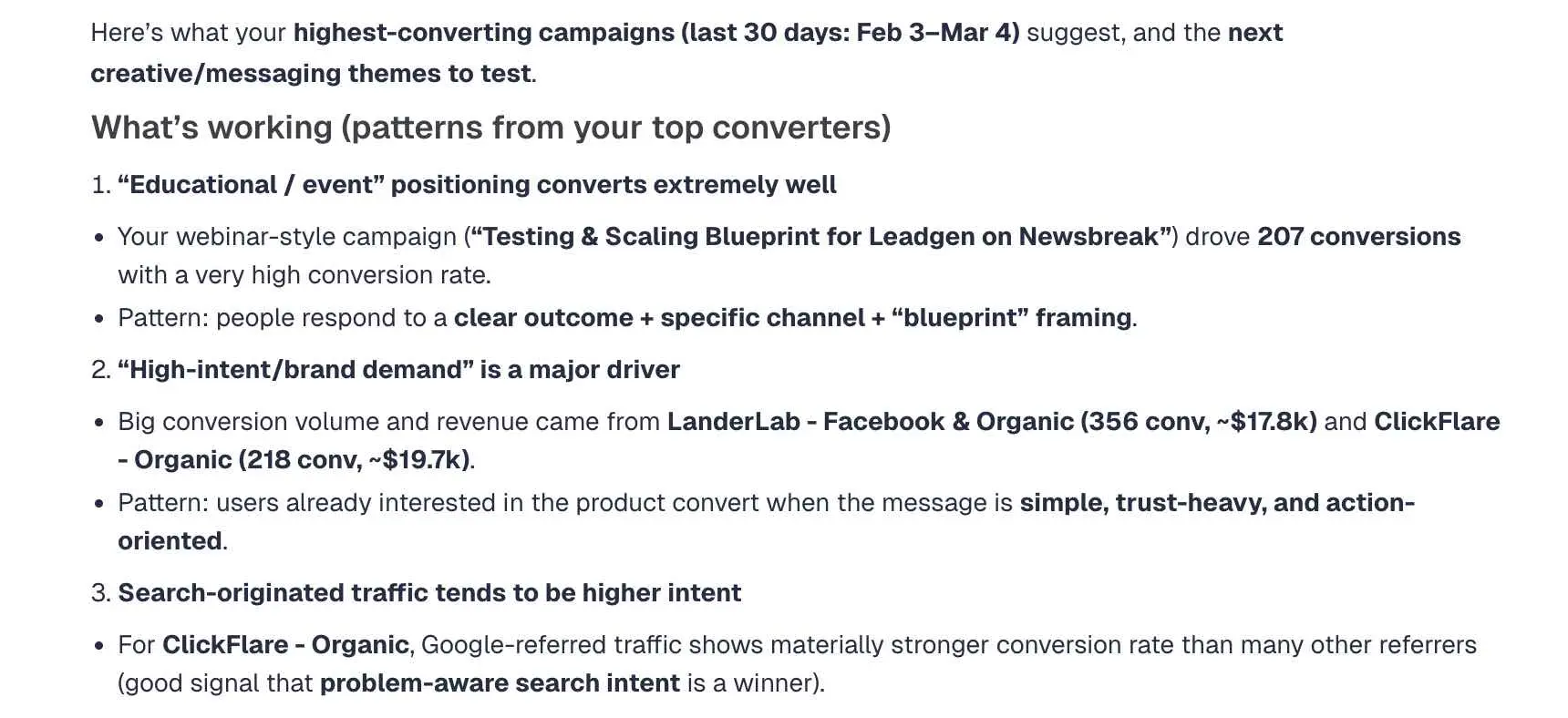
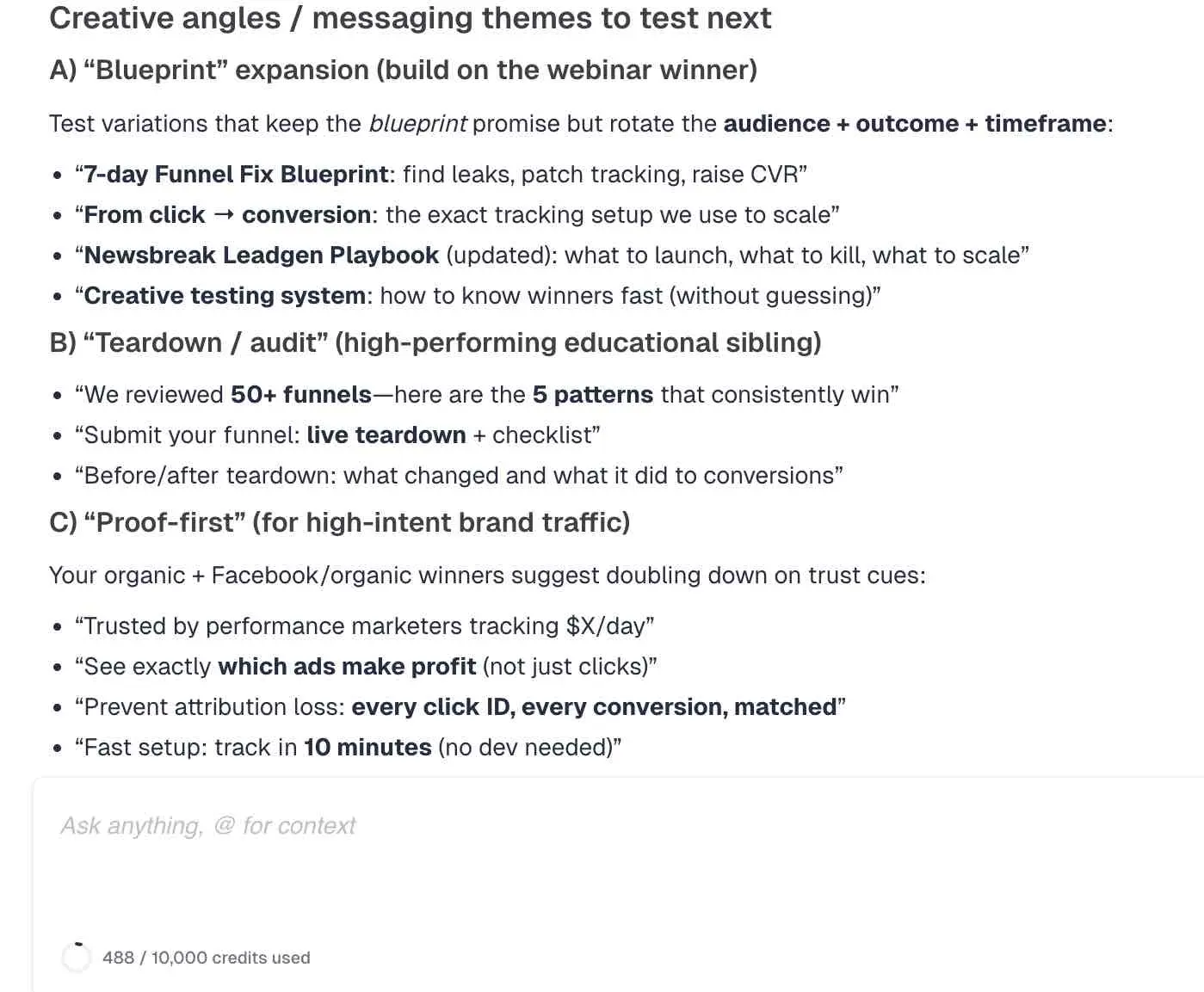
You will also get suggestions on what to try next based on winning patterns.
Here are just a few examples:
Suggest Creative Strategy Improvements
Prompt 2: “Based on my highest converting campaigns over the last 30 days, act as an expert media buyer and recommend improvements to my ad messaging and creative strategy that will increase conversion rates.”
Instead of recommending new creative angles to try out, this prompt will recommend improvements for existing ones.
Recommend Funnel Optimization Improvements
Prompt 3: “Act as a performance marketing expert and suggest specific improvements to my landing pages or offer pages to increase conversions, using my top converting funnels as examples.”
Apart from your creatives and campaign structure, the AI copilot can also recommend improvements to your funnel.
Improve Ad Set Structure
Prompt 4: “Based on my campaign performance data from the last 30 days, recommend how many ad sets I should use per campaign and how I should segment them for better optimization.”
You need to find a good balance between too many and too few ad sets to ensure you are testing each of them with a decent budget before moving on. This prompt helps identify a structure that balances testing and optimization.
Recommend Budget Distribution Structure
Prompt 5: “Based on campaign performance, recommend how I should restructure budget allocation across campaigns to improve overall profitability.”
This is a straightforward prompt to help you distribute your budget efficiently across your campaigns for better results.
Optimize Testing Volume
Prompt 6: “Based on my campaign performance, how many new ads or creatives should I test each week to maintain consistent optimization without hurting performance?”
Reporting is often one of the most time-consuming parts of campaign management. AI ad tracking software can reduce that workload by generating visual reports, actionable insights and summaries tailored for your specific audience.
Generate a Graph
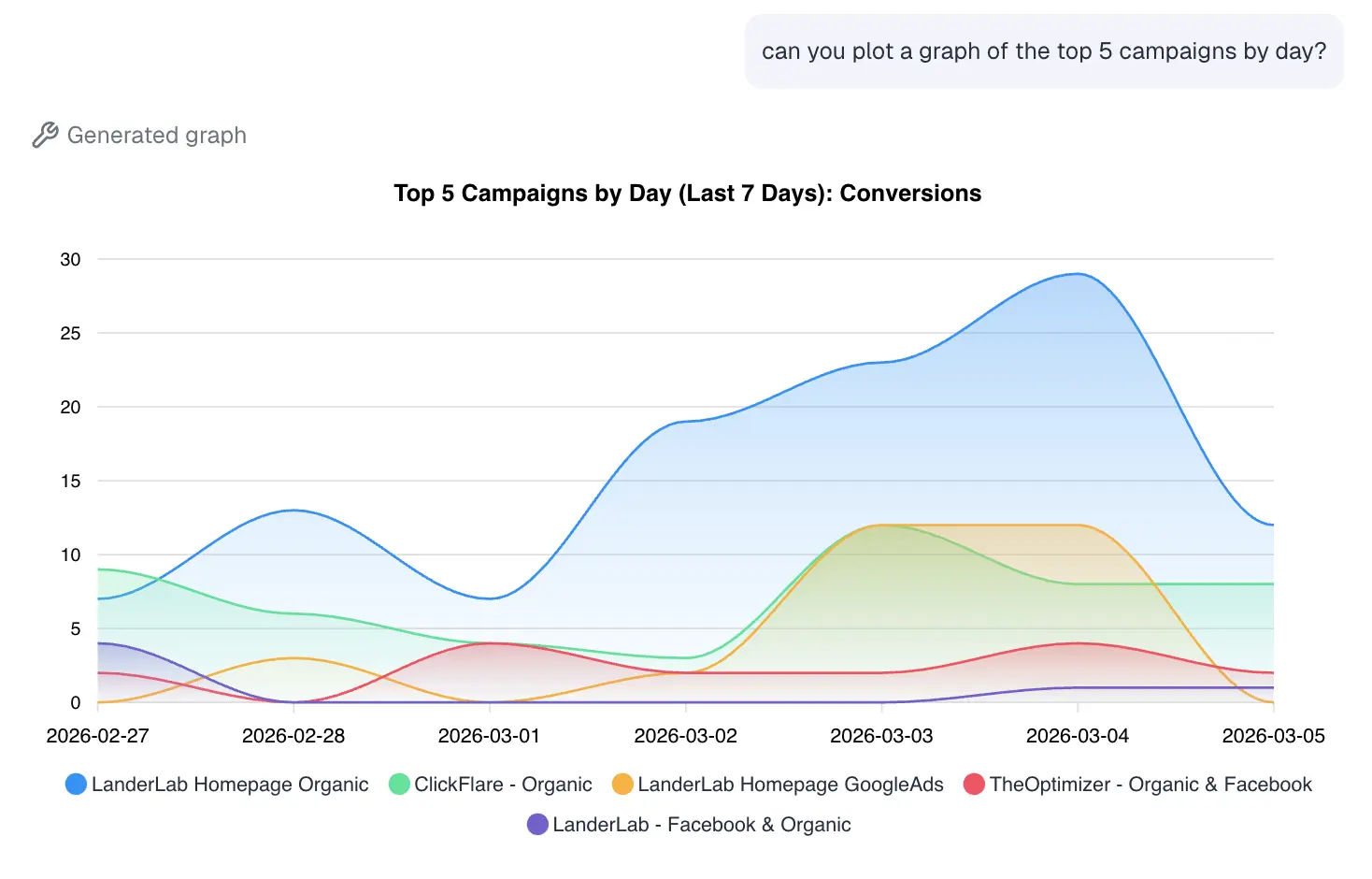
Prompt 1: “Plot a graph of my top 5 campaigns, broken down by day.”
Here are the results, showing the progression of conversions for our top campaigns day by day:
Generate a Visual Performance Trend Report
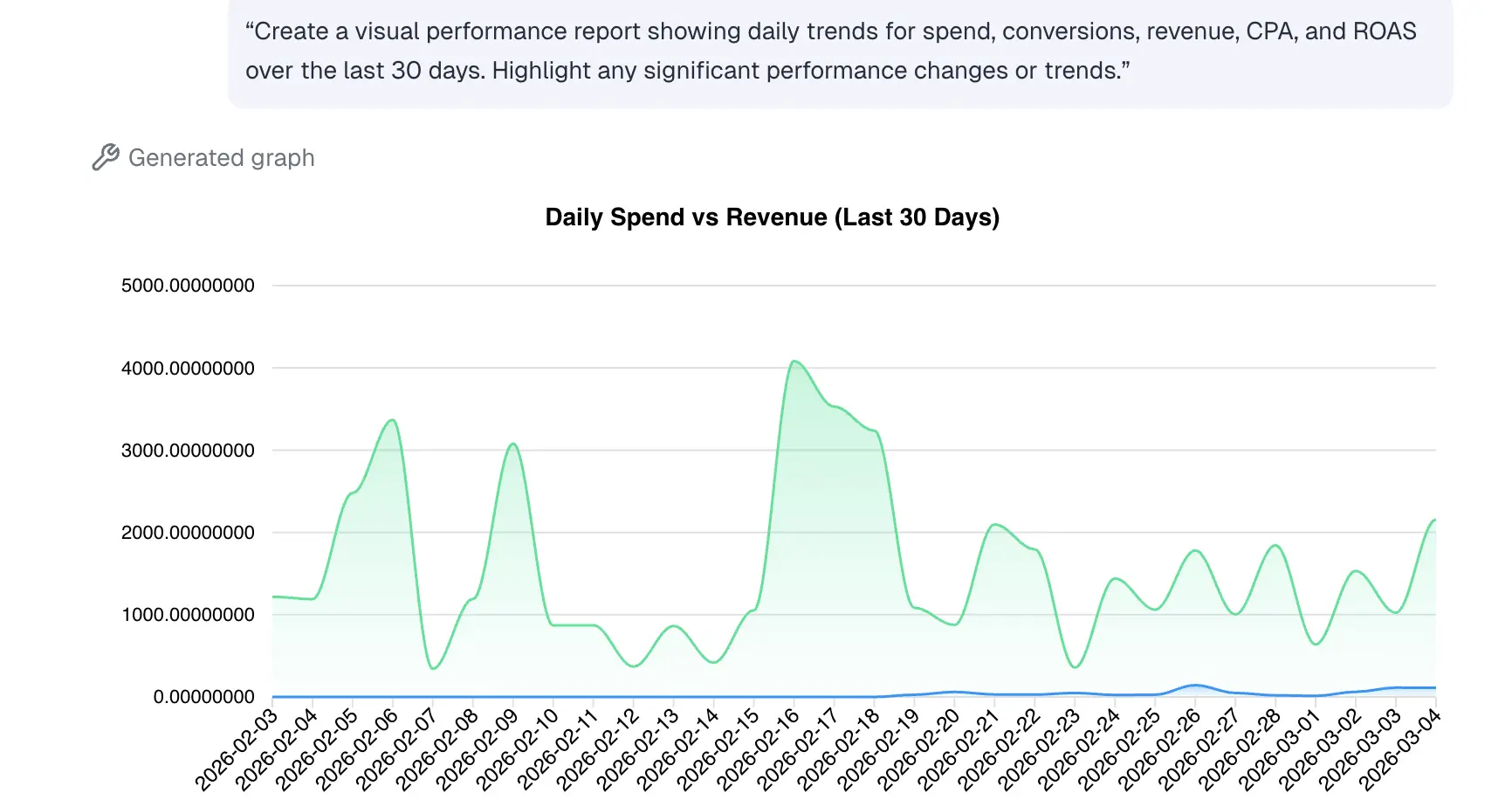
Prompt 2: “Create a visual performance report showing daily trends for spend, conversions, revenue, CPA, and ROAS over the last 30 days. Highlight any significant performance changes or trends.”
It’s easier to spot patterns through visual reports than raw data. These types of graphs quickly reveal trends such as rising costs or sudden performance drops. If you are reporting to clients, this type of data visualization helps communicate performance changes clearly.
For example, the first graph shows daily spend vs revenue for the last 30 days. Revenue is consistently above spend throughout this timeframe.
From February 19, ClickFlare spots an upwards trend in ad spend (as shown in the graph).
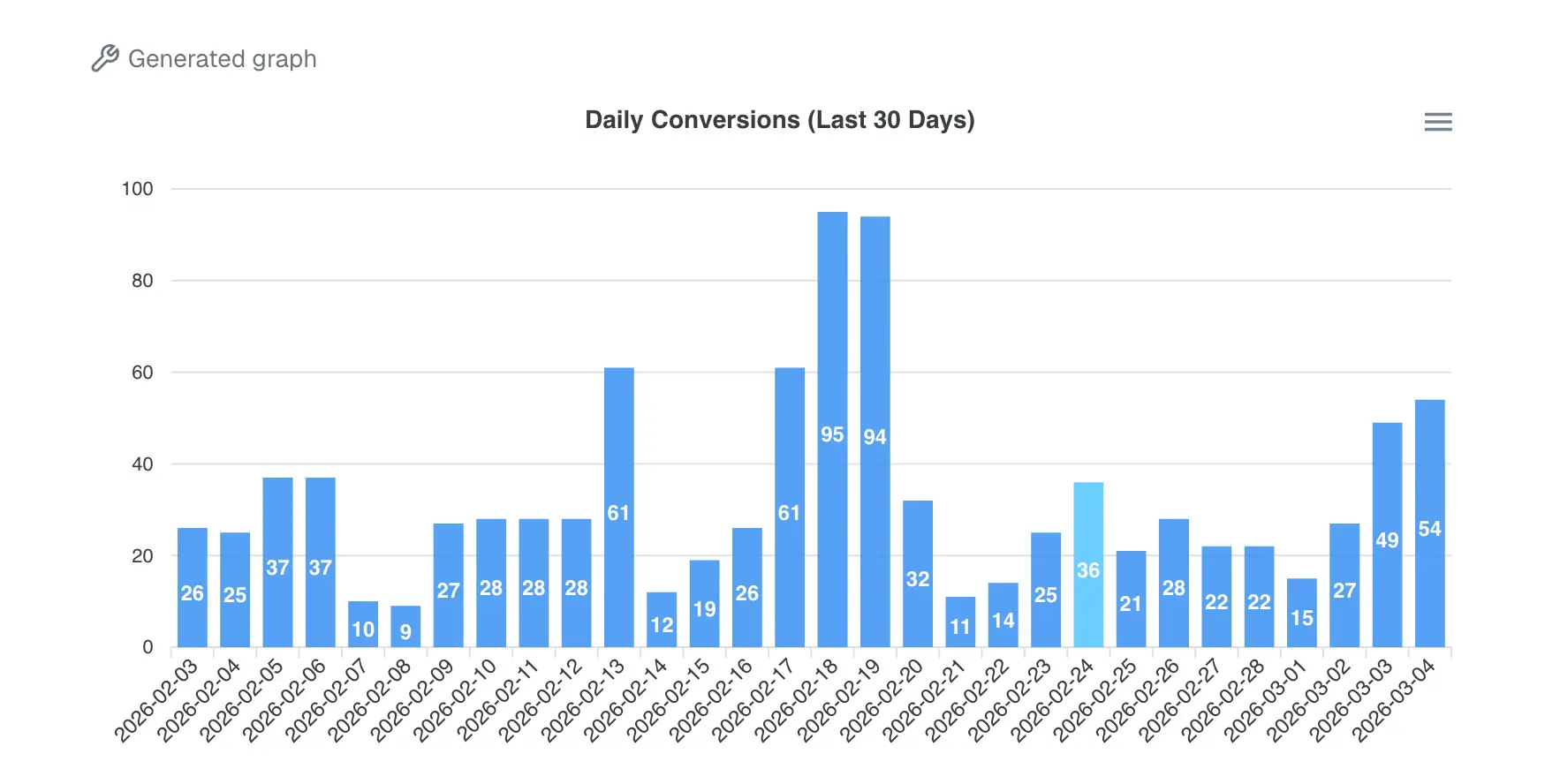
This other graph shows conversions throughout the last 30 days.
Daily conversions fluctuate with a few spikes around mid-February, suggesting short periods of well-converting traffic.
If there are any concerning patterns in the data, ClickFlare will usually provide advice for things you need to investigate next.
Monthly Performance Overview For Clients
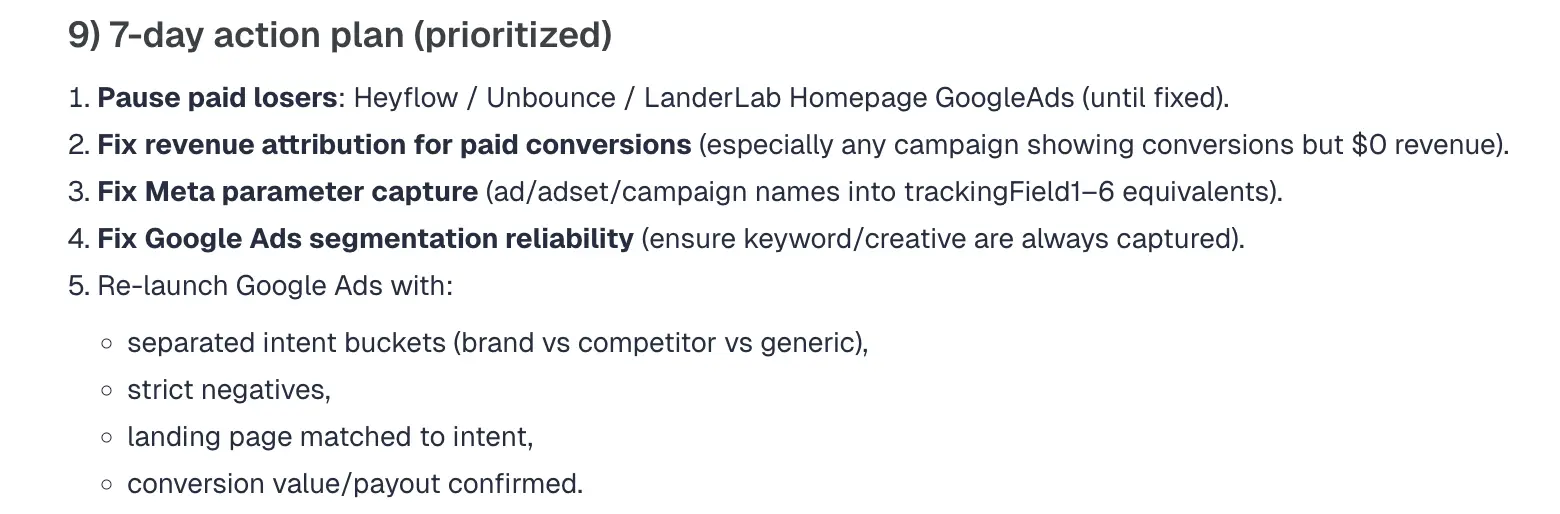
Prompt 3: “Analyze my ClickFlare campaign data from the last 30 days and generate a performance report with optimization recommendations. Evaluate ROAS, CPA, conversion rate, revenue per click, spend, profit, and conversion volume. Identify campaigns or segments to scale, campaigns to pause, traffic sources that need optimization, and messaging patterns that drive the highest conversions.”
This is a powerful prompt to turn a simple performance report into a strategic analysis your clients can act on. The report not only analyses data such as the mentioned metrics, top campaigns etc, but it also provides strategic recommendations. This allows you to quickly present clients with not just what happened in their campaigns, but also what should be optimized, paused, or scaled to improve results. Here is an example of an action plan ClickFlare will provide based on all your data:
Client-Friendly Performance Explanation
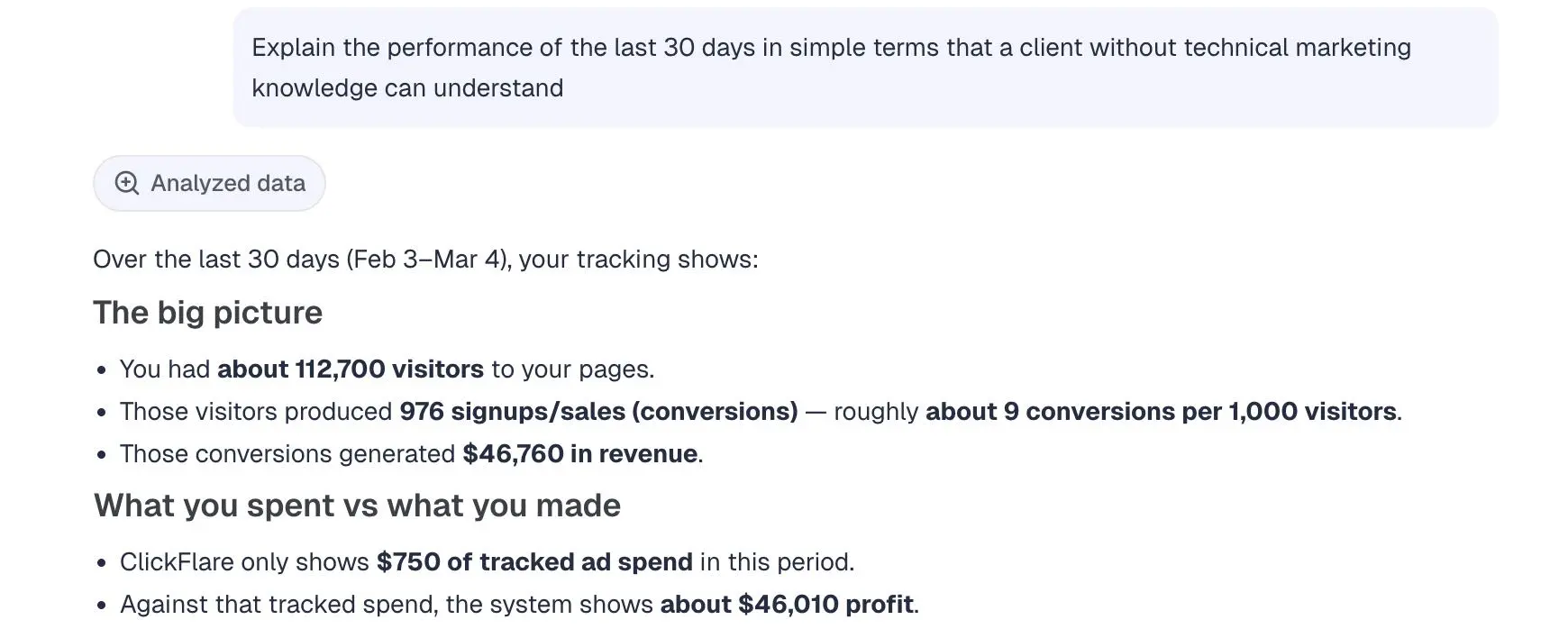
Prompt 4: “Explain the performance of the last 30 days in simple terms that a client without technical marketing knowledge can understand.”
It frequently happens that clients are not as fluent in reading data as you are, especially if they don’t have a marketing background. This prompt helps simplify the findings. Here’s an example of how ClickFlare does this:
With clear takeaways:
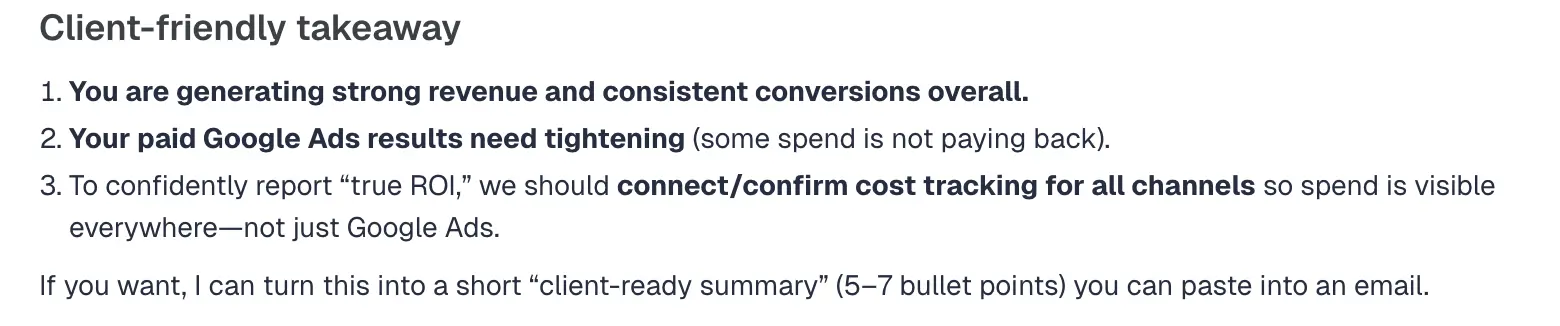
You can always ask follow-up questions or ask for more actionable insights.
Client Action Plan Summary
Prompt 5: “Based on the last 30 days of data, create a short action plan outlining recommended optimizations, scaling opportunities, and tests to run next.”
This prompt helps convert campaign analysis into a clear strategy that can be presented to clients.
Performance Comparison for Client Review
Prompt 6: “Compare performance between the last 30 days and the previous 30-day period and summarize the most important improvements and declines.”
Here is a clear overview where ClickFlare compares your key metrics:
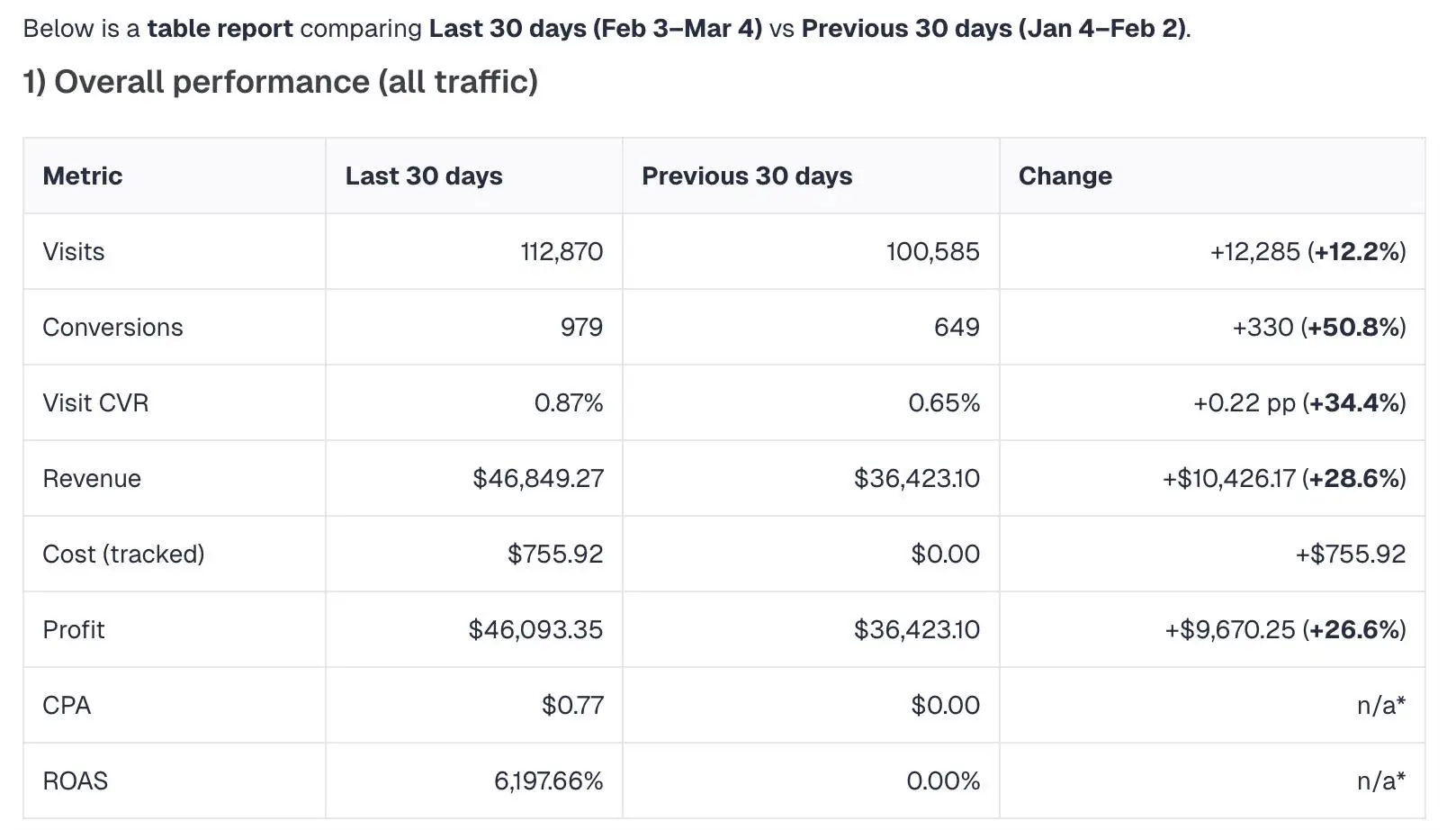
Apart from analyzing and providing recommendations, you can also use the AI copilot to automate routine tasks like creating elements such as campaigns, offers, landers and more on ClickFlare.
Create a New Campaign
Prompt 1: “Create a new campaign in ClickFlare for my [traffic source], with the same settings as [existing campaign] but switch the offer to [offer name]. Use my standard tracking setup.”
With this simple prompt you can clone your existing campaigns with new settings so you don’t have to continuously create new campaigns manually.
Generate a Tracking Link
Prompt 2: “Generate my tracking link for this campaign [campaign name]. Copy this link from the ClickFlare campaign tracking URL section” If you quickly need to grab your tracking link, you can do it in this way.
Create a New Offer
Prompt 3: “Use this URL [offer URL] to create a new offer in ClickFlare. The affiliate network is [affiliate network]. Make sure to append the right sub ID for the affiliate network to this link.”
Similarly to creating a new campaign, you can also create an offer.
Set Up an A/B Test
Prompt 4: “Create a ClickFlare campaign to A/B test two landing pages, [landing page 1] and [landing page 2], with offer [offer name]. Split traffic evenly between both pages and generate the tracking link I need to add on my ad network.”
This is a quick way to build an A/B testing campaign easily.
Create a New Lander
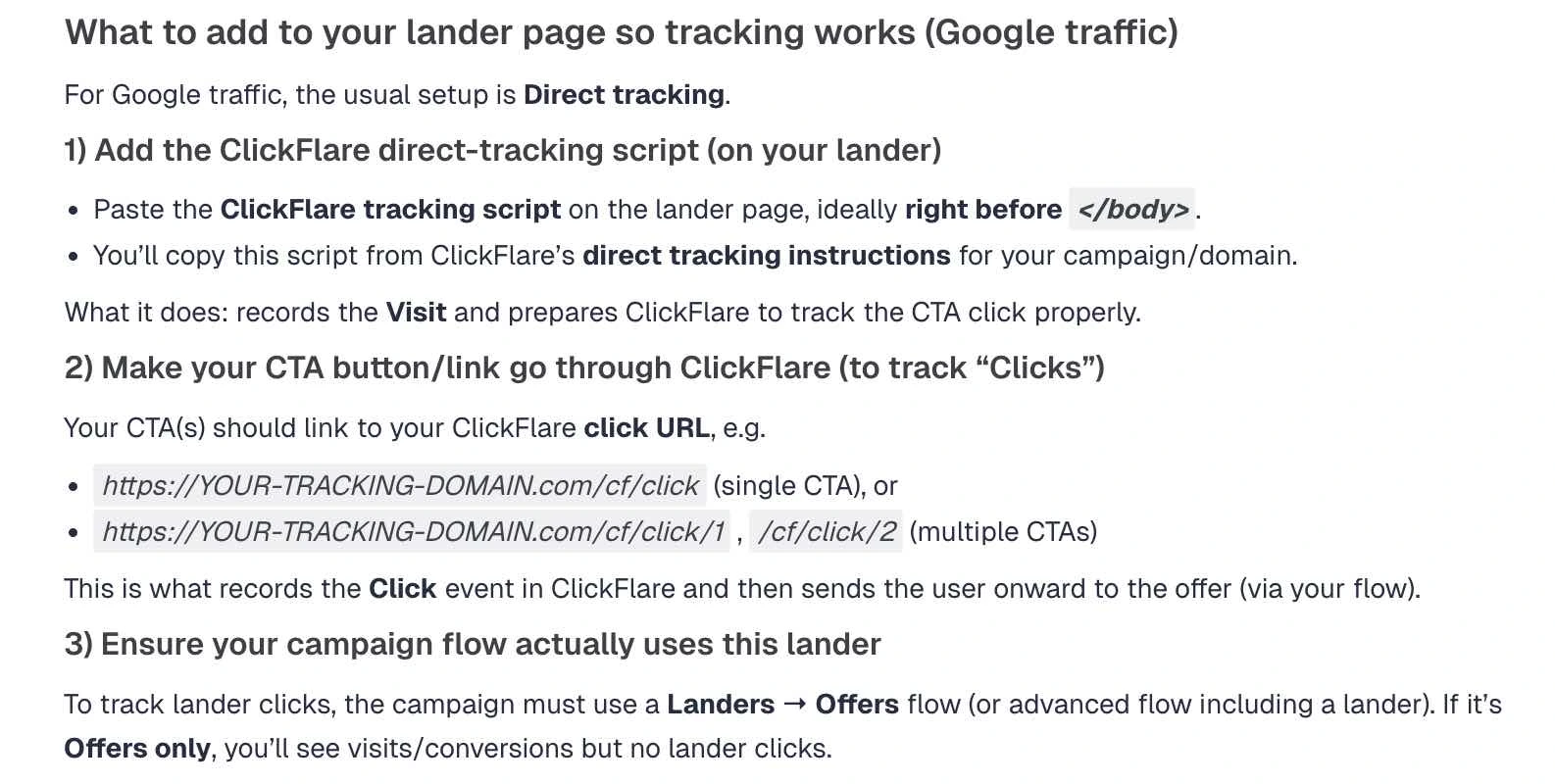
Prompt 5: “Create a new lander on ClickFlare based on this URL [lander URL]. The traffic source is [traffic source]. Let me know which URLs or tracking scripts I need to add to my page and where to make tracking for this lander work”.
Here is an example using Google as a traffic source:
Create Workspaces
Prompt 6: “Create a new private workspace for my client with the name [client name]. Add these campaigns to it [campaign 1, campaign 2…].”
You can also create and organize workspaces with AI.
Apart from using prompts to boost your reporting and strategy, you can also use them to get personalized support in your preferred language.
Get Help Setting Up Tracking
Prompt 1: “Give me a step by step guide on how to set up cost tracking for my Facebook campaign on ClickFlare.”
This will give you a detailed step-by-step answer.
Troubleshoot Tracking Issues
Prompt 2: “My campaign [campaign name] is receiving clicks but no cost is being tracked. What could be causing this and how can I fix it?”
You will get some common issues that might be causing you to not see the cost.
Learn How to Use a Specific Feature
Prompt 3: “Explain how the traffic filtering feature works in ClickFlare and how I should use it.”
If you come across a feature that you’re not sure about, this prompt can help you learn more about it.
Ask Questions in Your Preferred Language
Prompt 4: “Explain how ClickFlare tracking works in Spanish.”
The AI Copilot can respond in different languages, making it easier for users to understand technical concepts in your native language.
Understand Metrics and Reports
Prompt 5: “Explain what revenue per click and CTR metrics mean in my ClickFlare reports.”
You will see a variety of metrics in your ClickFlare reporting. Because different platforms might use various terms to imply different things, sometimes you might have questions about what exactly each metric is measuring. The AI Copilot will use the ClickFlare glossary database to answer.
Get Quick Answers to Specific Questions
Prompt 6: “How do I duplicate a campaign and change the GEO targeting in ClickFlare?”
You can ask specific questions as well, and our AI will use our knowledge base to answer your question.
AI ad tracking software is useful for any marketing professional, especially those running paid traffic and making data-driven marketing decisions.
Media buyers and affiliate marketers can use it to quickly analyze campaign performance and identify scaling opportunities.
E-commerce brands and lead generation businesses benefit from clearer attribution and faster optimization across multiple traffic sources.
Agencies managing campaigns for multiple clients can also use AI-powered tracking to streamline reporting, draw insights faster, and make better strategic decisions without manually analyzing large amounts of data.
As marketing campaigns become more complex and fast-moving, you need to be able to quickly interpret data and adjust performance accordingly. AI ad tracking software helps marketers do exactly that by combining traditional tracking capabilities with intelligent data analysis.
With tools like ClickFlare’s AI Copilot, you can analyze performance faster, detect wasted ad spend, uncover scaling opportunities, generate reports, and even automate routine campaign tasks.
By using well-structured prompts, marketers can turn their tracker into a powerful assistant that helps improve strategy, optimize funnels, and streamline reporting.
Whether you are a media buyer, affiliate marketer, agency, or brand running paid traffic, AI ad tracking software can help you spend less time analyzing data and more time focusing on growth.