




If your Meta or TikTok reporting suddenly looks worse than your actual sales, the problem probably isn't your ads, it's your tracking. This is exactly the gap that CAPI tracking closes. Conversions API (CAPI) tracking sends conversion data straight from your server to an ad platform, instead of relying on a browser pixel that iOS updates, ad blockers, and cookie restrictions increasingly interfere with.
Without it, you're stuck guessing how many sales your pixel actually missed. In this guide, we'll break down what CAPI tracking is, how it works, which platforms support it, and how to set it up so your ad platforms finally see the full picture.
Quick Summary
CAPI tracking (short for Conversions API tracking) is a server-to-server method of sending conversion data, like purchases, leads, or sign-ups, directly from your business's server to an ad platform such as Meta, Google, or TikTok. Instead of depending on a cookie or a script running in someone's browser, your server reports the event straight to the platform's API endpoint.
The term "CAPI" originally comes from Meta's Conversions API, released in 2020, but it's now used loosely to describe any server-side conversion API, including the versions offered by Google, TikTok, Snapchat, Reddit, Pinterest, LinkedIn, and Microsoft Advertising.
In practice, CAPI tracking is rarely used on its own. Most advertisers run it alongside their existing browser pixel, then deduplicate the two data sources so every conversion is counted once, not twice.
At a basic level, CAPI tracking follows the same pattern regardless of which ad platform you're sending data to:
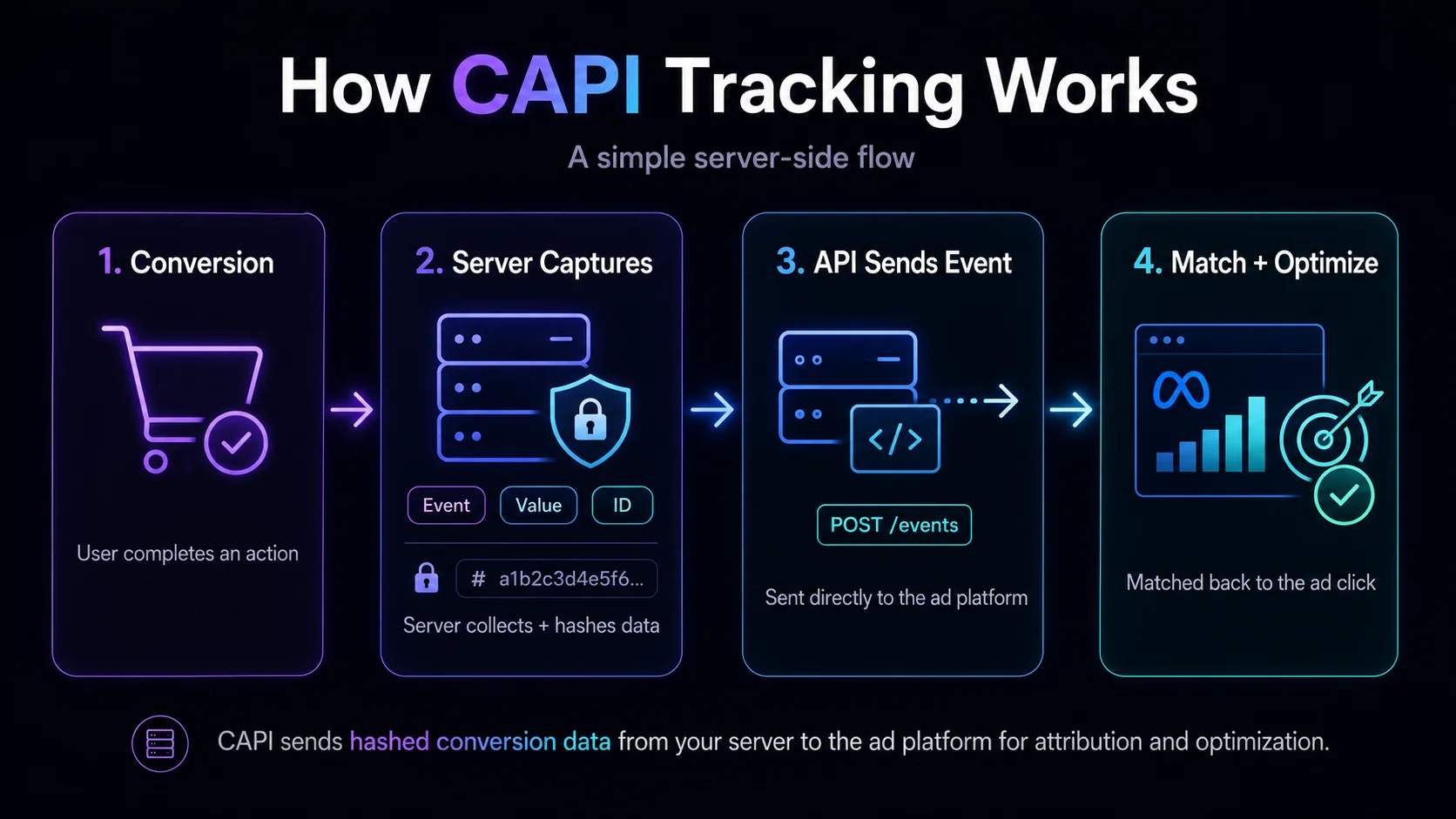
Because none of this depends on a script loading in the browser, CAPI tracking keeps working even when a user has an ad blocker installed, rejects cookies, or browses in a privacy-restricted mode like Safari's Intelligent Tracking Prevention.
The strength of that match depends heavily on how many identifiers you're able to send. Most platforms accept a combination of hashed emails, hashed phone numbers, external IDs, IP addresses, user agents, and click IDs, such as Meta's fbc and fbp parameters.
Sending several of these together, rather than relying on just one, is what actually moves match rates in practice. For the full, current list of accepted parameters and event types, Meta's own Conversions API documentation is worth bookmarking, since platforms tend to update these requirements over time.
Browser-based tracking has been losing accuracy for years, and CAPI tracking exists specifically to close that gap.
A few concrete reasons it matters:
This is also a big part of why your ad platform's dashboard rarely matches your tracker's numbers exactly. Different attribution windows, counting methods, and tracking sources will always create some gap between what each system reports.
Picture a Safari user who blocks third-party cookies by default. They click your Meta ad, land on your site, and complete a $150 purchase ten minutes later. With pixel-only tracking, there's a real chance that conversion never makes it back to Meta at all, since Safari's tracking prevention limits how long tracking data survives in the browser. With CAPI tracking running alongside the pixel, your server captures that same purchase and reports it directly to Meta's API, regardless of what happened in the browser.
Most advertisers don't have to choose one over the other, but it helps to understand how the two methods actually differ:
Meta, and most other platforms, actively recommend running the pixel and CAPI tracking together rather than picking one. When both are set up with proper event deduplication, you get the best of both: the pixel's speed and simplicity, plus the reliability of server-side data. Our guide on what a postback URL is covers the older server-to-server method that CAPI tracking has largely replaced for platforms that support it.
Nearly every major ad platform has released its own version of a Conversions API over the past few years. Here are the ones you'll encounter most often:
Each platform has its own documentation, required parameters, and event-matching logic, so an integration built for Meta won't automatically work for TikTok or Snapchat. If you're focused on Meta specifically, our full guide to the Facebook Conversion API walks through the setup in detail, and our TikTok Events API guide does the same for TikTok.
There are generally three ways to implement CAPI tracking, depending on your technical resources:
Whichever route you take, the core setup steps look similar:
If you'd rather not build and maintain a custom integration for every platform you advertise on, a tracking platform with built-in CAPI support can handle most of this for you. Here's what that actually looks like in practice.
If you're evaluating tools to handle CAPI tracking without building a custom integration, here's what ClickFlare's Conversion API Integrations include:
In practice, this means setting up CAPI tracking for a new platform is a matter of pasting in a pixel ID and access token, mapping your events, and saving, rather than writing and maintaining server-side code for every ad network you run.
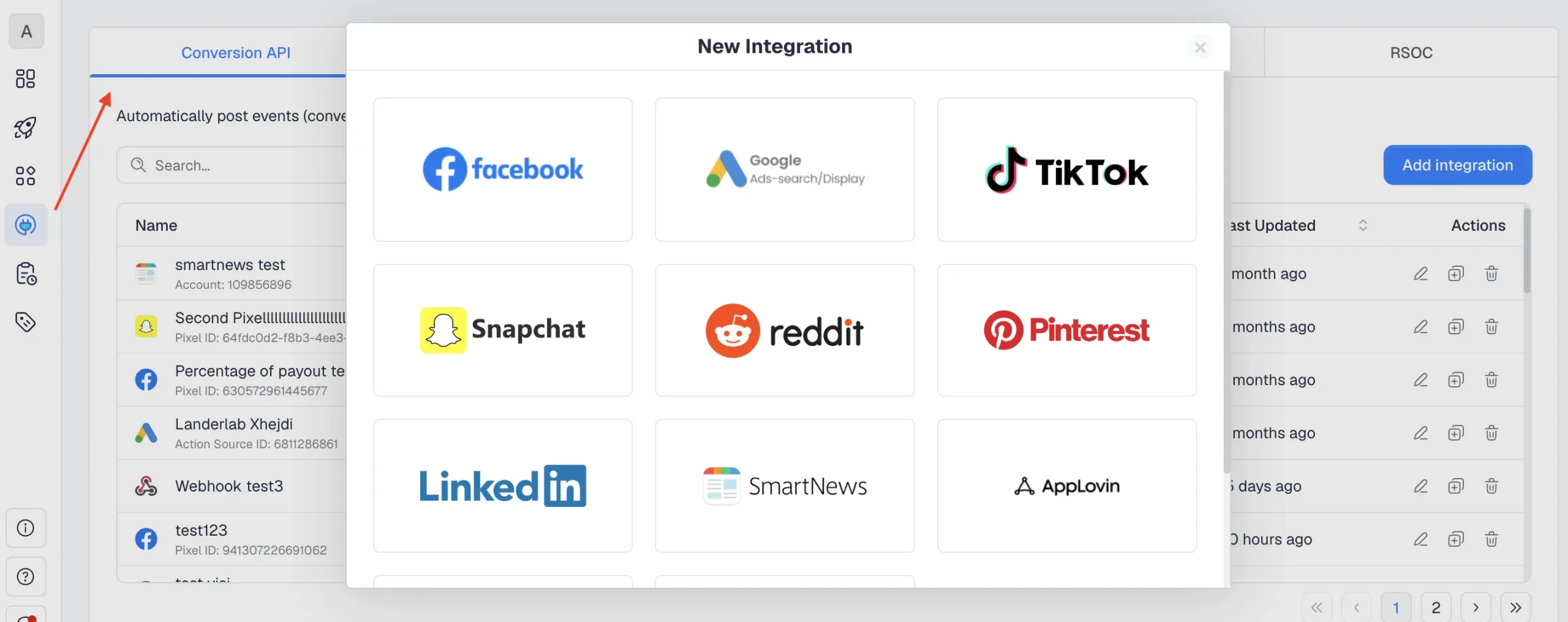
Setting up CAPI tracking in ClickFlare is very simple.You need to go to Integrations, select Conversion API, and choose the platform you wish to send data to from the list.
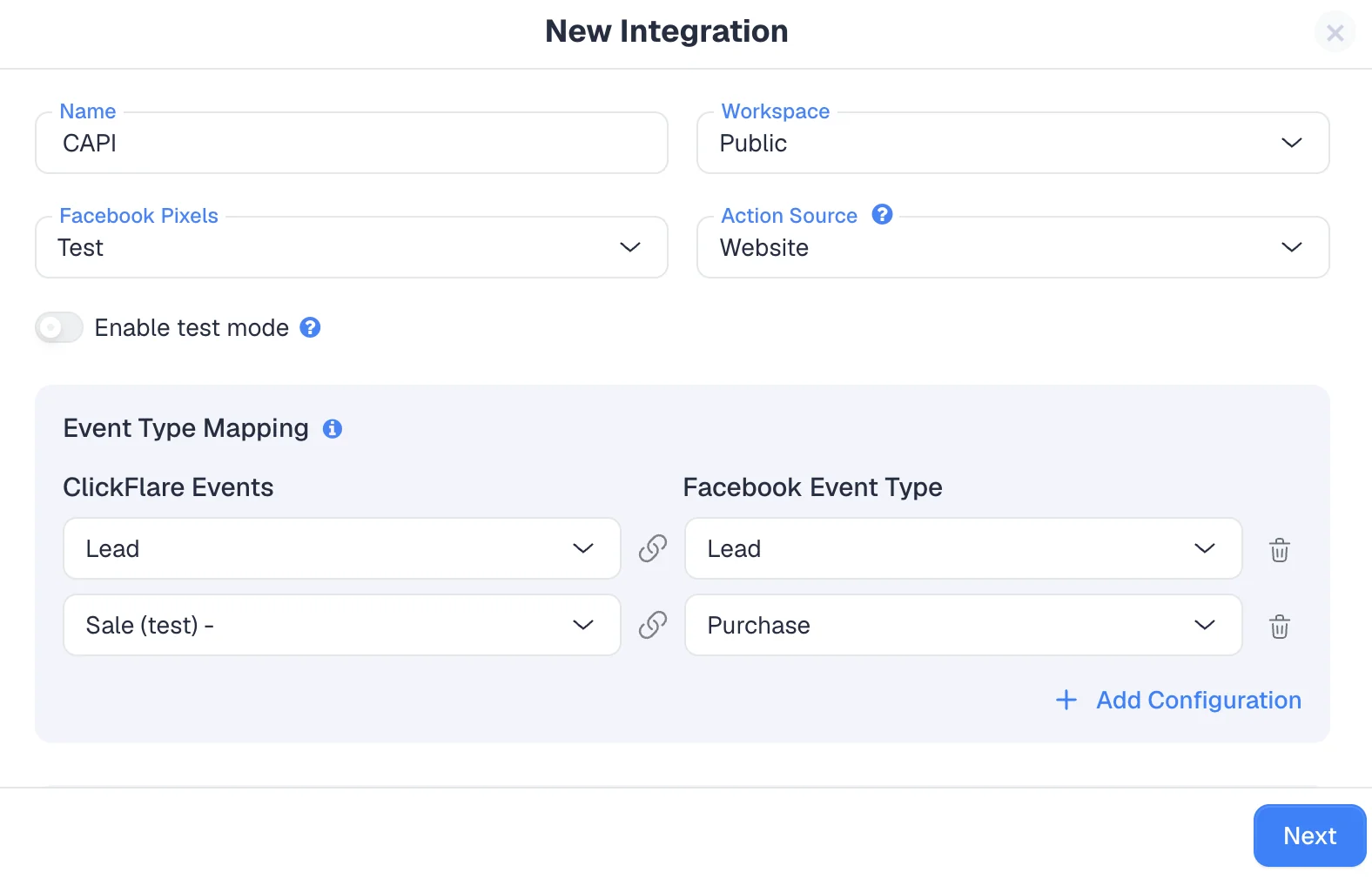
First, you need to set up the basic settings of the integration, such as giving it a name, assigning it to a workspace, and determining the action source (for example, Website).
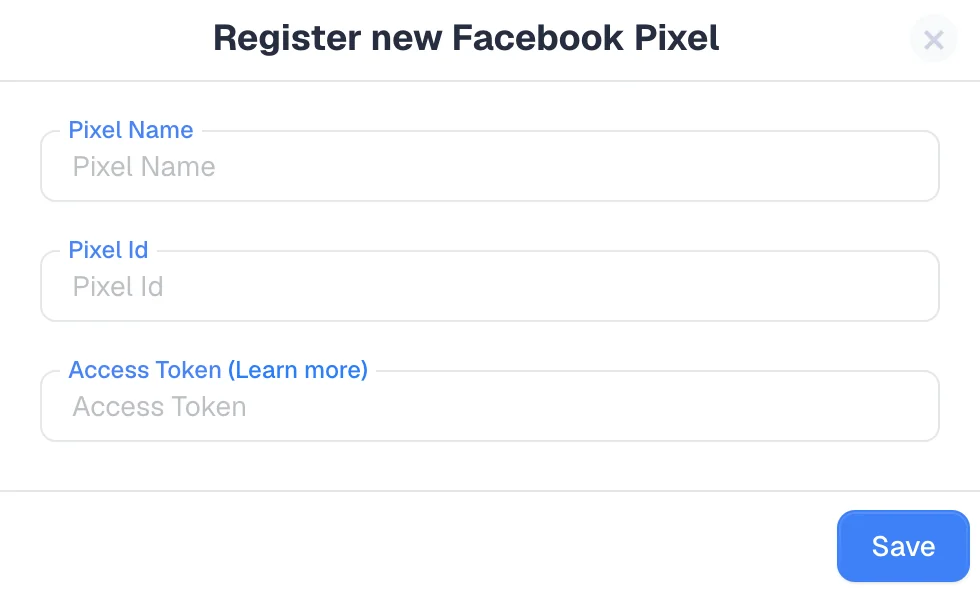
Next, you need to connect the actual ad network pixel. This part may vary slightly from platform to platform, but for most ad networks you need to input the pixel name (as it is shown on your account), the pixel ID (a string of numbers), and the access token (which you need to generate from your ad account).
You have the option to enable test mode. You can enable this option if you want to test the integration, using the test code under your pixel.
Under Event Type Mapping, you need to decide which ClickFlare events you will be posting to your ad network, and which event you will be matching them to. In the below example, we are sending ClickFlare Leads as "Lead" in Facebook, and Sale as "Purchase".
Under Event Data Configuration, you can configure which parameter you're going to post. ClickFlare automatically includes required parameters in the CAPI payload, such as click ID, country, IP address, and external ID.
These are required by the ad network, so you cannot remove or edit them.
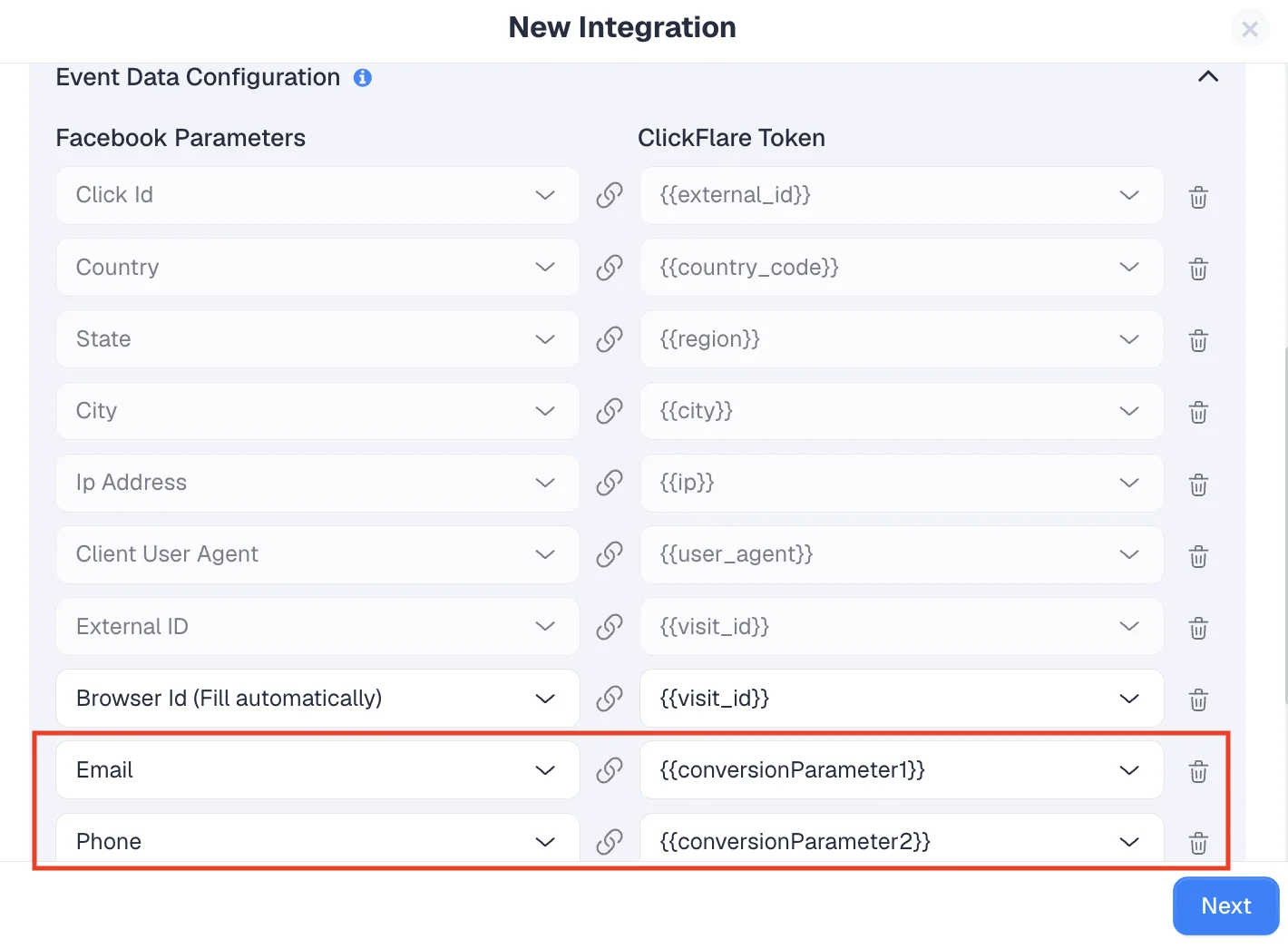
You can send additional events, such as email addresses and phone numbers. ClickFlare already includes a deduplication parameter to prevent your conversions from being sent twice.
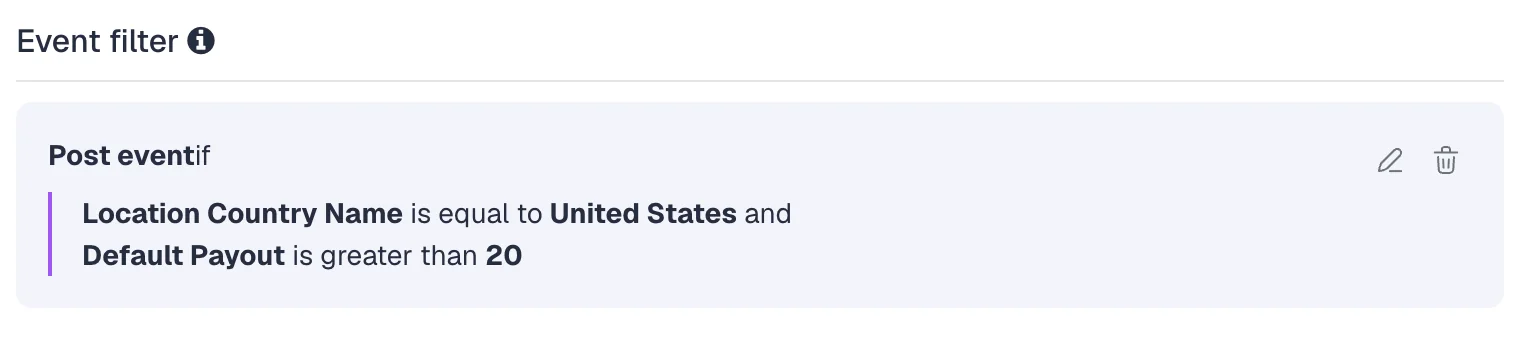
With ClickFlare's CAPI tracking, you can also apply an event filter. In order to control your event quality in your pixel, you can apply specific filters. For example, you can select to only send events coming from the United States, or only events with a payout greater than 20. You can choose from a number of filters, and you can apply multiple filters simultaneously.
If you'd rather not build a custom integration from scratch, here's what to look for in a tracking platform:
If you're comparing options more broadly, our breakdown of the best ad tracking software in 2026 covers pricing, integrations, and which tool fits which type of advertiser.
So, what is CAPI tracking, in short? It's the server-to-server method that lets you send conversion data directly to Meta, Google, TikTok, and other ad platforms, without depending on a browser cookie that might get blocked. As privacy restrictions keep tightening, CAPI tracking has moved from "nice to have" to a near-requirement for anyone running paid traffic seriously. The advertisers seeing the most consistent performance today are the ones combining pixel tracking with CAPI tracking, and monitoring both closely.
CAPI tracking is used to send conversion events, like purchases, leads, or sign-ups, directly from your server to an ad platform, so campaigns can be measured and optimized even when browser-based tracking is blocked or restricted.
No. Pixel tracking sends data from the user's browser, while CAPI tracking sends data from your server. Ad platforms recommend running both together, with deduplication, for the most complete data.
Not necessarily. Building a custom integration requires development work, but tools with built-in CAPI support, like ClickFlare, let you connect your pixel and access token without writing any code.
CAPI tracking can be GDPR compliant, but it isn't automatic. Personal identifiers are hashed before transmission, but you still need a valid legal basis and proper consent management before collecting and sending the data.
Meta, Google, TikTok, Snapchat, Reddit, Pinterest, LinkedIn, and Microsoft Advertising all offer their own version of a Conversions API, each with its own setup process and required parameters.






