




You visit a product page, close the tab, and an hour later that exact product is following you around the internet. That is possible due to something called a tracking pixel. So, what is a tracking pixel, exactly? It’s a tiny, often invisible image or snippet of code placed on a web page, ad, or email that fires a signal to a server the moment it loads, telling you that something happened.
Pixels power everything from email open rates to conversion tracking, but they also fail more often than most marketers realize. In this guide, we’ll cover what a tracking pixel is, how it works, why it doesn’t always fire correctly, and what to use instead when accuracy actually matters.
Quick Summary
A tracking pixel is a tiny graphic, typically a transparent 1×1 image, or a small piece of JavaScript embedded in a web page, digital ad, or email. When the content loads in someone’s browser or email client, the pixel quietly requests a file from a remote server. That request is the whole point: it tells the server that the page was viewed, the email was opened, or the action was completed, along with details like a timestamp, device type, and referring page.
You’ll also hear tracking pixels called pixel tags, web beacons, or marketing pixels. The names vary, but they all describe the same underlying mechanism: a resource that loads silently and reports back. Because it’s designed to be invisible, the average user never notices it’s there.
Pixels are one of several methods marketers use to connect an ad or email to what a user does next. If you want the bigger picture of how pixels sit alongside cookies, tracking links, and server-side methods, our guide on what ad trackers are and why they matter breaks down the full toolkit.
Every tracking pixel follows the same basic sequence. It’s simple in theory, which is exactly why it breaks so easily in practice.
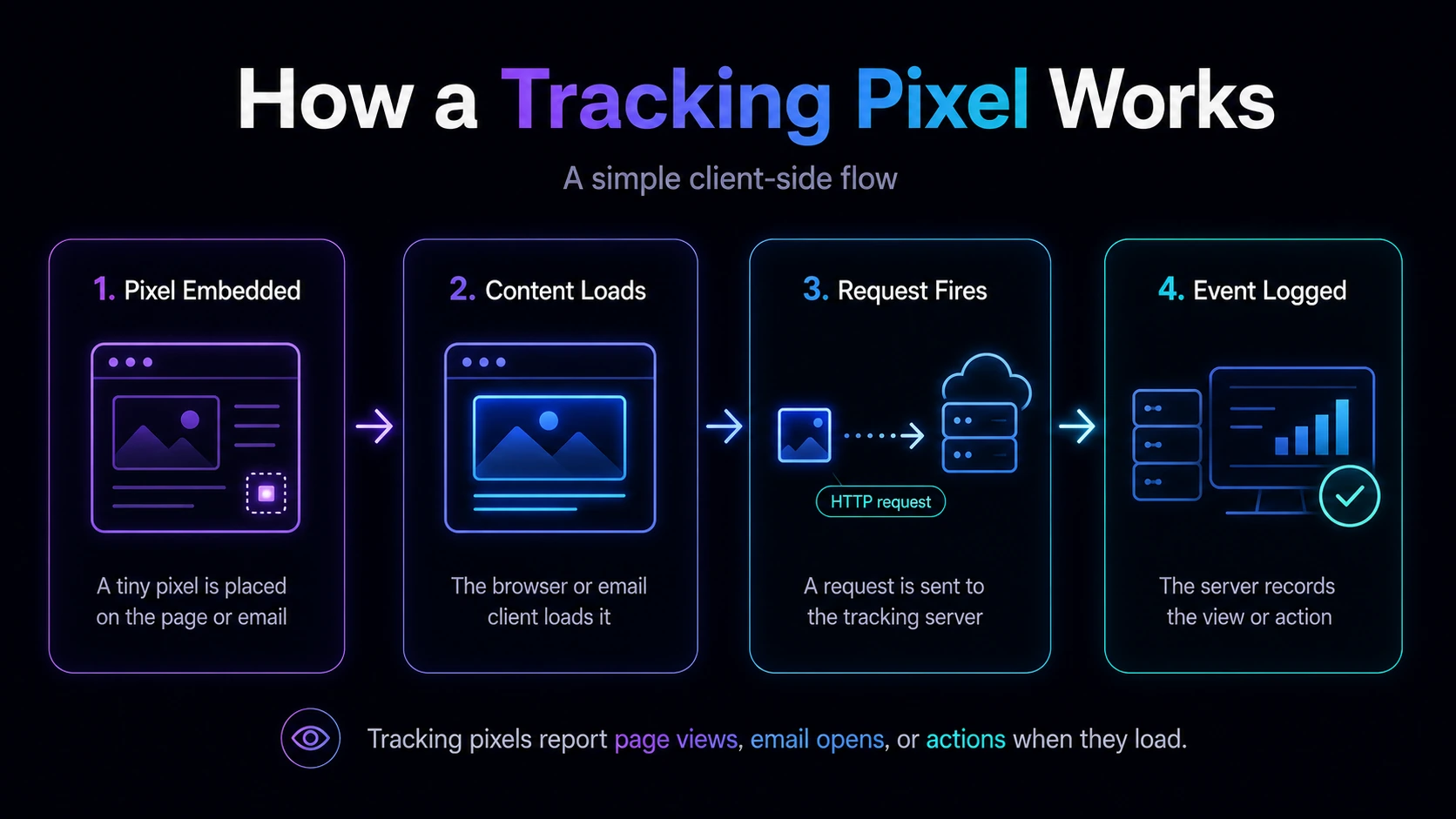
The catch is in step two and three. A pixel only reports data if it actually loads and fires. If the browser blocks it, the cookie it depends on is missing, or the user leaves before the page finishes loading, the event simply never gets recorded. We’ll come back to that shortly.
“Tracking pixel” is an umbrella term. Depending on where it’s used and how it’s built, a pixel can serve very different purposes.
The last two rows matter more than they look. An image pixel and a JavaScript pixel can track the same conversion, but they don’t behave identically, and that difference is often the reason one setup records a sale while the other misses it.
Pixels exist to answer one core question: did the thing I care about actually happen? In marketing, that usually breaks down into a few concrete jobs.
For advertisers running paid traffic, the conversion job is the one that pays the bills. Without accurate conversion data, you’re optimizing campaigns on guesswork, which is a fast way to waste budget.
A tracking pixel rarely works alone. It’s usually part of a system that also involves cookies and, increasingly, server-side methods like postbacks. Here’s how the three compare.
The pattern is clear: the closer a method sits to the browser, the more fragile it is. That fragility is exactly why so many conversions quietly go missing.
A tracking pixel is only as reliable as the environment it loads in, and that environment has become far more hostile over the past few years. Here are the most common reasons a pixel fails to record what it should.
Many conversion pixels rely on a cookie to remember who the visitor is. The click ID gets stored in a cookie when someone clicks your ad, and the pixel reads it back when the conversion fires. If the user has cookies disabled, or clears them between the click and the purchase, there’s nothing for the pixel to match against, so the conversion never registers.
Browser extensions and built-in blockers are specifically designed to stop tracking scripts and known pixel domains from loading. When they do their job, your pixel simply never fires, and you have no way of knowing how many events you missed.
Safari’s Intelligent Tracking Prevention and similar features in other browsers actively limit or shorten the life of cookies, especially those set across different domains. A cookie that would have survived for weeks might now be gone in a day, breaking attribution for anyone with a longer path to purchase.
This is a subtle but important one. A plain image pixel can struggle to set a cookie correctly when the tracking domain differs from the page domain. A JavaScript-based pixel is generally more reliable here because it can set a first-party cookie on the page’s own domain, which browsers treat far more favorably.
Pixels depend on the page finishing its load. If a user bounces early, the connection drops, or a script error stops the page from rendering, the pixel may never get the chance to fire, even when the conversion genuinely happened.
Email clients like Apple Mail now preload or proxy images, which can inflate or mask real open data. On top of that, privacy regulations such as the GDPR require clear user consent before non-essential tracking runs, so if a visitor declines, the pixel shouldn’t fire at all. You can see the full requirements in the GDPR guide to cookies.
Add all of this up and the takeaway is straightforward: a tracking pixel gives you a useful but incomplete signal. If your numbers never seem to agree across platforms, our breakdown of why conversions don’t match across platforms explains how much of that gap traces back to client-side tracking.
In ClickFlare, a conversion tracking pixel is offered as an alternative method for when server-to-server postback tracking isn’t available. It’s cookie-based: the click ID is stored in the visitor’s browser when they click, then retrieved automatically when the conversion happens.
Here’s the flow. When a visitor clicks a campaign URL or a call-to-action on your landing page, ClickFlare assigns a click ID and stores it in a browser cookie. If that visitor later completes an action and lands on a “Thank You” page where the pixel is placed, the pixel fires, pulls the click ID from the cookie, and sends a request to ClickFlare to log the conversion. Because the whole thing depends on that cookie, if cookies are disabled in the visitor’s browser, the conversion tracking pixel won’t function.
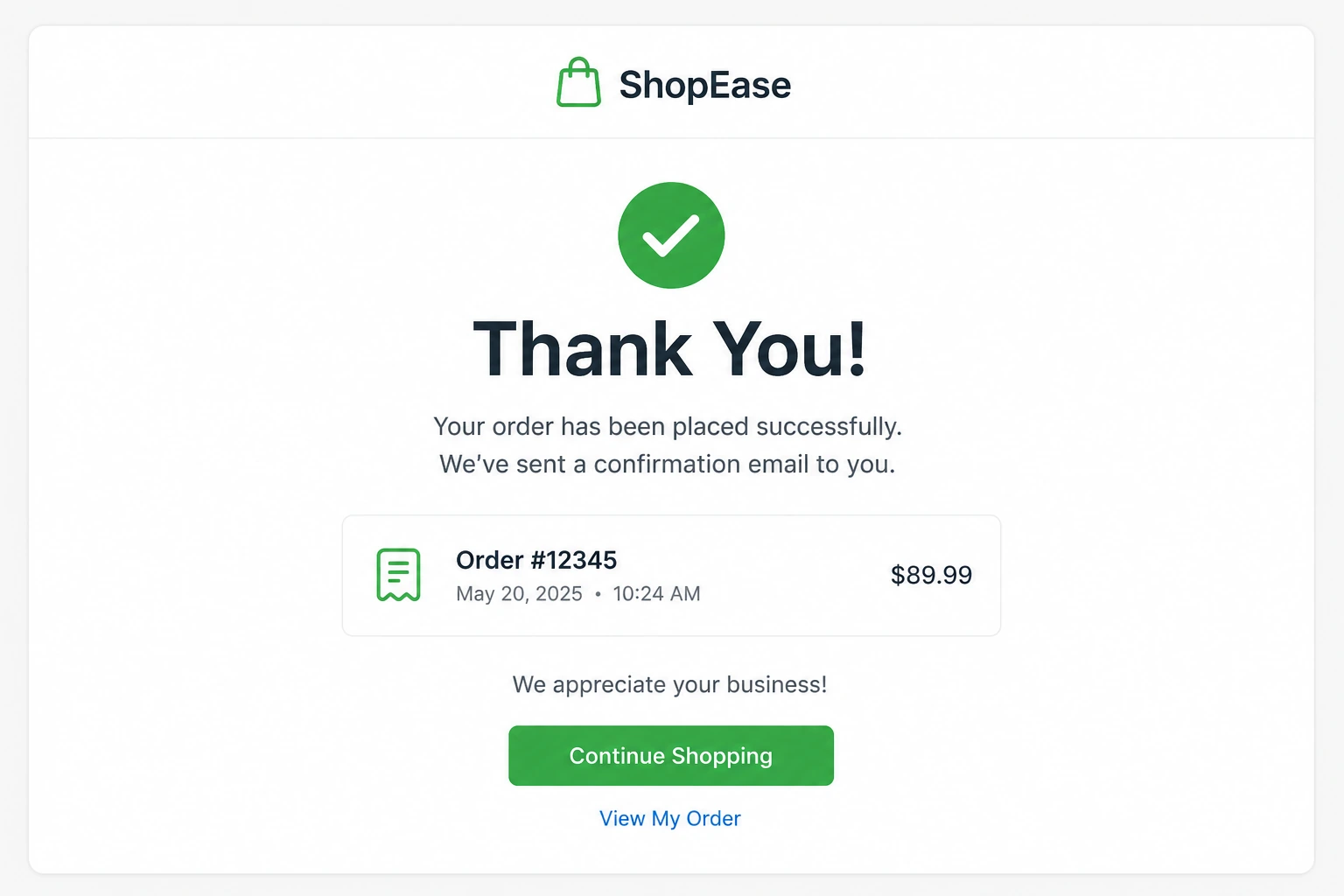
ClickFlare offers two formats for this: a conversion tracking image pixel (a hidden image tag) and a conversion tracking script (a JavaScript version). The script is generally the more reliable of the two, because it sets a first-party cookie on the domain of the page itself, whereas a plain image pixel can run into the cross-domain issues described above.
Both are set up from Settings > Tracking URLs, where you copy the pixel or script and place it on your confirmation page.
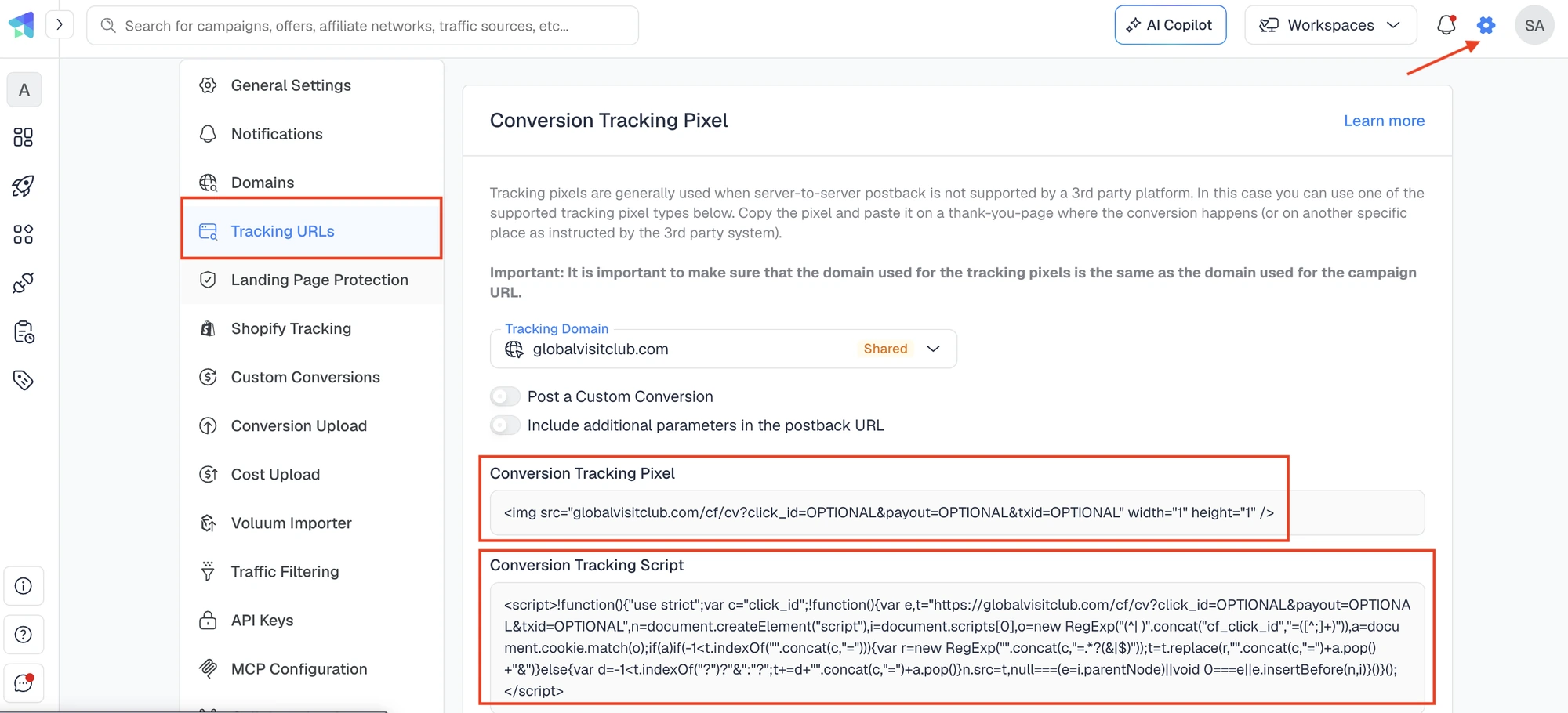
If you are tracking multiple events on ClickFlare, you can generate tracking pixels or scripts specifically for your custom conversion.
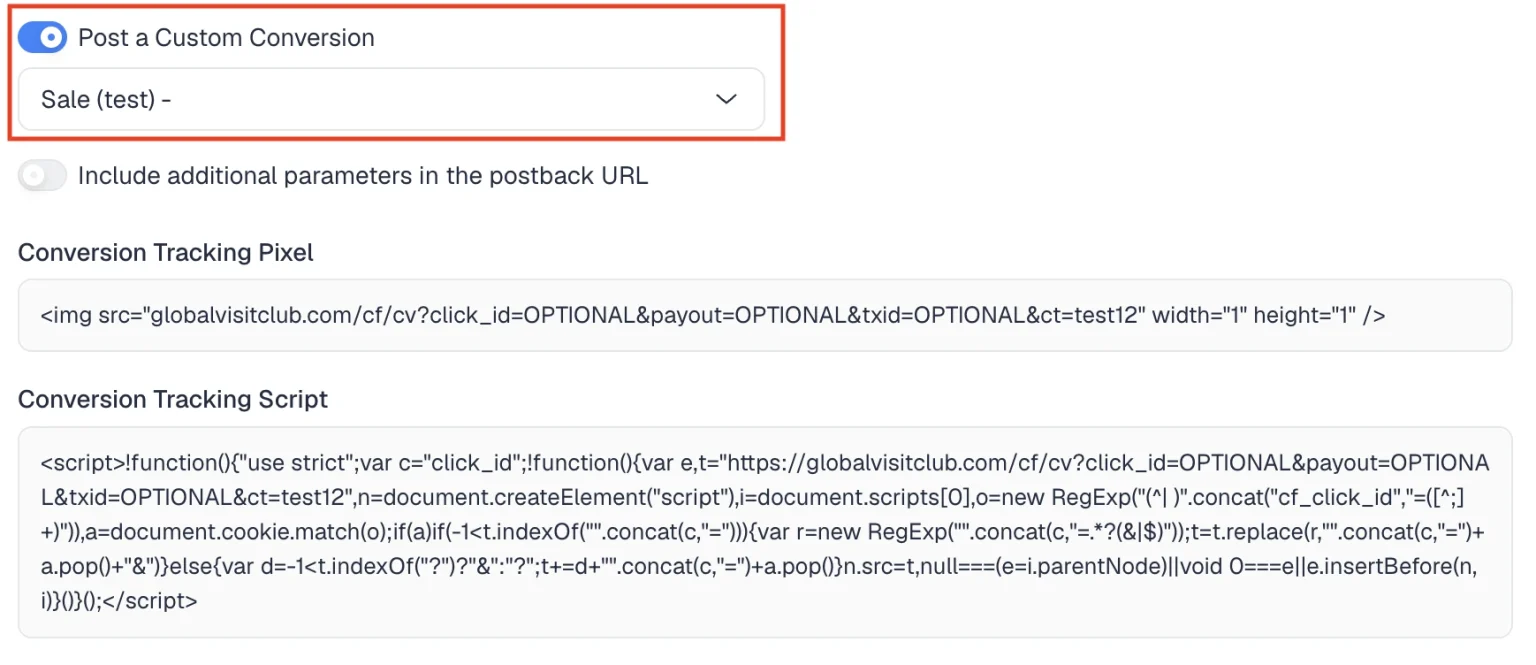
You can also pass optional parameters like the payout value and a transaction ID, and confirm everything is working by checking the Event Logs in your dashboard.
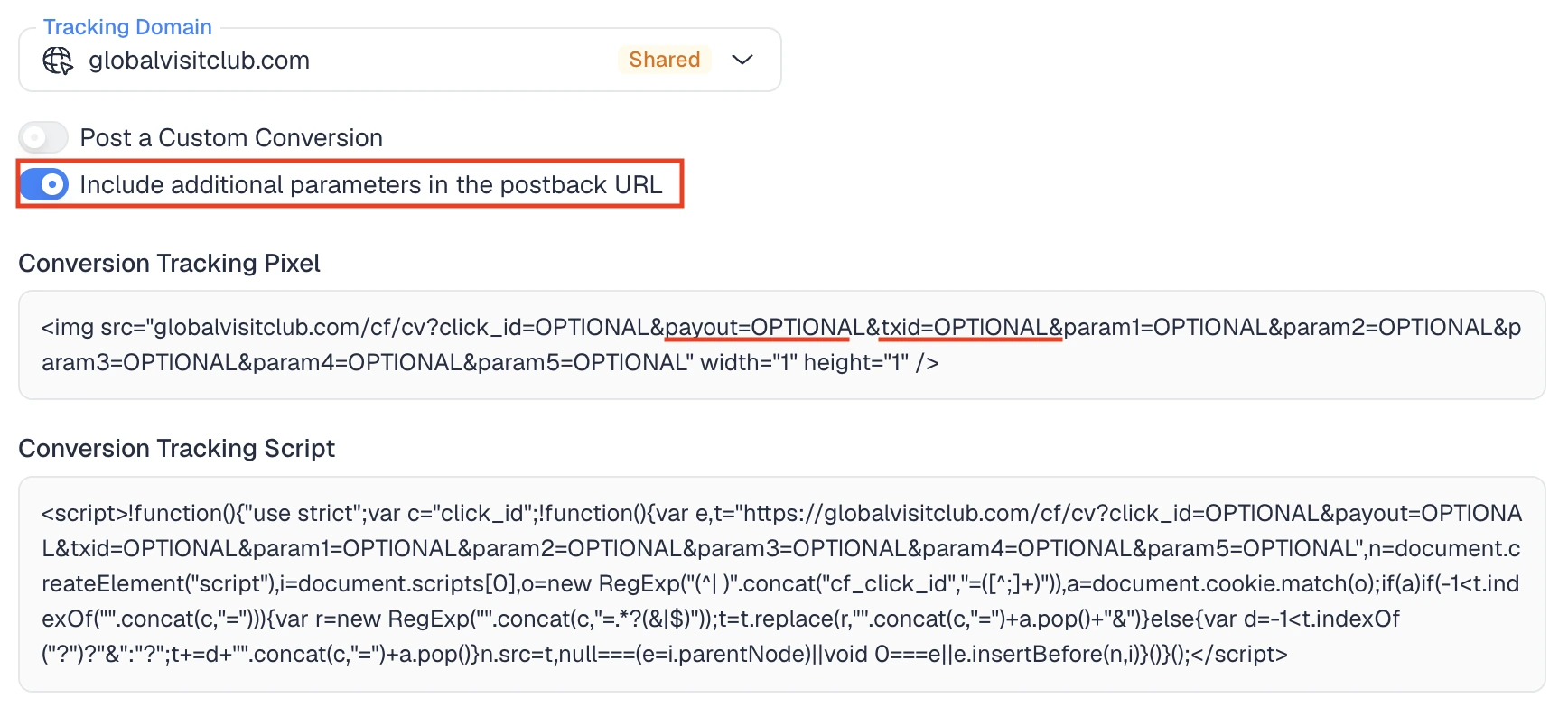
For the full walkthrough, including the exact pixel formats and setup steps, see the ClickFlare help center guide on tracking conversions using a conversion tracking pixel.
Given everything that can go wrong client-side, the smart move isn’t to abandon pixels entirely. It’s to lean on more durable methods for the data that matters most, and keep pixels as a supporting signal.
A postback sends conversion data directly from one server to another, with no browser in the middle. Because it doesn’t rely on a cookie surviving in someone’s browser, it isn’t affected by ad blockers, cookie restrictions, or browser privacy features. This is why ClickFlare recommends S2S postback tracking as the primary, more accurate method whenever your affiliate network supports it, and treats the conversion pixel as the fallback. If you’re new to the concept, our complete beginner’s guide to postback URLs walks through exactly how they work. ClickFlare provides 200+ ready-made tracking templates for traffic sources and affiliate networks.
A Conversion API sends events straight from your server to an ad platform such as Meta, Google, or TikTok, bypassing the browser pixel entirely. This helps the platform’s algorithm optimize toward real conversions rather than incomplete, browser-limited data, which became far more important after iOS privacy changes started creating gaps in what platforms could see on their own. Our guide on what CAPI tracking is covers when and how to use it. ClickFlare offers CAPI integrations with major ad platforms including Facebook, TikTok, Snapchat, Google Ads, and Microsoft Bing.
The most resilient setups don’t pick one method. They pair server-side tracking with a pixel or script so that if one path fails, another still captures the event. A dedicated tracking platform makes this practical by pulling pixels, postbacks, and Conversion APIs into a single dashboard, which is a big part of what to look for in the best ad tracking software in 2026.
So, what is a tracking pixel? It’s a small, invisible image or code snippet that fires a signal to a server when it loads, letting you measure opens, impressions, and conversions. It’s genuinely useful, but it’s also fragile, because it lives in the browser, where cookies get cleared, blockers get in the way, and privacy features quietly cut its lifespan short. The advertisers who track accurately treat the pixel as one signal among several, backing it up with server-side postbacks and Conversion APIs so the data holds up no matter what happens on the browser side. Get that balance right, and you stop guessing which campaigns actually make you money.
A tracking pixel is a tiny, usually invisible image or snippet of code placed on a web page, ad, or email. When the content loads, the pixel sends a request to a server, recording that the page was viewed, the email was opened, or a conversion happened.
No. A cookie is a small file stored in the browser, while a pixel is an image or script that fires a request when it loads. They often work together: the pixel reads or sets a cookie, and the cookie remembers the user between visits. But they are different mechanisms.
Pixels run in the browser, so ad blockers, disabled or cleared cookies, browser privacy features, and pages that don’t fully load can all stop them from firing. This is normal for client-side tracking and is why server-side postbacks are recommended for accuracy.
Yes. Many advertisers combine methods for better coverage, though a server-to-server postback is generally the more reliable primary method. In ClickFlare, the conversion pixel is offered as an alternative for when postback tracking isn’t available.
They can be, but privacy laws like the GDPR require clear, informed consent before non-essential tracking pixels collect personal data. You need a valid legal basis, transparent disclosure, and responsible handling of any data the pixel gathers.






