

Black Friday came early. Early-access prices until Nov 8.Black Friday: early-access prices until Nov 8.Early-access price ends in0d00h00m00sClaim the deal


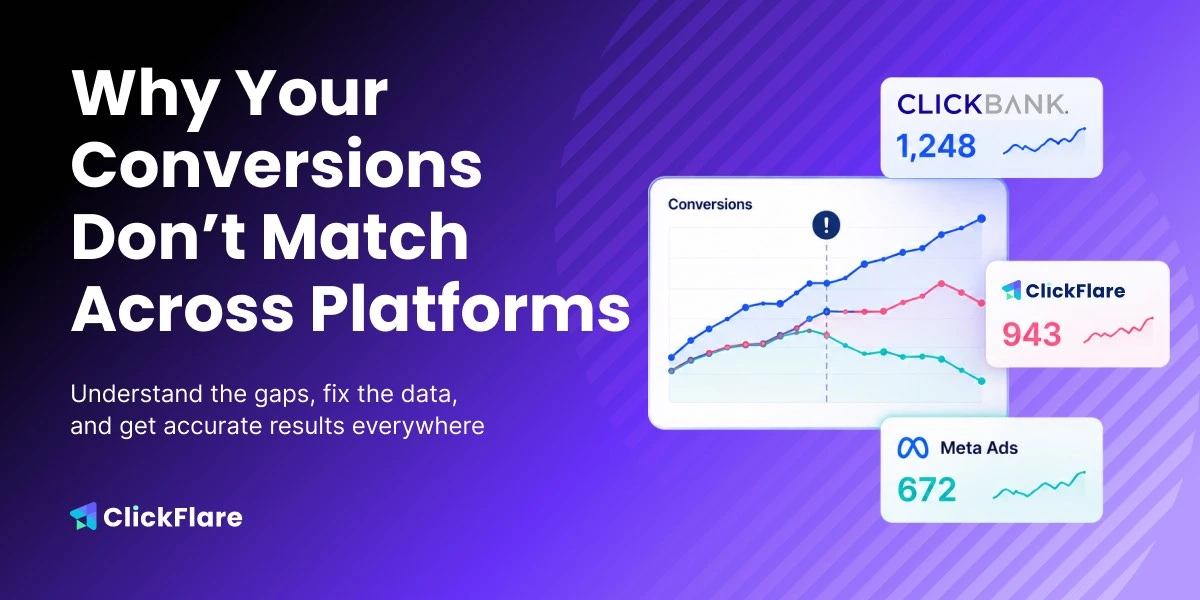

When conversions don’t match across platforms, you’re left with a bunch of numbers you can’t trust. You might see 40 conversions on Meta, 55 on your affiliate network, and 52 on your tracker, all for the same campaign.
This usually means that each platform may be counting and attributing conversions in a different way. But which numbers are the real ones?
And how can you optimize your campaigns despite these mixed signals?
In this article, we’ll break down why conversion data differs across platforms, and how to pinpoint where the mismatch is coming from.
When your conversions don’t match, it’s easy to assume that one of your platforms must be tracking numbers wrong. However, in many cases, different platforms just measure things differently.
An ad platform, affiliate network, or third-party tracker can all look at the same campaign and report a different number. That’s usually because each platform has its own way of attributing a conversion back to a click, assigning credit, filtering, or duplicating events.
For example, ad platforms like Meta, TikTok, or Google Ads usually report conversions tied to a user clicking, viewing or interacting with an ad before converting. Affiliate networks, on the other hand, count conversions based on the advertiser’s tracking rules.
Things like pending or rejected conversions, as well as payout updates, can affect results.
A tracking software like ClickFlare stands between your traffic and affiliate platforms, and it reports what it receives from your tracking setup, such as click IDs, pixels, scripts, or postbacks.
That is why conversion mismatches are so common. The real question is not “which platform is wrong?” but “what exactly is each platform measuring?”
From attribution settings, different tracking methods, and reporting delays, there are many reasons why your conversions don’t match. Let’s take a look at some of the main reasons:
Attribution models decide which click, campaign, or event gets credit for a conversion. If Meta, ClickFlare, and your affiliate network don’t attribute conversions the same way, this can create data mismatch.
For example, for a conversion to appear in Meta Ads Manager reporting, the event must not only be sent to Meta but must also be successfully matched and attributed to an eligible ad interaction.
That means that ClickFlare can record a conversion and send it to Meta through its Conversion API, but unless Meta approves it, it won’t show up on their reporting. In order for Meta to properly attribute a conversion, it needs a unique identifier, primarily the fbclid (Facebook Click ID).
If the traffic coming in doesn’t contain a fbclid, the conversions will not show up in Meta.
This could be due to incorrect tracking setup or conversions coming from organic traffic, but primarily it’s caused by bot and crawler traffic.
To ensure that this is truly the reason, you need to go to ClickFlare’s Event Log and check whether the External ID (which is where the fbclid is stored) is empty:
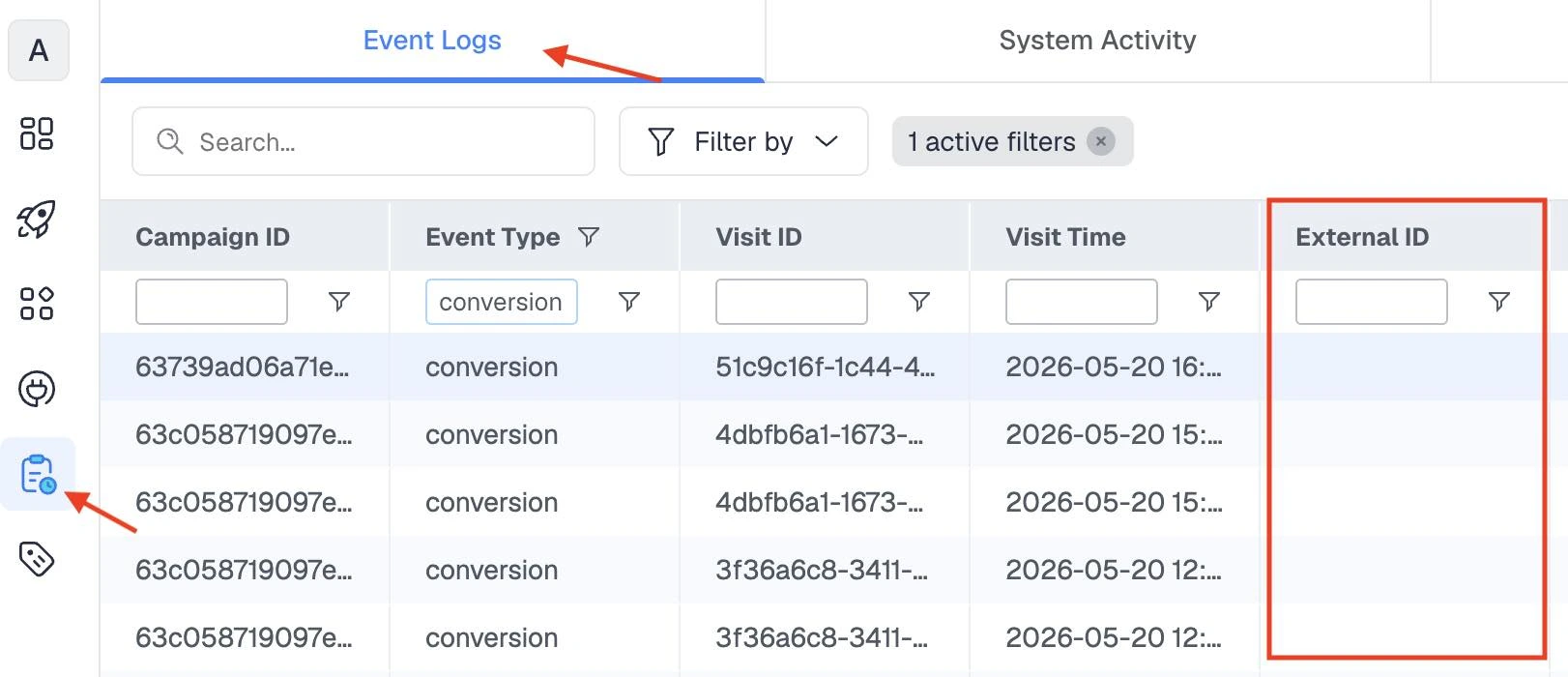
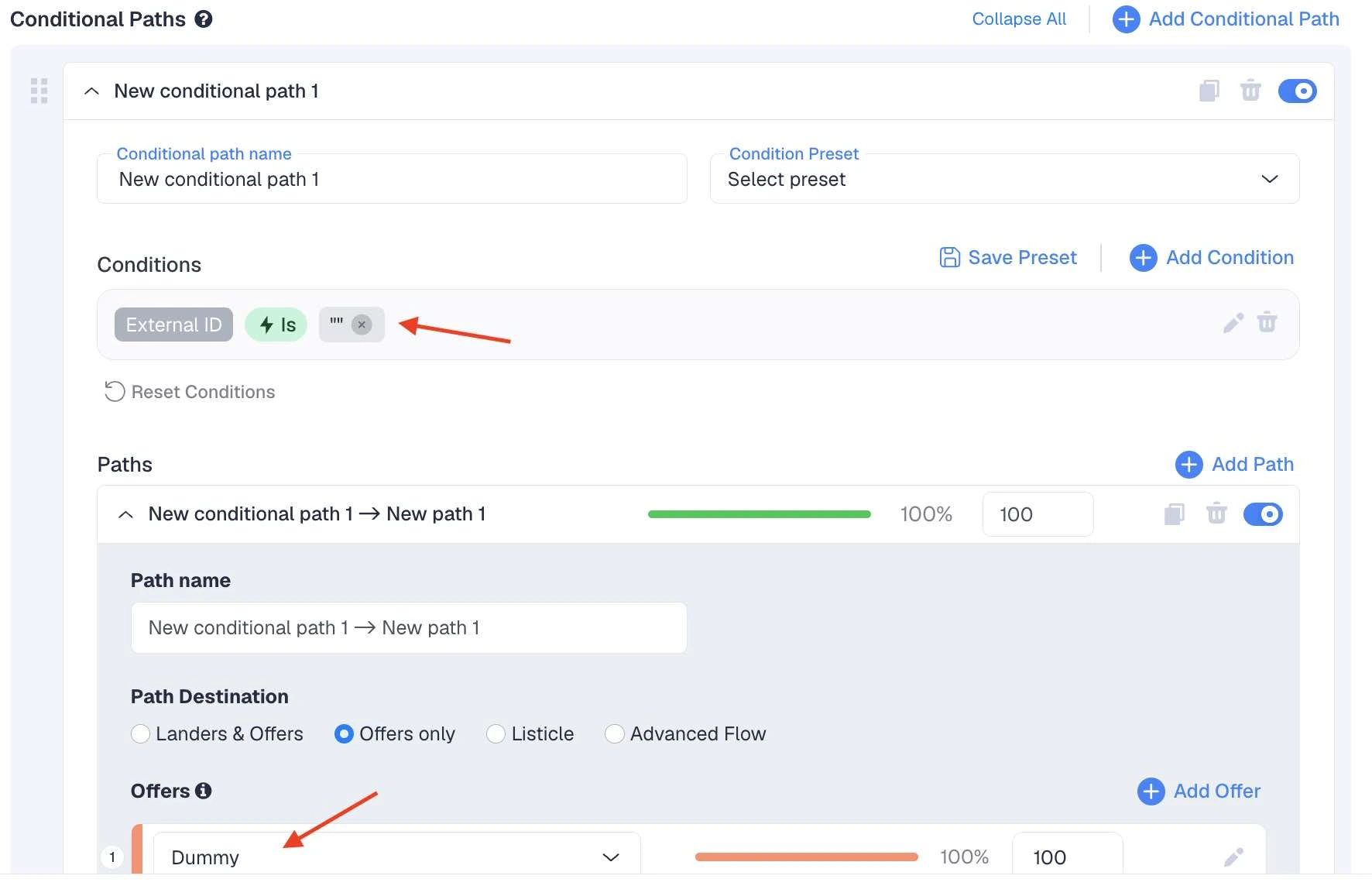
This is a common reason why you might be seeing more conversions in ClickFlare as compared to Meta. You can minimize this discrepancy by creating a conditional path inside your ClickFlare campaign.
The goal of this conditional path will be to send all bot and crawler traffic to a dummy page. Under Conditional Paths, add the condition: External ID is “”
Then, create a “dummy offer” inside ClickFlare
(for example redirecting users to a random landing page or google.com ).
Delayed reporting happens when one platform records a conversion faster than another.
This can make it look like your conversions don’t match, even though the data may still be syncing.For example, ClickFlare may record 20 conversions instantly through S2S postbacks from your affiliate network.
These conversions will be immediately fired to Meta via the Conversion API, but Meta takes longer to review and process these conversions before displaying them in their reporting dashboard.
To make sure that this is indeed the reason for the reporting mismatch, ClickFlare offers fully transparent logs where you can see the status of each event being sent to Meta in real-time.
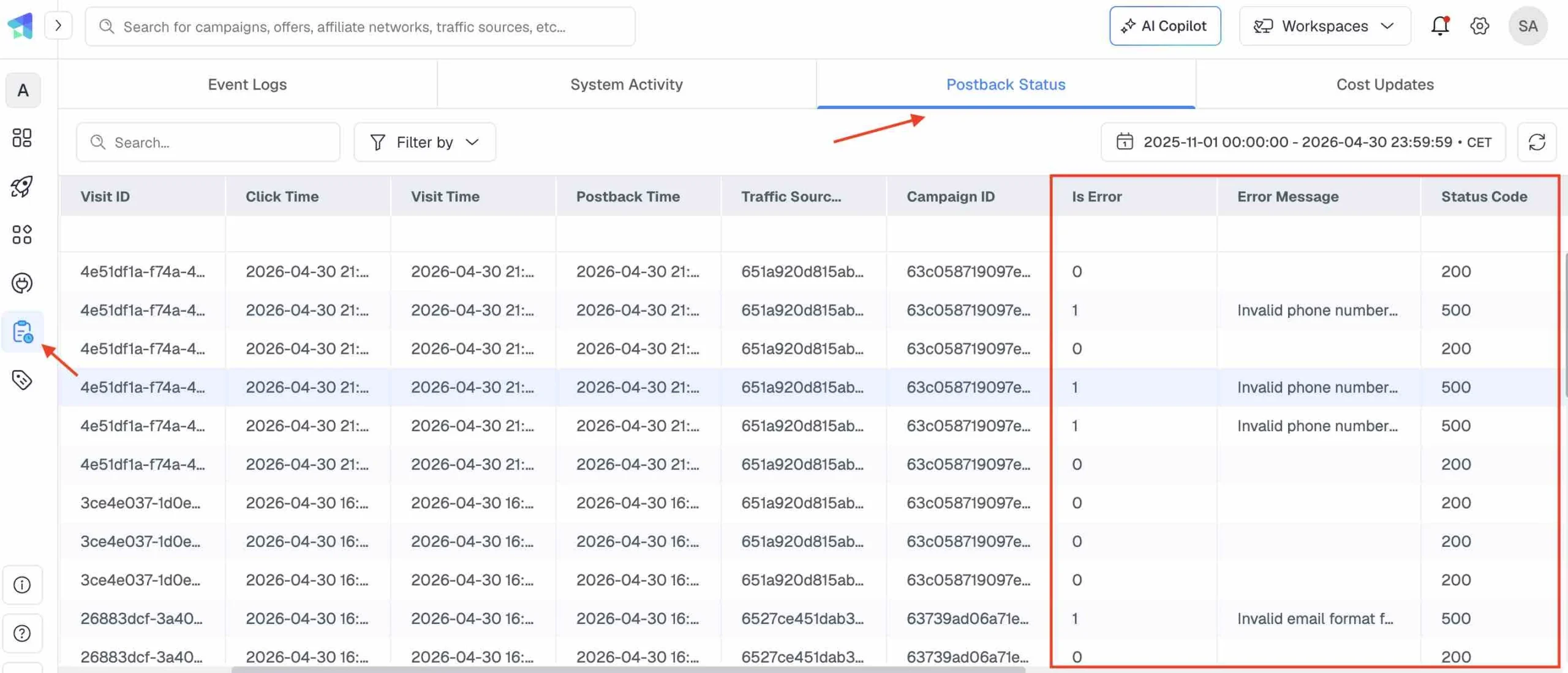
You need to go to Logs > Postback Status > Check the Status columns.
Status 200 means the conversions have been successfully sent back to your ad network, and the network is just taking some time before approving them.
If you see a different status code or an error message, you need to investigate it to see why the conversions are not being sent and address the issue:
You can also check data for the previous day to see if that matches.
If it does, it means the discrepancy is only temporary until your ad network fully approves the conversions.
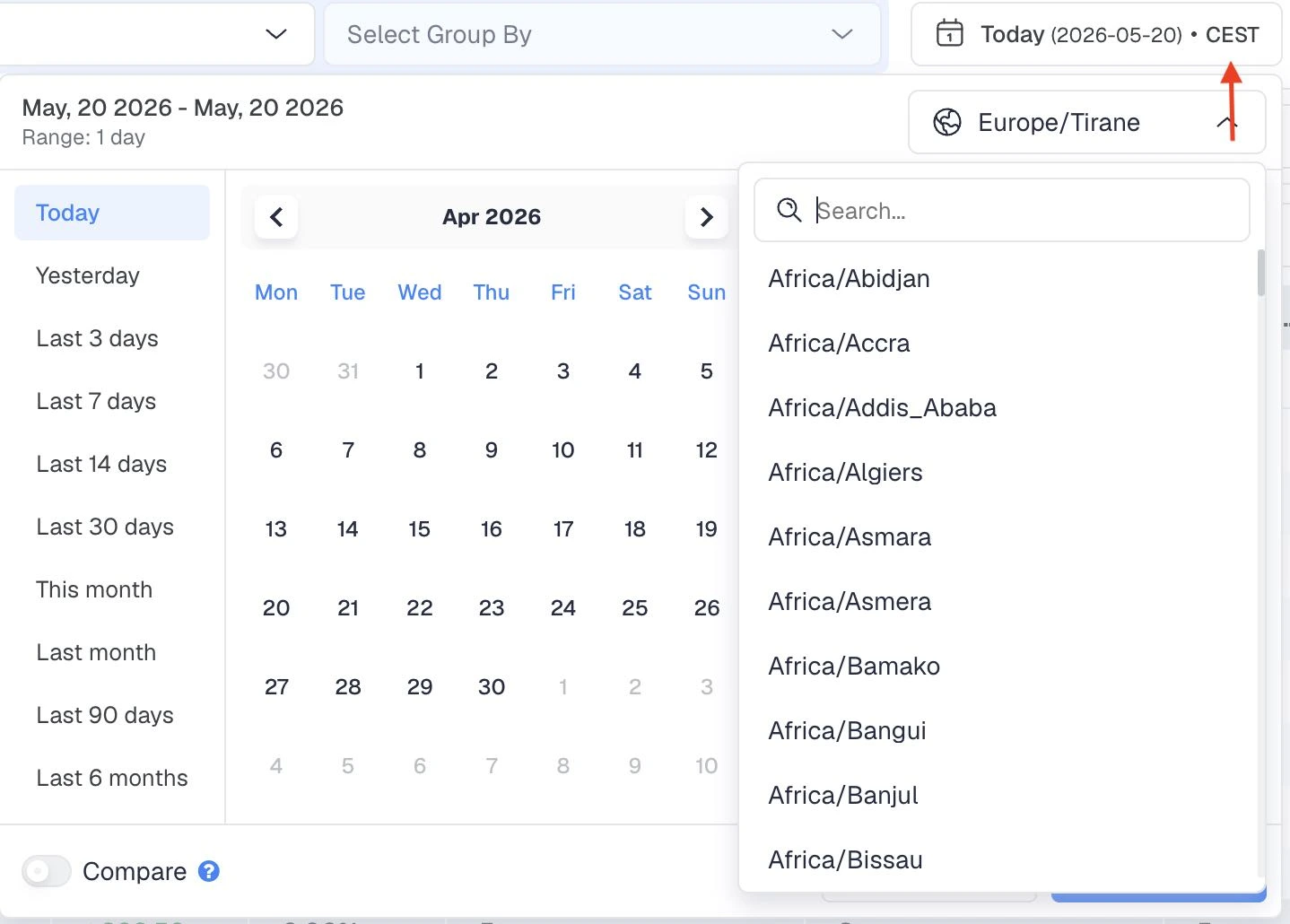
Different time zones can make the same conversion appear on different days in different platforms.
For example, if your Meta ad account reports in New York time, your affiliate network reports in UTC, and ClickFlare reports in Europe time, a conversion that happens at 11:30 PM on Monday in Meta may appear as 03:30 AM Tuesday in the affiliate network and 05:30 AM Tuesday in ClickFlare.
Temporarily, this may look like conversions don’t match.
This is especially common when comparing daily reports.
This is why you need to make sure you are always checking the correct timezone:
Different platforms also use different methods of determining the timestamp for a conversion registration.
Some platforms may be using "Visit timestamp", which means that conversions will be shown using the time of the visit that generated the conversion.
Others might be using "Postback timestamp", which means that conversions will be shown using the time they have been posted to ClickFlare.
If you are using “Visit timestamp” in ClickFlare, a conversion that happened today could be attributed to the previous day if the initial ad visit happened yesterday.
In the meantime, some affiliate networks may record this conversion today.
If you go to Settings > General Settings on ClickFlare, you can select your preferred method to match your affiliate network settings:

Missing click IDs are one of the most common reasons ClickFlare and an affiliate network do not show the same number of conversions.
The click ID is what connects the original ad click to the conversion.
Once a visitor clicks on the ClickFlare tracking link, the ClickFlare click ID is passed to the affiliate network.
When a conversion happens, the affiliate network sends that click ID back to ClickFlare through the postback.
If this click ID is not present, ClickFlare will not be able to properly attribute conversions, so you may see less conversions on ClickFlare compared to your affiliate network.
There are several reasons why the click ID is not properly passed, such as the ClickFlare tracking link not used correctly, the click ID not passed into the offer URL, the user entering the offer flow not using the ClickFlare link, and more.
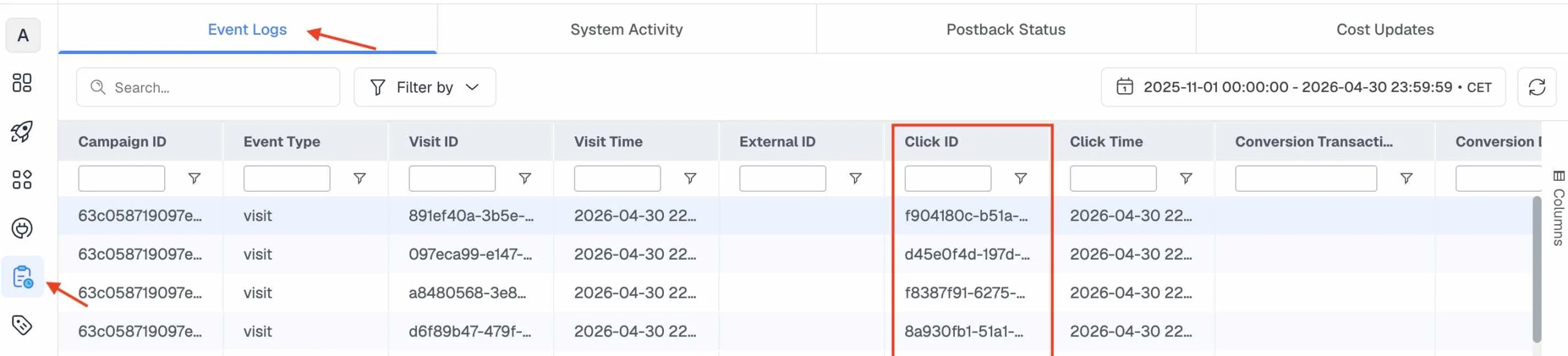
To check if a visit has generated a click ID, go to Event Logs and look at the Click ID column.
If it’s empty, it means this part has failed.
Sometimes, your affiliate network may record a conversion successfully, but that conversion is not sent back to ClickFlare.
Postbacks typically fail due to incorrect postback URLs, so always make sure to use the correct macros according to your network’s instructions.
To make this part easier and avoid possible mistakes, ClickFlare offers ready-made tracking templates for 150+ affiliate networks.
All you need to do is go to Affiliates > Select your network > Copy the automatically generated postback link, and place it in your affiliate network platform.
In other scenarios, conversions may be counted twice, causing your data to look inflated.
This can happen when deduplication is not properly applied.
For example, ClickFlare posts conversion events to ad networks like Meta and TikTok through the Conversion API.
If you also have a pixel firing on the page, you could be seeing double conversions on your ad network as compared to ClickFlare. If you are using ClickFlare, you need to make sure you don’t have a pixel firing at the same time.
In other cases, a user might have submitted the same form twice, generating two different conversions for the same click ID. Some platforms will deduplicate this, removing the extra conversion, while others might not.
In the Logs section on ClickFlare, make sure to check whether multiple events have the same click ID.
Once a conversion has been recorded in your affiliate network, it doesn’t always mean it’s final.
Depending on the network, this conversion could later be rejected or adjusted.
This can create mismatches between the affiliate network, ClickFlare, and your ad network.Because postbacks fire back conversions in real time, you could be seeing more conversions in ClickFlare which the affiliate network later rejected.
The solution is to check whether your affiliate network sends only initial conversions or also sends updates for approval status, rejection status, and payout changes.
Cross-device journeys happen when a user clicks on the ad on one device, but converts on another.
For example, they may click on your ad on their mobile phone, and later convert from a desktop browser. The affiliate network may still record the conversion if its own tracking connects the session.
ClickFlare may record it if the original click ID survives and is returned in the postback.
Your ad network may only report it if the conversion event is sent back and the network can match it to the original ad interaction.There is no perfect fix for every cross-device journey, especially when the conversion happens on a third-party affiliate offer that you do not fully control.
However, as long as the ClickFlare click ID is preserved, the conversion will be recorded on your tracker.
As explained in the previous section, not every conversion mismatch indicates a tracking problem.
When using different platforms, a small margin of difference in conversions is to be expected.
We discussed that mismatches can happen due to the ad network taking longer to match and attribute conversions sent from ClickFlare, or the affiliate network pending, rejecting or updating conversions after the postback has fired.
However, when the gap in conversions is large, sudden, or consistent, it could indicate a tracking problem.
For example:
As long as you understand why the numbers differ, you can still optimize your campaigns with confidence.
If you cannot explain why conversions don’t match, then you need to troubleshoot your tracking flow.
When your conversions don’t match, it’s always a good idea to follow the entire tracking setup step by step to pinpoint where it’s going wrong.
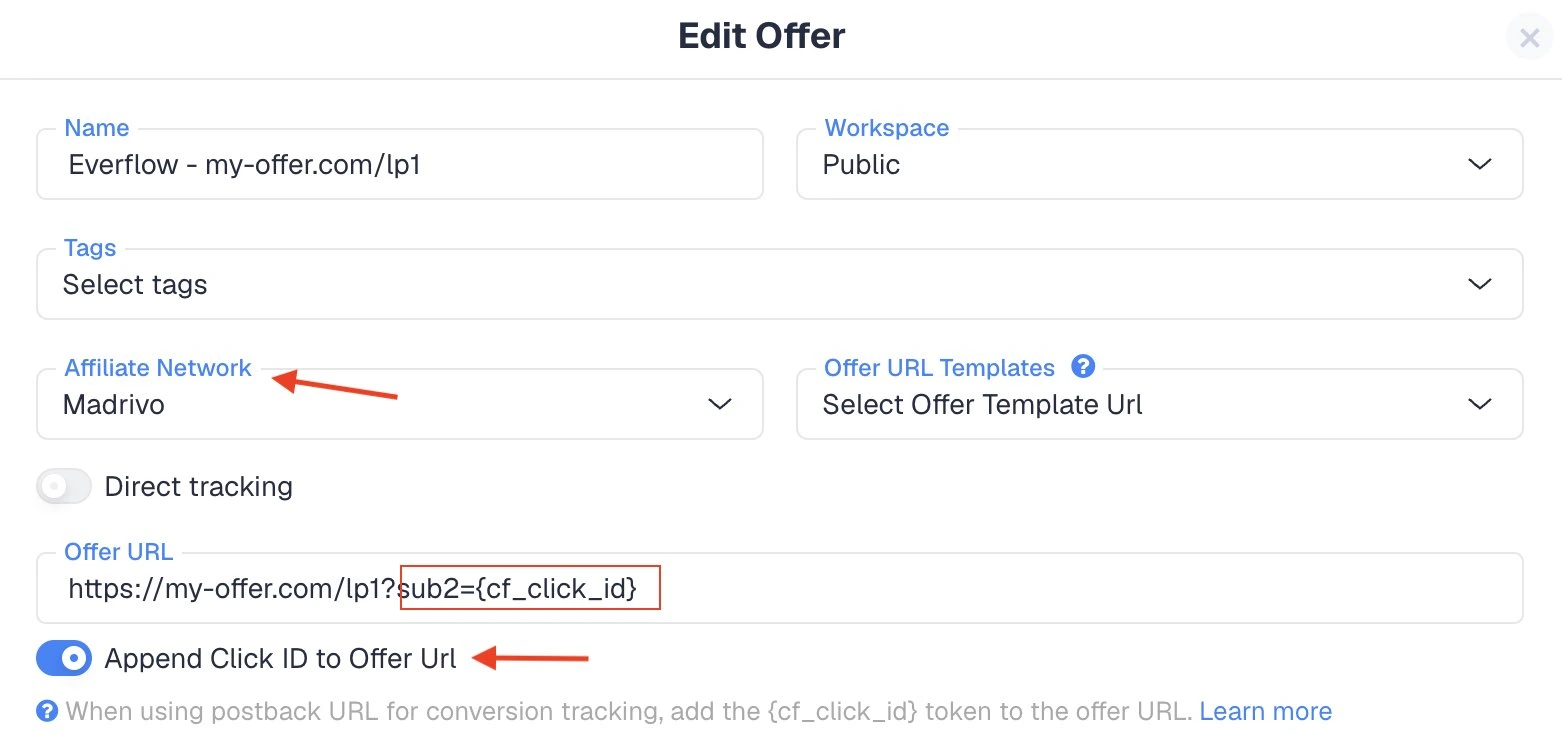
When creating the offer URL inside ClickFlare, you need to append ClickFlare’s unique click identifier, which will be sent to the affiliate network. If this part is missing, conversions won’t come through.
First, make sure you have selected the affiliate network from the dropdown.
Next, you need to turn on the “Append Click ID to Offer URL” button. This will automatically append the click_id to the offer URL in the right format. Please note that in order for this to work properly, you need to map this token in the affiliate network settings to the specific parameter your network uses to store click IDs (e.g., sub2, subid1, aff_sub).
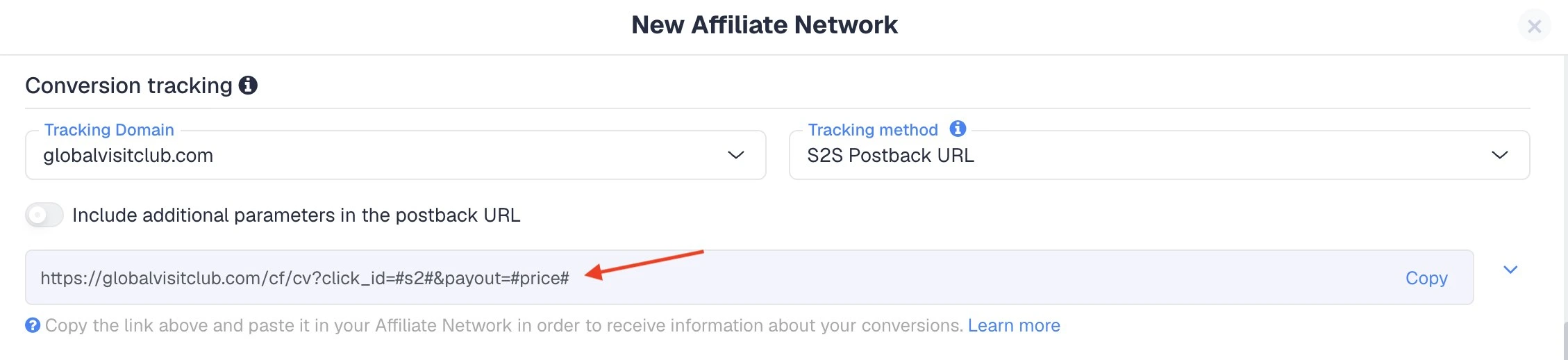
If the affiliate network is receiving the Click ID but ClickFlare isn't recording the conversion, the issue is likely the Postback URL configuration.
Make sure this postback URL from the Affiliate Network tab is copied and pasted under your network’s postback settings. If your network does not support global postbacks, you need to make sure to manually add this postback for each affiliate campaign.
ClickFlare deduplicates conversions if the Click ID, Transaction ID (txid), and Custom Conversion (ct) are all identical.If a network fires a postback twice for the same Click ID without a unique txid, ClickFlare will only show one conversion and will overwrite the first payout with the second one.
If you want to track multiple events for one click (like an upsell), ensure the network passes a unique Transaction ID. A common recommendation is to have the network pass a timestamp macro into the txid parameter.
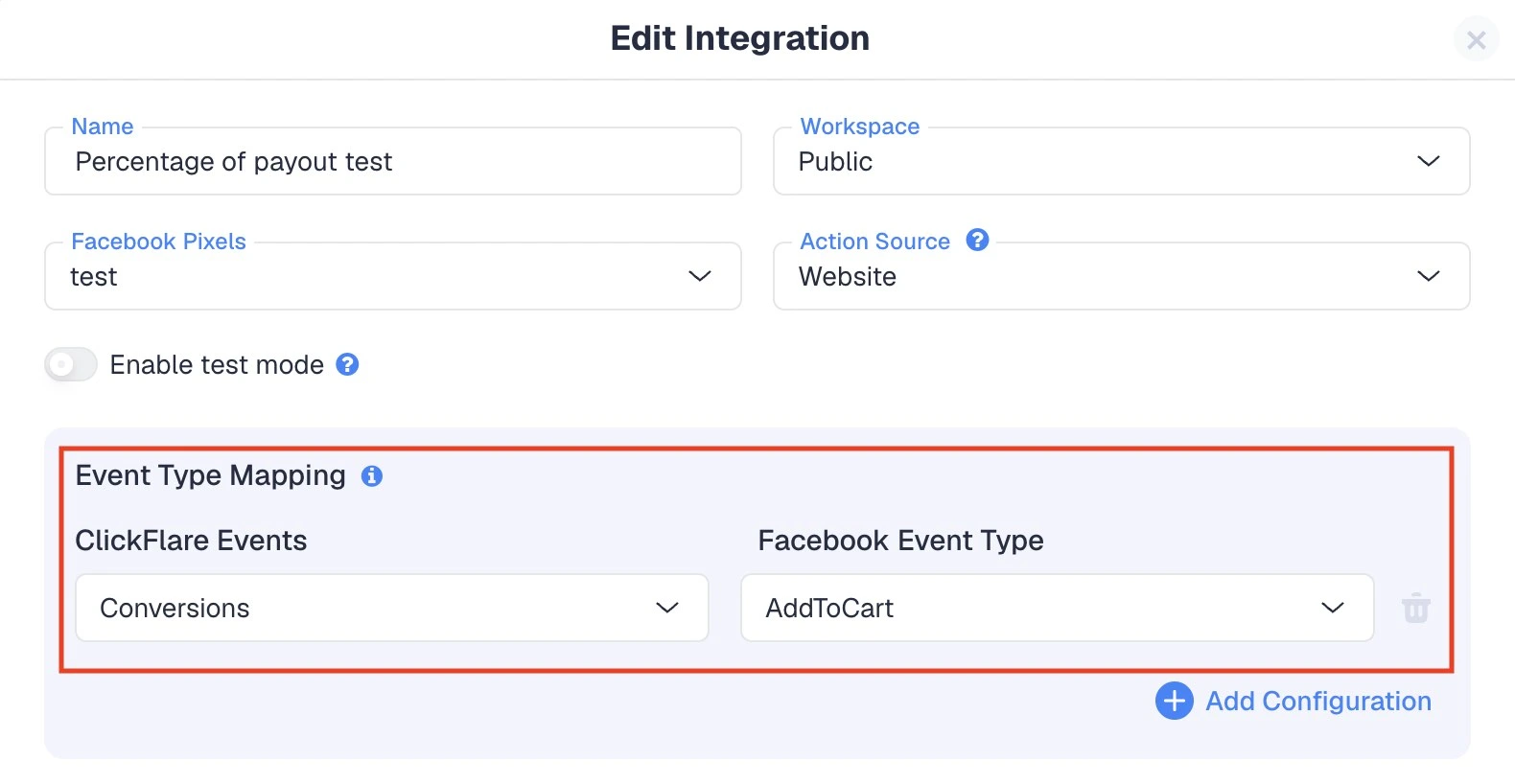
If the mismatch is happening between your ClickFlare/affiliate network dashboard and your ad network, then you need to check the Conversion API setup.
Make sure you have configured the right pixel, and that the conversion mapping is correct. For example, in this scenario a ClickFlare conversion will be posted as AddtoCart on Facebook:
If you can’t figure out where tracking is going wrong, the Logs are a useful resource.
You can go to Logs > Event Logs and filter by "Conversions." If you see a conversion but the "Click ID" or "Campaign" fields are empty, the postback is firing without a valid identifier.
If conversions are in ClickFlare but not your ad network (e.g., Meta/TikTok), check Logs > Postback Status.
Here you will see whether ClickFlare has fired them back to your ad network successfully (Status 200) or if something is going wrong.
If you are still unsure about what is going wrong, ClickFlare provides round-the-clock tech support that will help you troubleshoot your setup promptly.
Meta and ClickFlare do not report conversions in the same way. ClickFlare records conversions based on your tracking setup, while Meta only reports events it receives, matches, and attributes to eligible Meta ads.If the External ID is missing, the traffic is bot or crawler traffic, or Meta cannot match the event, the conversion may appear in ClickFlare but not in Meta Ads Manager.
This usually means the affiliate network recorded conversions that were not sent back to ClickFlare. Common causes include missing click IDs, incorrect postback URLs, wrong macros, delayed postbacks, rejected requests, or users entering the offer without going through the ClickFlare tracking link.
Daily numbers often do not match because of timezones, delayed reporting, or different timestamp settings. For example, ClickFlare may report conversions based on visit timestamp or postback timestamp, while your affiliate network may use its own conversion timestamp. This can make daily reports look different, even when weekly totals are matching.
It depends on what you are trying to measure. The affiliate network has the correct offer-side conversions. ClickFlare helps you see the bigger picture (clicks, conversions, revenue, cost and profit in one dashboard), but it can only track what the affiliate network is sending, so make sure your setup is correct. Ad networks will receive the conversions ClickFlare is sending their way.
There is no universal percentage that applies to every campaign. But a large or sudden gap should be investigated, especially when you cannot explain the difference.
There are many different reasons why conversions are not matching, from temporary ones such as timezone mismatch or a temporary platform delay, to broken tracking links and missing identifiers.
With affiliate campaigns, each platform sees a different part of the journey. The affiliate network registers what happens on the offer side. ClickFlare records what comes through your tracking setup. Ad networks like Meta, TikTok, Google Ads, Snapchat or Reddit report the conversions they receive from ClickFlare and are able to properly match and attribute to an ad.
With an affiliate tracking software like ClickFlare, you can centralize clicks, conversions, cost, and revenue in one place, making it easier to optimize your campaigns with cleaner data. You can use the troubleshooting strategies in this article to determine what is causing the conversion mismatch, or contact ClickFlare support for more help.






