

At a glance
How it works
1
AdMaven sends the click
A visitor clicks your ad. AdMaven opens your ClickFlare campaign URL and fills in its macros: the click ID in
clickid, the cost in cost, plus the campaign, creative, source and sub-source.2
ClickFlare stores the AdMaven click ID and cost
ClickFlare saves the value of
clickid as the visit’s External ID, records the cost for the visit, and redirects the visitor to your lander or offer.3
The conversion reaches ClickFlare
Your affiliate network or store posts the conversion back to ClickFlare, matched on the ClickFlare click ID.
4
ClickFlare posts it back to AdMaven
ClickFlare fires the AdMaven postback, replacing
{external_id} with the stored AdMaven click ID and {payout} with the revenue. AdMaven matches it to the original click.The mirror to keep straight: in the campaign URL you write ClickFlare’s parameter (
clickid) and AdMaven’s macro ({:click_id}). The template does this for you. In the postback URL you write AdMaven’s parameter (c) and ClickFlare’s token ({external_id}). AdMaven’s macros have a colon after the opening brace. ClickFlare tokens never do.Before you start
- Set up your own tracking domain. Run the campaign and the postback on your own custom domain. Shared domains get flagged by networks and blocked by browsers. See Custom Domains.
- Have an offer ready in ClickFlare, and its affiliate network set up to post conversions back to ClickFlare. See Creating an Offer and Adding an Affiliate Network.
- Have access to your AdMaven advertiser panel. You use its Conversion Tracking page to test the setup, and its Tracking URL page shows the postback for your account.
- Decide which conversion AdMaven should receive. AdMaven optimizes on what you send it. If your funnel has several steps (lead, then sale), choose the one that best predicts profit. See Sending the right event.
Step 1 – Create the campaign and the AdMaven traffic source
- Go to Campaigns and click New.
- In Traffic Source, open the dropdown and click + New Traffic Source.
- Type
admavenin the search box and select the AdMaven template. - Enter a Name, for example
AdMaven. - Leave Cost currency on USD unless your AdMaven account is billed in another currency.
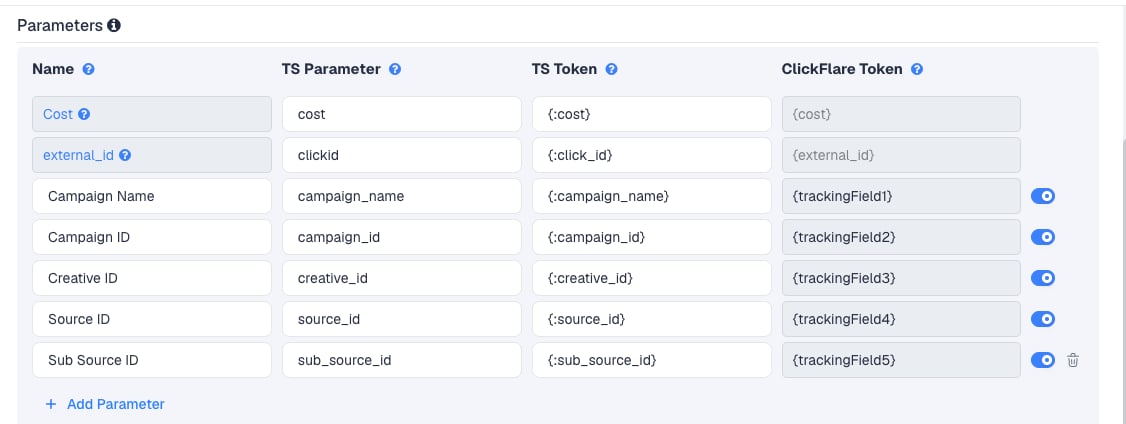
Add more AdMaven data
Five tracking fields are free. To pass more AdMaven data, click Add Parameter, give it a name and parameter, and enter the AdMaven macro as the TS Token. ClickFlare assigns the next free tracking field. AdMaven’s macro list includes these. Use the macro exactly as written, with the colon:Step 2 – Set up the postback
The postback is what sends conversions to AdMaven. It lives on the traffic source, so every campaign that uses this AdMaven traffic source sends conversions the same way. The AdMaven template includes the postback URL. When you turn on Traffic source postback URL, the field is already filled in: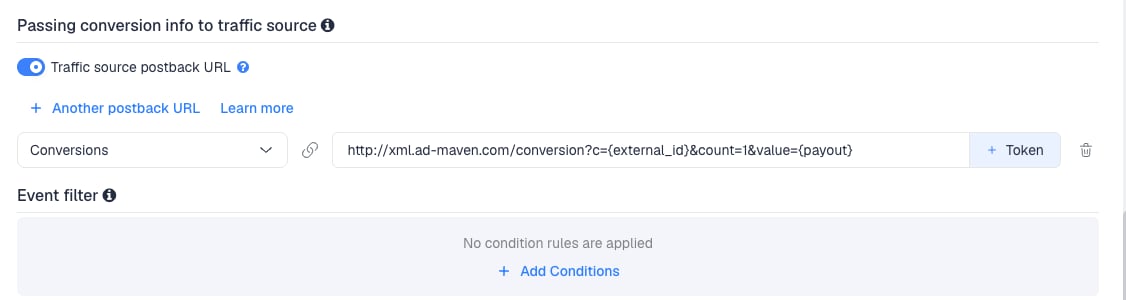
Turn it on in ClickFlare
- Back in the New Traffic Source form, scroll to Passing conversion info to traffic source.
- Turn on Traffic source postback URL. The template’s URL appears in the field. Leave it as it is.
- In the dropdown on the left, choose the ClickFlare event that should fire the postback. Keep Conversions to send every conversion. If your final action is a custom conversion (for example
purchase), choose that instead. - Click Save. You are back in the campaign editor with the AdMaven traffic source selected.
info parameter, use AdMaven’s URL instead and put ClickFlare’s {external_id} and {payout} in its click ID and value parameters.
Send {payout} unless you have a reason not to. AdMaven then reports the value of your conversions, not just their count. If your offers pay in a currency other than your AdMaven account currency, convert in ClickFlare first. See Multicurrency in ClickFlare.
To learn what each postback token does, see How to Configure a Traffic Source S2S Postback URL.
Step 3 – Finish the campaign and copy its URL
- Name the campaign.
- Set the Cost Model to Not Tracked. The template passes cost per visit. See Cost.
- Choose Redirect or Direct tracking. Redirect is the usual choice for AdMaven’s pop and push traffic.
- Click Next and, on Destination, add your lander (optional) and your offer.
- Save, open Tracking, select your own tracking domain and copy the campaign URL.
clickid={:click_id} and cost={:cost}.
If you use a lander, its call-to-action must link to the ClickFlare click URL, not to the offer directly. Otherwise the visit reaches the offer without a ClickFlare click ID, and the conversion cannot be traced back to AdMaven.
See Creating a Campaign in ClickFlare.
Step 4 – Create the campaign in AdMaven
- In AdMaven, go to Campaigns and create a campaign.
- Choose the campaign type, name it and set the budget.
- Set the GEO and other targeting.
- Turn on conversion tracking for the campaign, so AdMaven can optimize on the conversions you send.
- Paste the ClickFlare campaign URL into the campaign’s destination URL field.
- Add your creatives and submit the campaign.
Step 5 – Test the integration
AdMaven can verify the setup before you spend anything.- In AdMaven, click the Profile icon and open Conversion Tracking.
- In the first field, paste your ClickFlare campaign URL. It must contain
{:click_id}in theclickidparameter. The template already puts it there. - Click Test Conversion. A new window opens your campaign URL with a valid test click ID.
- In that window, complete the offer the way a real visitor would.
- Return to the Conversion Tracking page and click Refresh. The test conversion appears in the list below the test section.
- In ClickFlare, go to Logs → Postback Status and filter by the campaign. You should see a request to
xml.ad-maven.comwith the test click ID incand your payout invalue.
Sending the right event
AdMaven’s postback carries no event name, so each conversion it receives counts the same. Send the event you want AdMaven to optimize on.Sending only one event
Sending only one event
If AdMaven should only learn from your final sale, keep a single postback and map it to that event. Earlier steps (leads, add to carts) still show in ClickFlare. They just don’t reach AdMaven.To send a postback only for some conversions, for example only those above a certain payout, use Event filter under the postback to add conditions.
Why not send every step
Why not send every step
If you add a postback per event with + Another postback URL, all of them go to the same AdMaven URL. AdMaven cannot tell a lead from a sale and counts each one as a conversion, which inflates your AdMaven conversion count.
Cost
The template’s Cost row maps AdMaven’s{:cost} macro to ClickFlare’s {cost} token. AdMaven fills in the cost of each click or view when the ad is clicked, and ClickFlare records it against that visit. In the campaign URL, {:cost} is AdMaven’s macro, and AdMaven replaces it before the visit reaches ClickFlare.
To use it, set the campaign’s Cost Model to Not Tracked. ClickFlare then reads the cost from the campaign URL instead of a fixed value, so your Cost, Profit and ROI follow what AdMaven actually charged.
Check the cost in ClickFlare against AdMaven’s own statistics for the first days. If they drift, correct the totals with a manual cost upload. ClickFlare has no AdMaven cost API integration. See Cost Models and Traffic Source Cost Tracking.
Delayed revenue
If you run search arbitrage (RSOC or AFD) behind AdMaven, the feed reports revenue hours or days after the click. To pass that revenue to AdMaven once it arrives, see Sending Delayed Revenue to Traffic Sources.Troubleshooting
The AdMaven test conversion doesn't appear
The AdMaven test conversion doesn't appear
- The campaign URL is missing
clickid={:click_id}, or the macro was edited (for example, the colon was removed). Copy the URL from ClickFlare again. - The postback contains another placeholder instead of ClickFlare’s
{external_id}, usually because a URL from AdMaven or another tracker was pasted over the template’s. - The
external_idrow was removed from the traffic source.
Conversions show in ClickFlare but not in AdMaven
Conversions show in ClickFlare but not in AdMaven
- Traffic source postback URL is off on the AdMaven traffic source.
- Disable sending postbacks to traffic source is on in the campaign.
- The postback is mapped to a different event than the one the conversion logged. Check Logs → Event Logs to see which event was recorded.
- Check Logs → Postback Status: a failed request shows the status code AdMaven returned.
AdMaven shows conversions with no value
AdMaven shows conversions with no value
The postback has no payout. Make sure the
value parameter carries {payout}.Cost is zero in ClickFlare
Cost is zero in ClickFlare
- The campaign’s Cost Model is not Not Tracked, or a fixed value overrides it.
- The Cost row was removed or edited, so
cost={:cost}is missing from the campaign URL. - The URL was pasted somewhere AdMaven doesn’t replace macros.
Tracking columns show the macro name, or are empty
Tracking columns show the macro name, or are empty
AdMaven didn’t recognize the macro, usually because it was edited or written without the colon. Paste the campaign URL from ClickFlare unchanged. See Traffic Source Tokens Arriving Empty.
FREQUENTLY ASKED QUESTIONS
Q1: Can I use the same AdMaven traffic source for all my AdMaven campaigns?A1: Yes. The postback is set once on the traffic source and every campaign using it sends conversions the same way. Create a second AdMaven traffic source only if a campaign needs a different postback or event.
Q2: AdMaven lists several trackers, but not ClickFlare. Is that a problem?A2: No. You don’t need AdMaven’s tracker list: the ClickFlare template already has the postback, with
{external_id} and {payout} in place. If you do open AdMaven’s Tracking URL page, choose Other.
Q3: Why is the parameterA3: They are two halves of the same value. ClickFlare reads AdMaven’s click ID from its ownclickidin the campaign URL andcin the postback?
clickid parameter. AdMaven expects it back in its own c parameter. Keep the names as they are.
Q4: Should I use Redirect or Direct tracking with AdMaven?A4: Redirect is the usual choice and works with every AdMaven format. Use Direct only if AdMaven must see your lander’s domain as the destination. See Direct Campaign Tracking.
Q5: Why does AdMaven’s macro have a colon, like {:click_id}?
A5: That is AdMaven’s current macro format, as listed in AdMaven’s help center. ClickFlare’s own tokens, like {external_id}, have no colon. Keep each one exactly as the template writes it.
Related
Traffic source postbacks
Every token you can use in a postback.
Custom conversions
Choose which event AdMaven receives.
Cost models
How Not Tracked, CPC and CPA costs are calculated.
Conversions not showing
The general checklist when postbacks don’t arrive.