

At a glance
How it works
1
Yahoo DSP sends the click
A visitor clicks your ad. Yahoo DSP opens your ClickFlare campaign URL and fills in its macros: the order, placement, library ad, trafficked ad and publisher IDs, plus the Yahoo click ID in
vmcid.2
ClickFlare stores the Yahoo click ID
ClickFlare saves the value of
vmcid as the visit’s External ID and redirects the visitor to your lander, passing vmcid along in the lander URL.3
The conversion reaches ClickFlare
Your affiliate network or store posts the conversion back to ClickFlare, matched on the ClickFlare click ID. Your reports now show which order, placement and ad converted.
4
Yahoo receives the conversion
ClickFlare can’t post to Yahoo. The Yahoo Dot tag on your lander stores the
vmcid, and Yahoo credits the conversion when the Dot tag fires a conversion on your site, or when your server sends it through Yahoo’s Conversion API.The mirror to keep straight: in the campaign URL you write ClickFlare’s parameter (
vmcid) and Yahoo’s macro (${CC}). In the lander URL you write Yahoo’s parameter (vmcid) and ClickFlare’s token ({external_id}), so Yahoo’s Dot tag sees the click ID. There is no postback URL.Before you start
- Set up your own tracking domain. Run the campaign on your own custom domain. Shared domains get flagged by networks and blocked by browsers. See Custom Domains.
- Have an offer ready in ClickFlare, and its affiliate network set up to post conversions back to ClickFlare. See Creating an Offer and Adding an Affiliate Network.
- Turn on Enhanced Attribution in Yahoo DSP. It is the switch that makes Yahoo fill the
${CC}click ID macro. In Yahoo DSP, open your Advertiser Properties and click Enable enhanced attribution. - Have the Yahoo Dot tag on your lander. Without it, Yahoo can’t store the click ID and can’t credit any conversion to its clicks. Your Yahoo account team or the DSP’s Tracking section gives you the tag.
- Decide which conversions Yahoo should receive. Yahoo optimizes on the conversion events you track. If your funnel has several steps (lead, then sale), decide now which one Yahoo should learn from. See Tracking several events.
Step 1 – Create the campaign and the Yahoo DSP traffic source
- Go to Campaigns and click New.
- In Traffic Source, open the dropdown and click + New Traffic Source.
- Type
yahooin the search box and select the Yahoo DSP template. - Enter a Name, for example
Yahoo DSP. - Leave Cost currency on USD unless your Yahoo DSP seat is billed in another currency.
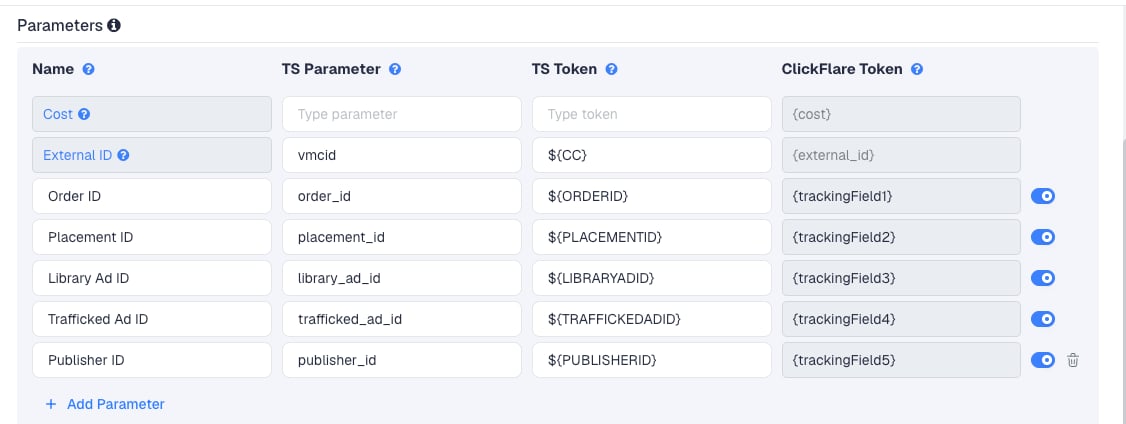
Publisher ID and Placement ID show where your traffic converts, so you can block or bid up inventory in Yahoo DSP. Library Ad ID and Trafficked Ad ID compare creatives.
The click ID row
The External ID row sends Yahoo’s click ID invmcid, using the ${CC} macro. Yahoo replaces ${CC} with a unique value for each click, but only when Enhanced Attribution is on for the advertiser.
If Enhanced Attribution is on in Yahoo DSP, Yahoo also appends vmcid to the destination URL itself. Check that vmcid appears only once in the final click URL. See Yahoo’s guide to enabling Enhanced Attribution.
To pass more Yahoo DSP data, click Add Parameter, give it a name and parameter, and enter the Yahoo DSP macro as the TS Token. ClickFlare assigns the next free tracking field. Check the macro list in your Yahoo DSP account before adding them.
Step 2 – Send conversions to Yahoo DSP
Yahoo DSP does not accept S2S postback URLs. That is why the template has no postback, and why Traffic source postback URL stays off on this traffic source. Yahoo attributes conversions with its click ID,vmcid, through one of two routes.
Pass vmcid to your lander
Both routes start the same way. Yahoo’s Dot tag readsvmcid from the URL of the page it loads on and stores it in a first-party cookie and local storage, for use when the visitor converts.
With Redirect tracking, Yahoo sends the click to ClickFlare, and ClickFlare redirects to your lander. The lander URL doesn’t carry vmcid unless you add it. Add it with ClickFlare’s External ID token at the end of your lander’s URL in ClickFlare:
{external_id} with the vmcid it stored. The Dot tag on the lander sees the same click ID Yahoo created.
With Direct tracking, the visitor lands on your lander straight from Yahoo, so vmcid is already in the URL. See Direct Campaign Tracking.
Option A: Dot tag conversions on your site
If the conversion happens on a site you control (your store, your lead form, your thank-you page), fire a Yahoo Dot conversion there. Set up the conversion rule for that page or event in Yahoo DSP’s Tracking section. Yahoo matches it to thevmcid the Dot tag stored on the lander.
Yahoo keeps the click ID for 24 hours in the cookie and up to seven days in local storage, depending on the browser. Conversions that happen later are not credited through this route.
This only covers conversions on your own pages. An affiliate offer’s thank-you page never loads your Dot tag.
Option B: Yahoo’s Conversion API, from your own server
Yahoo’s Conversion API accepts conversions server to server, with the click ID inclickData.vmcid. It is the route for conversions on sites you don’t control. It is also where ClickFlare stops:
- The API takes a JSON body in a
POSTrequest tohttps://batch.datax.yahoo.com/v1/events/<pixelId>. - Each request needs an OAuth 2.0 bearer token, obtained by signing a request with Yahoo-issued credentials. Tokens last 60 minutes.
- Conversion values are read as USD. Event times can’t be more than 30 days old.
Step 3 – Finish the campaign and copy its URL
- Name the campaign.
- Set the Cost Model to CPC and enter your cost per click. See Cost.
- Choose Redirect or Direct tracking. Redirect works with any lander. Direct is simpler for Yahoo, because
vmcidreaches the lander without extra steps. - Click Next and, on Destination, add your lander (with
vmcid={external_id}in its URL, as above) and your offer. - Save, open Tracking, select your own tracking domain and copy the campaign URL.
placement_id=${PLACEMENTID}, including vmcid=${CC}.
If you use a lander, its call-to-action must link to the ClickFlare click URL, not to the offer directly. Otherwise the visit reaches the offer without a ClickFlare click ID, and the conversion can’t be traced back to Yahoo.
See Creating a Campaign in ClickFlare.
Step 4 – Set up the ads in Yahoo DSP
- In Yahoo DSP, create your order and lines as usual.
- Use the ClickFlare campaign URL as the ad’s landing page URL.
- Make sure the URL contains only one
?. ClickFlare’s URL already has one, so add any extra parameters with&. - If you change the landing page URL later, update it on every ad in Yahoo DSP. Yahoo needs a click tracker update when the landing page changes.
${...} macro when the ad is clicked.
Step 5 – Test the integration
Yahoo has no postback test, so test each part separately.- The click. Open your campaign URL in a browser and replace
${CC}with a test value, for examplevmcid=test123. In ClickFlare, find the visit and check that its External ID istest123. - The lander. Check that the lander opened with
vmcid=test123in its address bar. If it didn’t, thevmcid={external_id}part is missing from the lander URL. - The Dot tag. On the lander, check in your browser’s developer tools that the Dot tag loads.
- The conversion. Complete the offer. The conversion should appear in ClickFlare against that visit.
- Live clicks. After launch, check that the External ID column fills with Yahoo values. If it’s empty, Enhanced Attribution is off, or the ad still uses an older campaign URL.
Tracking several events
Yahoo counts each conversion rule (Dot tag) or eacheventName (Conversion API) as a separate event.
- In ClickFlare, create a custom conversion for each step, for example
leadandpurchase, so your reports show them separately. - In Yahoo DSP, create one conversion rule per step, and fire each from the page where it happens.
- If you use the Conversion API, send each ClickFlare event with its own
eventName, for exampleleadandpurchase. - Choose in Yahoo DSP which event the line optimizes for.
What the Dot tag can and can't see
What the Dot tag can and can't see
- It sees conversions on pages where your Dot tag loads.
- It doesn’t see conversions on an affiliate offer’s pages, or approvals that happen days later in the affiliate network.
- It keeps the click ID for at most seven days.
- For everything else, ClickFlare still records the conversion. Only Yahoo misses it.
Sending only one event
Sending only one event
If Yahoo should only learn from your final sale, fire only that conversion rule, or send only that event through the API. Earlier steps still show in ClickFlare.
Cost
The template has a Cost row, but its parameter and macro are empty, so Yahoo DSP passes no cost in the URL. ClickFlare can’t read cost from the click. Set the campaign’s Cost Model to CPC and enter your cost per click. Yahoo DSP usually buys on CPM, and a display impression is not a visit, so don’t enter the CPM divided by 1,000. Work out the cost per click instead: CPM ÷ (1,000 × click-through rate). For example, a CPM of 2.00 USD at a 0.2% click-through rate is 2.00 ÷ 2 = 1.00 USD per click. Update it once you see real data. The most accurate figure comes from Yahoo DSP’s own spend report. Import it with a manual cost upload, matched by the Order ID column. See Cost Models.Delayed revenue
If you run search arbitrage (RSOC or AFD) behind Yahoo DSP, the feed reports revenue hours or days after the click. ClickFlare records it when it arrives. Yahoo only receives it if your own Conversion API service sends it, within Yahoo’s 30-day window. For the general approach, see Sending Delayed Revenue to Traffic Sources.Troubleshooting
External ID is empty in ClickFlare
External ID is empty in ClickFlare
- Enhanced Attribution is off in Advertiser Properties, so Yahoo doesn’t fill
${CC}. - The ad in Yahoo DSP still uses an older campaign URL without
vmcid=${CC}.
Yahoo shows no conversions
Yahoo shows no conversions
- The lander URL doesn’t pass
vmcid={external_id}, so the Dot tag never stored the click ID. - The Dot tag isn’t on the lander, or doesn’t load.
- The conversion happened on an affiliate offer’s page, which your Dot tag can’t see. Use the Conversion API route.
- The conversion came more than seven days after the click.
vmcid appears twice in the click URL
vmcid appears twice in the click URL
Enhanced Attribution makes Yahoo append
vmcid itself, and the campaign URL already carries vmcid=${CC}. Check the final click URL and make sure vmcid appears only once.Columns show the macro text instead of a value
Columns show the macro text instead of a value
Yahoo didn’t replace the macro, usually because the URL was edited, has two
? characters, or the macro isn’t available for that ad type. Copy the campaign URL from ClickFlare again. See Traffic Source Tokens Arriving Empty.FREQUENTLY ASKED QUESTIONS
Q1: Why doesn’t the Yahoo DSP template have a postback?A1: Yahoo DSP has no postback URL. Its server-side route is the Conversion API, which needs an OAuth token and a JSON request. A traffic source postback can’t send either, so the template leaves Traffic source postback URL off.
Q2: Where is the Verizon Media (Yahoo Gemini) template?A2: Yahoo Gemini was Yahoo’s native ad platform. Yahoo shut it down in 2023, and ClickFlare no longer offers its template. Yahoo’s native inventory is now bought through Yahoo DSP, so use the Yahoo DSP template.
Q3: Do I need vmcid if I don’t send conversions to Yahoo?
A3: Not for ClickFlare’s own reports. The order, placement and ad columns work without it. Leave it in anyway: it costs nothing, and you’ll have the click IDs if you later set up the Dot tag or the Conversion API.
Q4: Should I use Redirect or Direct tracking with Yahoo DSP?A4: Both work. Direct puts
vmcid on your lander without extra steps, which suits the Dot tag. Redirect needs vmcid={external_id} added to the lander URL. See Direct Campaign Tracking.
Q5: Can I use the same Yahoo DSP traffic source for all my orders?A5: Yes. The parameters are the same for every order, and the Order ID column separates them in your reports.
Related
Direct campaign tracking
Send Yahoo clicks straight to your lander.
Custom conversions
Split leads and sales into separate events.
Manual cost upload
Import spend from Yahoo DSP’s reports.
Conversions not showing
The general checklist when conversions don’t arrive.