

At a glance
How it works
1
Appnext sends the click
A user taps your app recommendation. Appnext opens your ClickFlare campaign URL and fills in its macros: the click ID in
cid, your bid, the pricing model, the device’s advertising ID, the publisher app, the sub-publisher, and the Appnext campaign and creative.2
ClickFlare stores the Appnext click ID
ClickFlare saves the value of
cid as the visit’s External ID, records the cost, and redirects the user to your lander, offer or store page.3
The conversion reaches ClickFlare
Your affiliate network, store or attribution partner posts the conversion back to ClickFlare, matched on the ClickFlare click ID.
4
ClickFlare posts it back to Appnext
ClickFlare fires the Appnext postback, replacing
{external_id} with the stored Appnext click ID, and adds the device and visitor details. Appnext matches it to the original click.The mirror to keep straight: in the campaign URL you write ClickFlare’s parameter (
cid) and Appnext’s macro (xapnt1x). The template does this for you. In the postback URL you write Appnext’s parameter (clickid) and ClickFlare’s token ({external_id}).Before you start
- Set up your own tracking domain. Run the campaign and the postback on your own custom domain. Shared domains get flagged by networks and blocked by browsers. See Custom Domains.
- Have an offer ready in ClickFlare, and its affiliate network or attribution partner set up to post conversions back to ClickFlare. See Creating an Offer and Adding an Affiliate Network.
- Know your Appnext campaign’s pricing model. CPI, CPC or CPA decides which Cost Model you use in ClickFlare. See Cost.
- Talk to your Appnext account manager about the postback. Appnext’s public documentation covers tracking through its listed attribution partners. Confirm with them that they accept conversions from ClickFlare on the template’s endpoint, and which conversion actions they want reported.
Step 1 – Create the campaign and the Appnext traffic source
- Go to Campaigns and click New.
- In Traffic Source, open the dropdown and click + New Traffic Source.
- Type
appnextin the search box and select the Appnext template. - Enter a Name, for example
Appnext. - Leave Cost currency on USD unless your Appnext account is billed in another currency.
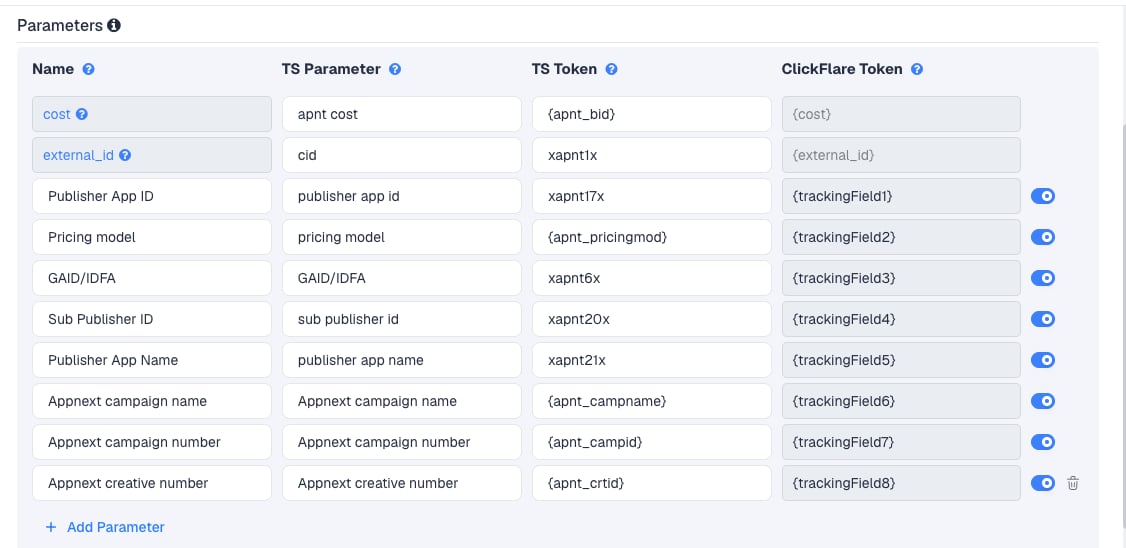
Rename the parameters with spaces
Nine of the template’s TS Parameters contain spaces or a slash, for examplepublisher app id and GAID/IDFA. A URL parameter name shouldn’t contain either. Rename each one in the TS Parameter column before you copy the campaign URL. Keep the TS Token and ClickFlare Token as they are:
The names are only labels in your campaign URL. ClickFlare reads each value back by the same name, so any name without spaces works.
Two macro styles
The template mixes Appnext’s two macro styles:xapnt…x macros (click ID, advertising ID, publisher fields) and {apnt_…} macros (bid, pricing model, campaign, creative). Both come from Appnext’s macro list. If the {apnt_…} columns stay empty or show the macro as text after launch, ask your Appnext account manager for the current equivalents.
To pass more Appnext data, click Add Parameter, give it a name and parameter without spaces, and enter the Appnext macro as the TS Token. ClickFlare assigns the next free tracking field. Appnext also offers xapnt16x (the publisher ID), xapnt5x (the click IP) and {apnt_bidcurr} (the bid currency).
Step 2 – Set up the postback
The postback is what sends conversions to Appnext. It lives on the traffic source, so every campaign that uses this Appnext traffic source sends conversions the same way.- In the New Traffic Source form, scroll to Passing conversion info to traffic source.
- Turn on Traffic source postback URL. The template’s postback appears:
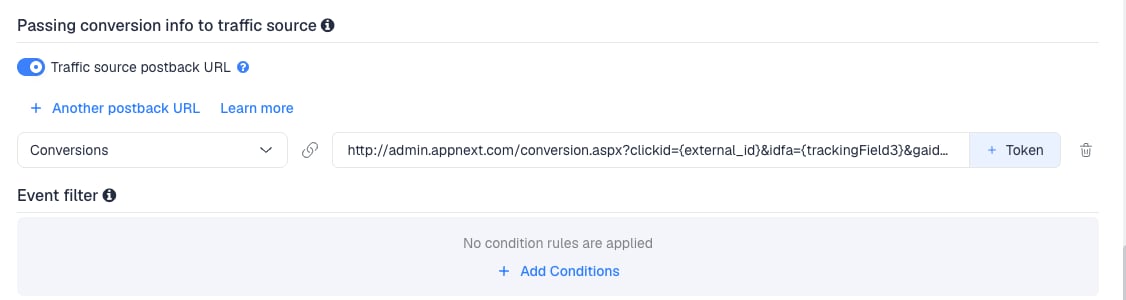
{external_id}) and the advertising ID ({trackingField3}), both as ClickFlare tokens. {city} and {ip} are ClickFlare tokens too. Fix the rest:
Click + Token next to the URL field to see the tokens your account offers before you remove anything. The result:
idfa and gaid both read tracking field 3, because the xapnt6x macro carries whichever ID the device has. Appnext ignores the one that doesn’t apply.
- In the dropdown on the left, choose the ClickFlare event that should fire the postback. Keep Conversions to send every conversion. If your final action is a custom conversion (for example
installorpurchase), choose that instead. - Click Save. You are back in the campaign editor with the Appnext traffic source selected.
Step 3 – Finish the campaign and copy its URL
- Name the campaign.
- Set the Cost Model according to your Appnext pricing model: Not Tracked for CPC, CPA for CPI and CPA. See Cost.
- Choose Redirect tracking.
- Click Next and, on Destination, add your lander (optional) and your offer.
- Save, open Tracking, select your own tracking domain and copy the campaign URL.
cid=xapnt1x and pub_app_id=xapnt17x once you have renamed the parameters.
If you use a lander, its call-to-action must link to the ClickFlare click URL, not to the offer directly. Otherwise the visit reaches the offer without a ClickFlare click ID, and the conversion cannot be traced back to Appnext.
See Creating a Campaign in ClickFlare.
Step 4 – Create the campaign in Appnext
- In Appnext, create the campaign as usual.
- In the tracking stage of the campaign setup, paste the ClickFlare campaign URL as the campaign’s tracking link. Appnext’s tracking partner list covers attribution providers. If you can’t enter a custom link, ask your Appnext account manager to set it.
- Click the green Check button to save the tracking link.
- Add funds if needed, then in Manage Campaigns, change the campaign’s status from Paused to Active.
Step 5 – Test the integration
- In Appnext, go to Manage Campaigns and click Set Tracking in the campaign’s actions. Send the test link to your phone by email or SMS.
- Open it on a device with the same operating system and country as the campaign, and complete the offer the way a real user would. For an app, use a device that has never had it installed.
- In ClickFlare, go to Logs → Postback Status and filter by the campaign. A successful request to
admin.appnext.comconfirms ClickFlare sent the postback. Open it and check thatclickidand the advertising ID hold real values. - Back in Appnext, click Check. Active means the conversion was tracked. If it still shows Not Active, wait and try again, then contact Appnext support.
Sending only some conversions
The template has one postback, for every conversion. If Appnext should only learn from one step of your funnel, for example installs and not later purchases, create a custom conversion for that step and map the postback to it in the event dropdown.Reporting more than one event
Reporting more than one event
Appnext’s public documentation doesn’t describe in-app event postbacks on this endpoint. If your account manager confirms Appnext accepts several actions, click + Another postback URL once per extra event, add the action name they give you to each URL, and map each URL to its ClickFlare event.
Filtering by payout
Filtering by payout
To send a postback only for some conversions, for example only those above a certain payout, use Event filter under the postback to add conditions.
Cost
The template passes cost per click. Thecost row sends Appnext’s {apnt_bid} macro, which is your campaign’s bid, and ClickFlare records it as the visit’s cost. The Pricing model column tells you what that bid is for.
With CPA, ClickFlare ignores the cost passed in the URL. Make sure the ClickFlare event that counts as a conversion is the one Appnext charges for, for example the install.
ClickFlare has no cost integration for Appnext. When the recorded spend differs from your Appnext spend, correct it with a manual cost upload. See Cost Models.
Delayed revenue
If your offer reports revenue hours or days after the click, see Sending Delayed Revenue to Traffic Sources to pass that revenue to traffic sources once it arrives.Troubleshooting
Appnext doesn't record the conversions
Appnext doesn't record the conversions
- The campaign URL in Appnext is missing
cid=xapnt1x, or the macro was edited. Copy the URL from ClickFlare again. - The postback uses a click ID token other than
{external_id}. - Your account manager expects an
actionparameter the template doesn’t send.
Conversions show in ClickFlare but not in Appnext
Conversions show in ClickFlare but not in Appnext
- Traffic source postback URL is off on the Appnext traffic source.
- Disable sending postbacks to traffic source is on in the campaign.
- The postback is mapped to a different event than the one the conversion logged. Check Logs → Event Logs to see which event was recorded.
- Check Logs → Postback Status: a failed request shows the status code Appnext returned.
The postback shows tokens as text
The postback shows tokens as text
A token ClickFlare doesn’t know, for example
{os_version} or {user_agent}, is sent as literal text. Remove it, or replace it with a token from the + Token list.Columns are empty or the campaign URL looks broken
Columns are empty or the campaign URL looks broken
- TS Parameters with spaces were not renamed. Rename them as in Step 1 and copy the campaign URL again.
- An
{apnt_…}macro was not replaced. Ask Appnext for the current macro. - See Traffic Source Tokens Arriving Empty.
FREQUENTLY ASKED QUESTIONS
Q1: Can I use the same Appnext traffic source for all my Appnext campaigns?A1: Yes. The postback is set once on the traffic source and every campaign using it sends conversions the same way. Set the Cost Model per campaign, according to each campaign’s pricing model.
Q2: Why is itA2: They are two halves of the same value. ClickFlare reads Appnext’s click ID from its owncidin the campaign URL andclickidin the postback?
cid parameter. Appnext expects it back in its own clickid parameter. Change neither.
Q3: Appnext lists attribution partners like AppsFlyer and Adjust, but not ClickFlare. Is that a problem?A3: Those partners track app installs from inside the app. ClickFlare tracks the click and the conversion your offer reports. If you can’t paste a custom tracking link in Appnext, ask your account manager to set the ClickFlare campaign URL for you.
Q4: Should I use Redirect or Direct tracking with Appnext?A4: Redirect. Appnext sends the user to the tracking link, so the campaign URL must be a ClickFlare redirect. See Direct Campaign Tracking for when Direct applies.
Q5: Does the postback send the payout to Appnext?A5: No. The template sends no value. Appnext charges on its own pricing model, so it doesn’t need your payout to bill. If your account manager wants revenue for optimization, ask for the parameter name and add it with
{payout}.
Related
Traffic source postbacks
Every token you can use in a postback.
Custom conversions
Send Appnext only the step it charges for.
Cost models
How CPC, CPA and RevShare costs are calculated.
Conversions not showing
The general checklist when postbacks don’t arrive.