

At a glance
How it works
1
A-ADS sends the click
A visitor clicks your ad. A-ADS opens your ad link with the goal tracking suffix attached, and fills in its macros:
{{partner}} (campaign and ad unit), plus IP, timestamp, browser, device, country, language and OS.2
ClickFlare stores the partner value
ClickFlare saves the value of
partner as the visit’s External ID and redirects the visitor to your lander or offer. Every visit from the same ad unit has the same partner value. It identifies the publisher, not the click.3
The conversion reaches ClickFlare
Your affiliate network, store or app posts the conversion back to ClickFlare, matched on the ClickFlare click ID.
4
ClickFlare calls the A-ADS Goal Tracking API
ClickFlare fires the A-ADS postback with the stored
partner value, a unique ID for the conversion, your A-ADS password and the reward amount. A-ADS deducts the reward plus its fee from your campaign balance and pays the publisher behind that ad unit.The mirror to keep straight: in the campaign URL you write ClickFlare’s parameter (
partner) and A-ADS’s macro ({{partner}}). The template does this for you. In the postback URL you write A-ADS’s parameter (partner) and ClickFlare’s token ({external_id}). A-ADS’s macros use double braces. ClickFlare’s tokens use single braces. Don’t mix them.Before you start
- Set up your own tracking domain. Run the campaign and the postback on your own custom domain. Shared domains get flagged by networks and blocked by browsers. See Custom Domains.
- Have an offer ready in ClickFlare, and its affiliate network set up to post conversions back to ClickFlare. See Creating an Offer and Adding an Affiliate Network.
- Decide whether you need the postback. A-ADS only accepts Goal Tracking API calls from CPA advertisers who have agreed terms with an A-ADS manager. If you buy on CPD only, you still get A-ADS’s data in ClickFlare, and you leave the postback off.
- If you have a CPA deal, get your API password and agree the reward. A-ADS provides the password. The reward is a whole number of satoshi per conversion.
- Decide which conversion A-ADS should reward. Every postback pays a publisher. Send only the action you agreed to pay for. See Choosing the event to send.
Step 1 – Create the campaign and the A-ADS traffic source
- Go to Campaigns and click New.
- In Traffic Source, open the dropdown and click + New Traffic Source.
- Type
a-adsin the search box and select the A-ADS template. - Enter a Name, for example
A-ADS. - Leave Cost currency on USD.
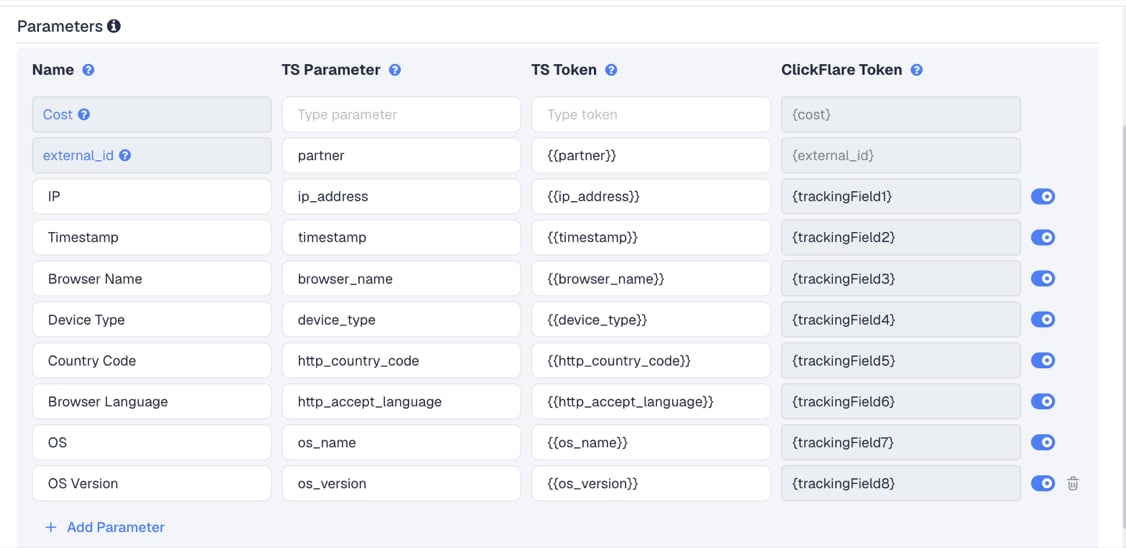
Adding more A-ADS macros
The template leaves out two A-ADS macros that are worth adding with Add Parameter:
Click Add Parameter, give the row a name and parameter, and enter the A-ADS macro, with its double braces, as the TS Token. ClickFlare assigns the next free tracking field.
banner_size tells you which of your banner sizes convert, which helps when you decide which sizes to produce more of.
Step 2 – Set up the postback
Skip this step if you buy A-ADS traffic on CPD only and have no CPA agreement. Leave Traffic source postback URL off and go to Step 3. The postback is a call to A-ADS’s Goal Tracking API. It lives on the traffic source, so every campaign that uses this A-ADS traffic source sends conversions the same way.A-ADS’s Goal Tracking API
A-ADS documents the call like this, with its own example values:
The reward is deducted from your campaign balance and paid to the publisher as soon as the call arrives. A-ADS charges its fee on top: with
amount=80, A-ADS takes 100 satoshi from your balance, pays 80 to the publisher and keeps 20.
Add it to the traffic source in ClickFlare
- Back in the New Traffic Source form, scroll to Passing conversion info to traffic source.
- Turn on Traffic source postback URL. The template’s postback appears:
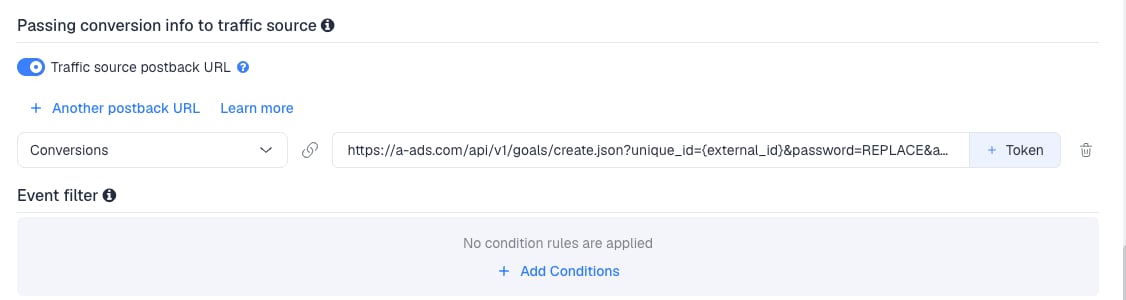
- Replace
password=REPLACEwith the advertiser password A-ADS gave you. - Replace
amount=REPLACEwith your reward per conversion, as a whole number of satoshi, for exampleamount=5000. Don’t put{payout}here. ClickFlare’s payout is a decimal in your currency, and A-ADS reads it as satoshi. - Replace
comment=OPTIONALwith a short note of your own, for examplecomment=clickflare, or delete&comment=OPTIONAL. Left as it is, every call carries the wordOPTIONAL. - Change
unique_id={external_id}tounique_id={cf_click_id}.{external_id}holds A-ADS’ partner value, which many clicks share, and A-ADS needs a differentunique_idfor every reward.{cf_click_id}is ClickFlare’s own click ID, unique for each click. Keeppartner={external_id}, which sends back the value A-ADS passed on the click.
- In the dropdown on the left, choose the ClickFlare event that should fire the postback. Choose the action you agreed with A-ADS, usually a custom conversion such as
depositorpurchase, rather than Conversions. - Click Save. You are back in the campaign editor with the A-ADS traffic source selected.
duration=259200, which is three days in seconds. A-ADS’s current API description doesn’t list duration. Keep it unless A-ADS tells you otherwise, and ask your A-ADS manager what it controls when you agree the CPA terms.
To learn what each postback token does, see How to Configure a Traffic Source S2S Postback URL.
Step 3 – Finish the campaign and copy its URL
- Name the campaign.
- Set the Cost Model. For CPD buying, choose Not Tracked and upload your daily spend. See Cost.
- Choose Redirect or Direct tracking. Redirect is the usual choice.
- Click Next and, on Destination, add your lander (optional) and your offer.
- Save, open Tracking, select your own tracking domain and copy the campaign URL.
partner={{partner}} and device_type={{device_type}}.
If you use a lander, its call-to-action must link to the ClickFlare click URL, not to the offer directly. Otherwise the visit reaches the offer without a ClickFlare click ID, and the conversion cannot be traced back to A-ADS.
See Creating a Campaign in ClickFlare.
Step 4 – Set up the campaign in A-ADS
A-ADS doesn’t take the whole campaign URL in one field. It has the ad link, and a separate Goal tracking suffix that it appends to the link on every click. You split the ClickFlare campaign URL between the two.- In A-ADS, create your campaign, or open an existing one.
- Set the campaign’s ad link to the ClickFlare campaign URL without the
?and everything after it. - Turn on Goal tracking for the campaign.
- Set the goal tracking suffix to the
?and everything after it, from the same ClickFlare campaign URL. It starts with?partner={{partner}}and lists the other A-ADS macros. - Save the campaign.
{{...}} macro when the ad is clicked.
Goal tracking is useful even without a CPA deal. A-ADS says it can be turned on for analysis alone, without the API call. You still get ad unit level data in ClickFlare.
Step 5 – Test the integration
A-ADS has no test conversion tool, and a real API call spends money. Test the two halves separately.- Test the click. Open the ClickFlare campaign URL in a browser, replacing
{{partner}}with a made-up value, for examplepartner=11111_22222. In ClickFlare, check that the visit shows11111_22222as its External ID. - Check the first real conversion. After the campaign gets traffic, wait for a real conversion. Go to Logs → Postback Status, filter by the campaign, and open the call to
a-ads.com. Confirm the URL has your password, a whole-number amount, apartnervalue in the12345_67890form, and noREPLACE. - Check A-ADS. Confirm the reward shows in your A-ADS campaign and your balance dropped by the reward plus the fee.
partner value while the postback is on. A-ADS can’t match it to a publisher, and you learn nothing about your real setup.
Choosing the event to send
A-ADS’s Goal Tracking API has no event parameter. Every call it receives is a paid reward. Send A-ADS only the action you agreed to pay for.- In ClickFlare, create a custom conversion for each step, for example
signupanddeposit. - On the A-ADS traffic source, map the postback to the paid action, for example
deposit.
Rewarding more than one action
Rewarding more than one action
You can click + Another postback URL and add a second Goal Tracking call for another action, with its own
amount. Each call pays the publisher again. Agree this with A-ADS first.A-ADS requires unique_id to be unique within the campaign’s rewards. If two actions come from the same click, {cf_click_id} is the same in both calls. Use {txid} (the conversion’s transaction ID) for the second call instead, if your affiliate network sends one.Filtering which conversions are sent
Filtering which conversions are sent
To reward only some conversions, for example only deposits above a certain payout, use Event filter under the postback to add conditions.
Cost
The template does not pass cost. It has no Cost row, and A-ADS documents no cost macro. Choose the cost model by how you buy:
CPD doesn’t map to a per-click cost, because what you pay for a day doesn’t depend on how many visits you get. A manual upload of the daily total is the accurate option. If you prefer an estimate while the campaign runs, use CPC with your daily spend divided by your daily visits, and correct it with an upload later.
A-ADS’s Max CPM setting on CPD campaigns is a filter, not a price. It excludes ad units whose effective CPM is above the limit. Don’t enter it in ClickFlare as your cost.
Delayed revenue
If you run search arbitrage (RSOC or AFD) behind A-ADS, the feed reports revenue hours or days after the click. ClickFlare can fire a postback once that revenue arrives, but A-ADS pays the fixedamount in the postback, not the revenue. See Sending Delayed Revenue to Traffic Sources.
Troubleshooting
Calls to A-ADS fail
Calls to A-ADS fail
password=REPLACEwas never replaced, or the password is wrong.amount=REPLACEwas never replaced, or holds a decimal value such as{payout}. The amount must be a whole number of satoshi.- Your A-ADS campaign balance is too low to cover the reward plus the fee.
- You don’t have a CPA agreement with A-ADS yet.
- Open Logs → Postback Status to see the full URL and the status code A-ADS returned.
Conversions show in ClickFlare but no call goes to A-ADS
Conversions show in ClickFlare but no call goes to A-ADS
- Traffic source postback URL is off on the A-ADS traffic source.
- Disable sending postbacks to traffic source is on in the campaign.
- The postback is mapped to a different event than the one the conversion logged. Check Logs → Event Logs to see which event was recorded.
The partner value is empty or not replaced
The partner value is empty or not replaced
- Goal tracking is off on the A-ADS campaign, so A-ADS adds no suffix.
- The suffix in A-ADS doesn’t contain
partner={{partner}}, or the macro lost a brace. - The full ClickFlare URL, with its
?part, was pasted as the ad link and the suffix was added again. Split it as described in Step 4.
Device, browser or OS columns are empty
Device, browser or OS columns are empty
The macros were not replaced, usually because the suffix in A-ADS was edited or a macro was typed with single braces. Copy the
? part of the campaign URL from ClickFlare again. See Traffic Source Tokens Arriving Empty.FREQUENTLY ASKED QUESTIONS
Q1: Can I use the same A-ADS traffic source for all my A-ADS campaigns?A1: Yes, as long as they reward the same action with the same amount. The postback, including the
amount, is set once on the traffic source. Create a second A-ADS traffic source for a campaign with a different reward.
Q2: Is A-ADS’s partner value a click ID?
A2: No. It is the campaign ID and the ad unit ID, for example 12345_67890. Many visits share it. ClickFlare stores it as the External ID because that is the value A-ADS needs back to know which publisher to reward.
Q3: Why does A-ADS use double braces?A3: That is A-ADS’s macro format:
{{partner}}, {{device_type}} and so on. ClickFlare’s own tokens use single braces, such as {external_id}. Keep each where it belongs: double braces in the campaign URL, single braces in the postback.
Q4: Can I send my offer’s payout to A-ADS?A4: No. The
amount is the reward A-ADS pays the publisher, in satoshi, and it is charged to you. It is set by your CPA agreement, not by your payout.
Q5: Do I need the postback if I only buy on CPD?A5: No. Turn on Goal tracking in A-ADS so the macros reach ClickFlare, leave Traffic source postback URL off, and analyse ad units in ClickFlare.
Related
Traffic source postbacks
Every token you can use in a postback.
Custom conversions
Split sign-ups and deposits into separate events.
Manual cost upload
Add your daily A-ADS spend.
Conversions not showing
The general checklist when postbacks don’t arrive.