

At a glance
How it works
1
Noviclick sends the click
A visitor clicks your push ad or opens your popunder. Noviclick opens your ClickFlare campaign URL and fills in its macros: the click ID in
clickid, the cost of the click in cost, plus the campaign, banner, site, category and subscriber age.2
ClickFlare stores the Noviclick click ID
ClickFlare saves the value of
clickid as the visit’s External ID, records the cost, and redirects the visitor to your lander or offer.3
The conversion reaches ClickFlare
Your affiliate network or store posts the conversion back to ClickFlare, matched on the ClickFlare click ID.
4
ClickFlare posts it back to Noviclick
ClickFlare fires the Noviclick postback, replacing
{external_id} with the stored Noviclick click ID and {payout} with the revenue. Noviclick matches it to the original click through cid and to your account through key.The mirror to keep straight: in the campaign URL you write ClickFlare’s parameter (
clickid) and Noviclick’s macro ({clickid}). The template does this for you. In the postback URL you write Noviclick’s parameter (cid) and ClickFlare’s token ({external_id}).Before you start
- Set up your own tracking domain. Run the campaign and the postback on your own custom domain. Shared domains get flagged by networks and blocked by browsers. Noviclick also asks that your URL has no VirusTotal flags. See Custom Domains.
- Have an offer ready in ClickFlare, and its affiliate network set up to post conversions back to ClickFlare. See Creating an Offer and Adding an Affiliate Network.
- Get your Noviclick personal key. It goes into the postback URL. Noviclick shows it at the end of the conversion postback URL when you create a campaign. See Get your key from Noviclick.
- Decide how Noviclick should bid. Smart CPA only works with a working postback, because Noviclick blacklists sites based on the conversions it receives. Set up the postback before you switch a campaign to Smart CPA.
Step 1 – Create the campaign and the Noviclick traffic source
- Go to Campaigns and click New.
- In Traffic Source, open the dropdown and click + New Traffic Source.
- Type
noviclickin the search box and select the Noviclick template. - Enter a Name, for example
Noviclick. - Leave Cost currency on USD. Noviclick accounts run in US dollars. Even euro deposits are converted to USD when they are credited.
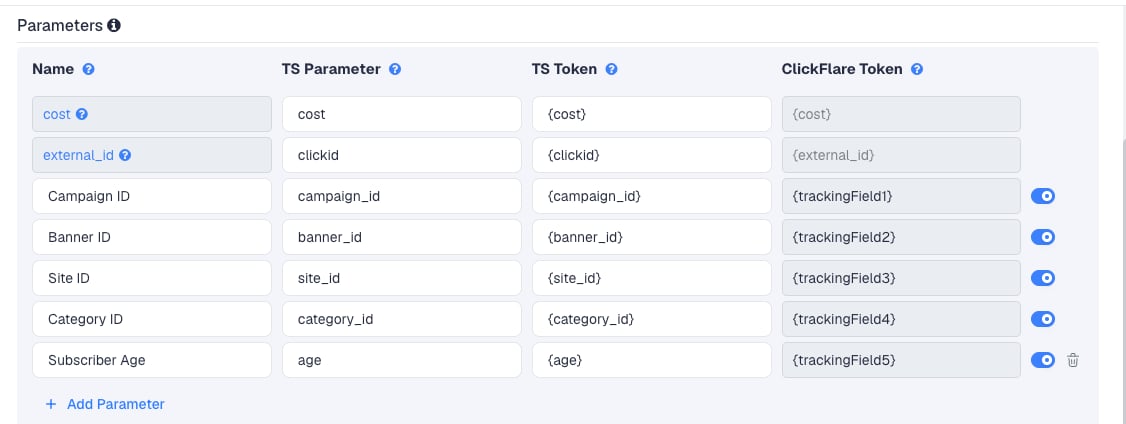
{site_id} its most important token: it shows which publisher sites convert, so you can blacklist them, whitelist them, or set custom bids on them in Noviclick.
Subscriber Age tells you how long ago the visitor subscribed to push notifications. Fresh subscribers often click and convert differently from old ones. Group by it to see whether a cut-off is worth it.
To pass more Noviclick data, click Add Parameter, give it a name and parameter, and enter the Noviclick macro as the TS Token. ClickFlare assigns the next free tracking field. The template already covers every macro in Noviclick’s published token list, so check with your Noviclick account manager before adding others.
Step 2 – Set up the postback
The postback is what sends conversions to Noviclick. It lives on the traffic source, so every campaign that uses this Noviclick traffic source sends conversions the same way.Get your key from Noviclick
- In Noviclick, click Create campaign.
- Scroll to the Conversion postback section. Noviclick shows its postback URL there, in this format:
- Copy the value after
key=. It is your personal key, a string of digits.
{externalid} as a placeholder. Noviclick explains that the click ID token differs per tracker. In ClickFlare it is {external_id}, and the template already has it.
Add it to the traffic source in ClickFlare
- Back in the New Traffic Source form, scroll to Passing conversion info to traffic source.
- Turn on Traffic source postback URL. The template’s postback appears:
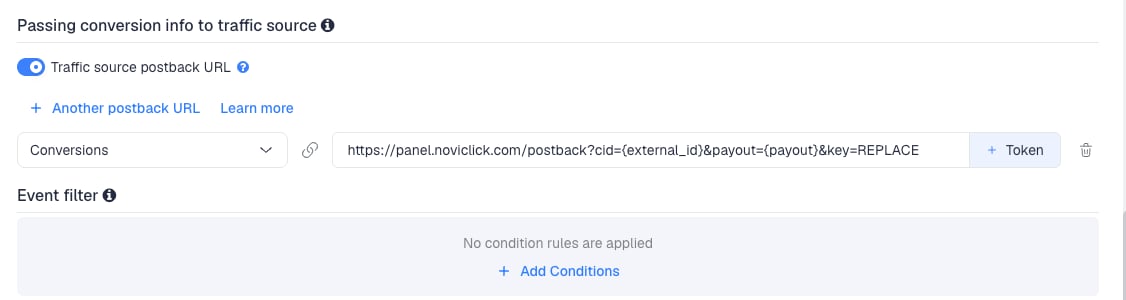
{external_id}) and the payout ({payout}), both as ClickFlare tokens.
- Replace
REPLACEwith your Noviclick personal key. For example, if your key is923847478:
- Compare the result with the URL Noviclick showed you. Apart from the click ID token (
{externalid}in Noviclick,{external_id}in ClickFlare), the two should match. If Noviclick shows a different host or path, use Noviclick’s host and path, and keepcid={external_id}andpayout={payout}. - In the dropdown on the left, choose the ClickFlare event that should fire the postback. Keep Conversions to send every conversion. If your final action is a custom conversion (for example
purchase), choose that instead. - Click Save. You are back in the campaign editor with the Noviclick traffic source selected.
payout in US dollars, the currency of your Noviclick account. If your offers pay in another currency, ClickFlare’s {payout} follows your ClickFlare account currency. See Multicurrency in ClickFlare.
To learn what each postback token does, see How to Configure a Traffic Source S2S Postback URL.
Step 3 – Finish the campaign and copy its URL
- Name the campaign. Noviclick suggests a name built from country, vertical and device, for example
US – Dating – Mobile. Using the same name in both tools makes reports easier to match. - Set the Cost Model to Not Tracked, so ClickFlare uses the cost Noviclick passes. See Cost.
- Choose Redirect or Direct tracking. Redirect is the usual choice for popunder and push traffic.
- Click Next and, on Destination, add your lander (optional) and your offer.
- Save, open Tracking, select your own tracking domain and copy the campaign URL.
clickid={clickid} and site_id={site_id}.
If you use a lander, its call-to-action must link to the ClickFlare click URL, not to the offer directly. Otherwise the visit reaches the offer without a ClickFlare click ID, and the conversion cannot be traced back to Noviclick.
See Creating a Campaign in ClickFlare.
Step 4 – Create the campaign in Noviclick
- In Noviclick, click Create campaign.
- Enter a Campaign name.
- Select the ad format: Popunder, Push or In-page push.
- Set the budget and the bid. Noviclick shows the top bid and average bid for your targeting below the bid field. Start around the average bid.
- Paste the ClickFlare campaign URL into the URL field.
- Check that the Conversion postback key is the one you used in Step 2.
- Choose countries, and a category for popunder campaigns.
- For Push and In-page push, add at least two creatives to split test.
- Set any special targeting, then tick the confirmation that you have read the campaign guidelines.
- Click Create campaign.
{...} macro when the ad is clicked.
Noviclick checks your URL before approval. It must work, have no VirusTotal flags, and load in under 5 seconds. Campaigns targeting mobile or tablet need a responsive page. A clean custom tracking domain helps here.
Step 5 – Test the integration
Noviclick has no built-in postback test tool. Test with a real click.- Once the campaign is approved and running, click one of your own ads, or open the campaign URL with test values filled in by hand, for example
clickid=test123. - In ClickFlare, check that the visit appears in the campaign with an External ID and a Site ID.
- Complete the offer, or fire a test conversion from your affiliate network to ClickFlare.
- In ClickFlare, go to Logs → Postback Status and filter by the campaign. A successful request to
panel.noviclick.comconfirms ClickFlare sent the postback, with your key in the URL. - In Noviclick’s statistics, check that the conversion appears on the campaign.
Tracking several events
Noviclick’s postback has no event parameter. Every postback it receives counts as one conversion, with the payout you send.Sending only your final event
Sending only your final event
This is the usual setup. Map the postback to the event that matters for your profit, for example a
purchase custom conversion. Earlier steps (leads, registrations) still show in ClickFlare. They just don’t reach Noviclick.Smart CPA bids on the conversions it receives. Send it the event you set your CPA target for.Sending several events
Sending several events
You can click + Another postback URL and map a second postback to another event. Noviclick will count both as conversions, so its conversion count and its CPA will no longer mean one sale. Do this only if you want Noviclick to optimize on the earlier step.
Filtering conversions
Filtering conversions
To send a postback only for some conversions, for example only those above a certain payout, use Event filter under the postback to add conditions.
Smart CPA and site optimization
Noviclick offers three pricing models: CPC, Smart CPC and Smart CPA.- CPC bids exactly what you enter.
- Smart CPC spreads your bid to find the best price per spot. It usually brings cheaper traffic and a little less volume.
- Smart CPA works to keep your cost per conversion at or below the target you set. It automatically blacklists a site ID after it spends 3 times your CPA target with no conversion in the last 30 days. Noviclick recommends a target of about 70–80% of your payout.
- Blacklists and whitelists. Exclude or target site IDs directly in the campaign. Enter them comma or line-separated.
- Custom bids per site ID. Raise the bid on sites that convert and lower it on weak ones. Noviclick suggests adjusting after a site has spent twice your target CPA.
- Custom audiences. Save groups of site IDs under Audiences and reuse them as whitelists or blacklists across campaigns.
Cost
The template passes cost per click. Thecost row sends Noviclick’s {cost} macro, and ClickFlare records it as the visit’s cost.
On the campaign, set the Cost Model to Not Tracked so ClickFlare uses the cost passed in the URL.
Noviclick flags suspicious visits per site ID, and in some cases refunds them. The refunds show in Noviclick’s campaign overview. A refund lowers your real spend after the visit, while the cost ClickFlare recorded stays the same. If your ClickFlare cost runs higher than your Noviclick spend, correct it with a manual cost upload.
{cost} macro is not being filled. Switch the Cost Model to CPC and enter your Noviclick bid as the cost value. For a Smart CPC campaign, use your average cost per click from Noviclick’s statistics.
ClickFlare has no cost-tracking API integration for Noviclick. See Cost Models.
Delayed revenue
If you run search arbitrage (RSOC or AFD) behind Noviclick, the feed reports revenue hours or days after the click. To pass that revenue to Noviclick once it arrives, see Sending Delayed Revenue to Traffic Sources.Troubleshooting
Conversions show in ClickFlare but not in Noviclick
Conversions show in ClickFlare but not in Noviclick
REPLACEwas never replaced with your Noviclick key, or the key has a typo.- Traffic source postback URL is off on the Noviclick traffic source.
- Disable sending postbacks to traffic source is on in the campaign.
- The postback is mapped to a different event than the one the conversion logged. Check Logs → Event Logs to see which event was recorded.
- Check Logs → Postback Status: a failed request shows the status code Noviclick returned.
The postback reaches Noviclick but the conversion isn't counted
The postback reaches Noviclick but the conversion isn't counted
- The campaign URL in Noviclick is missing
clickid={clickid}, or the macro was edited. Copy the URL from ClickFlare again. - The postback uses Noviclick’s
{externalid}instead of ClickFlare’s{external_id}. ClickFlare doesn’t know{externalid}and sends it as literal text. - The
externalIdrow was removed from the traffic source.
Noviclick shows conversions with no payout
Noviclick shows conversions with no payout
The template sends
payout={payout}, so it was removed or edited. Restore &payout={payout} before &key= in the postback.Smart CPA blacklists sites that convert
Smart CPA blacklists sites that convert
Noviclick is not receiving those conversions. Fix the postback first, using the checks above. Then review the blacklist in Noviclick and remove site IDs that convert in ClickFlare.
FREQUENTLY ASKED QUESTIONS
Q1: Can I use the same Noviclick traffic source for all my Noviclick campaigns?A1: Yes. Your key belongs to your Noviclick account, not to one campaign, so the same postback works for every campaign. Create a second Noviclick traffic source only if a campaign needs a different postback, for example a different event.
Q2: Why is it calledA2: They are two halves of the same value. ClickFlare reads Noviclick’s click ID from its ownclickidin the campaign URL andcidin the postback?
clickid parameter. Noviclick expects it back in its own cid parameter. Both names are fixed. Change neither.
Q3: Noviclick’s help mentionsA3: Neither. Those are other trackers’ tokens. In ClickFlare the stored Noviclick click ID is##CLICKID##instead of{externalid}. Which one do I use?
{external_id}, which the template already uses.
Q4: Should I use Redirect or Direct tracking with Noviclick?A4: Redirect is the usual choice and works with every Noviclick format. Use Direct only if Noviclick must see your lander’s domain as the destination. See Direct Campaign Tracking.
Q5: Do I need the postback if I don’t use Smart CPA?A5: It is still worth it. Noviclick’s account managers use your conversion data to suggest site IDs to whitelist and blacklist, and its statistics show conversions next to spend.
Related
Traffic source postbacks
Every token you can use in a postback.
Custom conversions
Split leads and sales into separate events.
Cost models
How CPC, CPA and RevShare costs are calculated.
Conversions not showing
The general checklist when postbacks don’t arrive.