Once a visitor clicks an ad, a series of data is generated regarding the visit’s details. Based on predefined elements, using an HTTP(S) request, this info is passed to ClickFlare. Adding to the data received, ClickFlare gathers additional information, such as info on the type of device used, its os and so on. When analyzed, these data can come to great use, helping you shape your campaigns and redefine your targeting.

How all works

When you add a new traffic source to ClickFlare, in the Parameters section, you can enter the parameters that your traffic source sends with ClickFlare variables.
Note: If you are using a traffic source from a template, its parameters will be automatically generated, and you won’t need to adjust any settings.
To better illustrate the idea, let’s look at a common example when you want to pass info about which offer has been clicked the most by visitors from your traffic source platform to ClickFlare.
Note: Check your traffic source’s documentation to know which parameter is used to pass information about an offer.
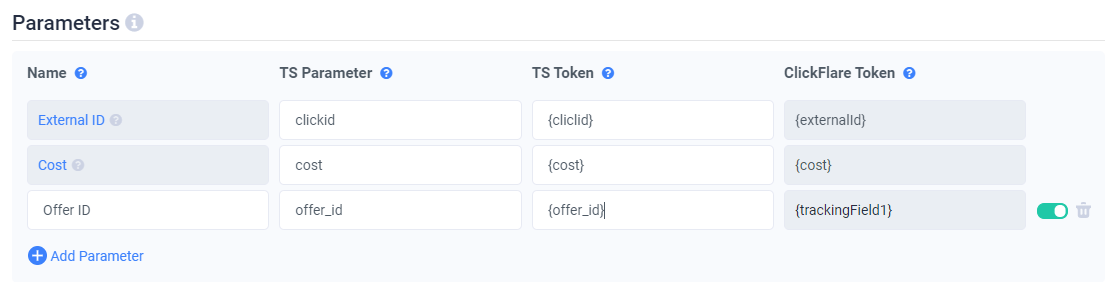
As seen below, information about offers is defined by the offer_id traffic source’s parameter name and passed in the {coffer_id} token. This name and {token} pair is mapped to ClickFlare’s trackingField1 custom variable. As seen below, information about offers is defined by the offerid traffic source's parameter name and passed in the… From now on, ClickFlare’s trackingField1 custom variable will be associated with the information about an offer. Parameters you have configured will be automatically added to the campaign URL. Your campaign URL in this case will look like:
When a visitor clicks an ad, tokens will be replaced with actual values that characterize this person’s visit. A campaign URL after a visitor’s click looks like: https://your_clickflare_domain.com/25ee1413-dd9d-4w6b-f6e2-1e2z07c1d365?clickid=c384EFV6WNBVOOV00175OKB9&cost=1&offer_id=my_awesome_offer
Note: Both parameter names and tokens are case-sensitive.

Setting up Parameters

Matching traffic source platform parameters with custom variables can be done in the traffic source setup in ClickFlare, in the Parameters section. The table below shows what kind of information you need to provide: